
[vagrant@localhost ~]$ python -V
Python 3.5.2
[vagrant@localhost ~]$ pip list
pip (8.1.1)
setuptools (20.10.1)
You are using pip version 8.1.1, however version 9.0.1 is available.
You should consider upgrading via the 'pip install --upgrade pip' command.
[vagrant@localhost ~]$ pip install --upgrade pip
Collecting pip
  Downloading pip-9.0.1-py2.py3-none-any.whl (1.3MB)
    100% |████████████████████████████████| 1.3MB 478kB/s
Installing collected packages: pip
  Found existing installation: pip 8.1.1
    Uninstalling pip-8.1.1:
      Successfully uninstalled pip-8.1.1
Successfully installed pip-9.0.1
[vagrant@localhost ~]$ pip install numpy
Collecting numpy
  Downloading numpy-1.13.1-cp35-cp35m-manylinux1_x86_64.whl (16.9MB)
    100% |████████████████████████████████| 16.9MB 54kB/s
Installing collected packages: numpy
Successfully installed numpy-1.13.1
vagrant upしようとした際に、error
コマンドラインで、vagrant upしようとしたら、error while executing `VBoxManage`と表示
>vagrant up
Bringing machine 'default' up with 'virtualbox' provider...
==> default: Importing base box 'bento/centos-6.8'...
==> default: Matching MAC address for NAT networking...
==> default: Checking if box 'bento/centos-6.8' is up to date...
==> default: A newer version of the box 'bento/centos-6.8' is available! You currently
==> default: have version '2.3.0'. The latest is version '2.3.4'. Run
==> default: `vagrant box update` to update.
==> default: Setting the name of the VM: FirstCentOs_default_1504414856800_6279
==> default: Clearing any previously set network interfaces...
==> default: Preparing network interfaces based on configuration...
    default: Adapter 1: nat
    default: Adapter 2: hostonly
==> default: Forwarding ports...
    default: 22 (guest) => 2222 (host) (adapter 1)
==> default: Booting VM...
There was an error while executing `VBoxManage`, a CLI used by Vagrant
for controlling VirtualBox. The command and stderr is shown below.

Command: ["startvm", "6663a9a1-034a-4794-b88f-xxxxxxxxxxxx", "--type", "headless"]
困りますよね。別の仮想マシンを立ち上げましたが、同じように、error while executing `VBoxManage`と表示されたので、windowsのアプリから、Oracle VM VirtualBox 5.1.22をアンインストールして、Oracle VM VirtualBox 5.1.26を再度インストール。
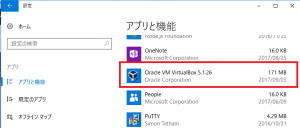
今度は上手くいきました。
>vagrant up
Bringing machine 'default' up with 'virtualbox' provider...
==> default: Checking if box 'bento/centos-6.8' is up to date...
==> default: A newer version of the box 'bento/centos-6.8' is available! You currently
==> default: have version '2.3.0'. The latest is version '2.3.4'. Run
==> default: `vagrant box update` to update.
==> default: Clearing any previously set forwarded ports...
==> default: Clearing any previously set network interfaces...
==> default: Preparing network interfaces based on configuration...
    default: Adapter 1: nat
    default: Adapter 2: hostonly
==> default: Forwarding ports...
    default: 22 (guest) => 2222 (host) (adapter 1)
==> default: Booting VM...
==> default: Waiting for machine to boot. This may take a few minutes...
    default: SSH address: 127.0.0.1:2222
    default: SSH username: vagrant
    default: SSH auth method: private key
    default: Warning: Connection reset. Retrying...
    default: Warning: Connection aborted. Retrying...
    default:
    default: Vagrant insecure key detected. Vagrant will automatically replace
    default: this with a newly generated keypair for better security.
    default:
    default: Inserting generated public key within guest...
    default: Removing insecure key from the guest if it's present...
    default: Key inserted! Disconnecting and reconnecting using new SSH key...
==> default: Machine booted and ready!
Numpy
Numpy
– functions useful for statistical analysis
– mean, median, standard deviation
Data Scientist
Hacking skills, Math & statistics knowledge, Substantive Expertise
Machine Learning, Data Science, Traditional Research
Raw data – processing – data set – statistical models / analysis – machine learning predictions – data driven products, reports visualization blogs
‘substantive expertise’
– knows which question to ask
– can interpret the data well
– understands structure of the data
– data scientist often work in team
Data science can solve problems you’d expect…
– netflix, social media, web apps, (okcupid, uber, etc)
bioin formatics, urban planning, a straphysics, public health, public health, sports
Tools to use
– Numpy
– multidimensional arrays + matrices
– mathematical functions
– Pandas
– handle data in a way suited to analysis
– similar to R
Both common among data scientists
Heavy Lifting Done by the run time
spow workers assign mappers
assign reducers
Issues to be handled by the run time
Master data structures
– location of files created by completed mapper
– score board of mapper/reducer assignment
– fault tolerance
* start new instances if no timely resonse
* completion message from redundant stragglers
– locality management
– task granlarity
– backup tasks
Content Delivery Networks
Napster started for music sharing
content hash, node-id where content stored
content-hash = 149 => <149, 80>
Name space {key-space, node-space}
content -> sha-1 -> unique 160-bit key, unique 160-bit node id
Objective:
APIs
– put key, getkey
CDN – an overlay network
routing table at A, name, node id, next
multimedia API
middleware
commodity OS
Parallel program
-pthreads: API for parallel programs
Distributed programs
-sockets: API for distributed programs
Conventional Distributed program
client – unix(socket) – server e.g. NFS
Novel multimedia Apps
sensor-based: sensors, distributed
sense -> prioritize -> process -> actuate
computationally intensive, real time
large-scale situation awareness
PTS Programming Model
Channel ch1 =
lookup(“video channel”)
while(1){
// get data
response γ =
ch1.get(
// process data
…
// produce output
ch2.put(item,
}
RioVista
RioVista
– performance-conscious design of persistent memory
Quicksilver
– making recovery a first class citizen in os design
LRVM Revisited
begin-xact, nomal program writes, end-xact
cpu, undo <- memory, cpu memory, memory data reda
CPU, application memory, File cache
mmap => normal application memory secomes rersistent
Crash Recovery
Treat like abort
– recover old image from undo log -> servives crashes since it is in RIO file cache
Crash during crash recovery?
– idempotency of recovery -> no problem
Server design
Server design
-persistent metadata m1, m2, ..mm
-normal data structures + code
=>
create external data segments to back persistent data structures
-apps manage their persistence needs
Designer’s choice to use single or multiple data segment
RVM Primitives
Initialization
– initialize(options)
– map(region, options)
– unmap(region)
Body of server code
– begin_xact (tid, restore_mode)
– set_range(tid, addr, size)
– end_xact(tid, connect, t_mode)
– abort_xact(tid)
GC to reduce log space
– flush()
– truncate()
bigin_xact(tid,mode);
	set range(tid, base_addr, #bytes);
	write meta data m1
	write meta data m2
end_xact(tid, mode);
No action by LRVM
LRVM create redo log in memory
Redo log
-AV changes of different region between begin and end xact
Commit
Redo log, window of vulnerability
Log truncation
apply to data seg, read redo log
Log based striping
Client: memory, log seq, log fragments parity, LAN, storage services
Stripe Group, stripe group for x, y, z, L, M, N
-subset server into stripe group
-parallel client activities
-increased availability
-efficient log cleaning
Cache coherence
-single writer, multiple reader
-fileblock unit of coherence
write- request
-receive token
-manager revokes
Log cleaning
log segment evolution, writes to file blocks
– may belong to different files
Unix File System
{filename, offset} -> i-node -> data blocks on disk
Client node action
filename -> mmap -> metadata manager
Manager node actions
filename -> File Dir -> i-number -> i-map -> i-node a dir -> stripe group map -> storage server -> index node of logseg id -> stripe group map -> storage servers -> data blocks form -> storage severs
LRVM
– persistent memory layer in support of system service
Riovista
– performance conscious design of persistent – memory
Quicksilver
– making recovery a first clacks citizen in os design
Persistence
– need of os subsystems
– make virtual memory persistent
– subsystem designers 4 is performant
– use persistent logs to record changes to VM
VM -> replace VM
Implementation
Write(x)
DSM + OS coop x -> twin, original writable
Write project after release Twin, X’ diff run length
Non-page-based DSM
shared r/w -> dsm software -> <-data
library-based
-annotate shared variables
-coherence achons
inserted at point of access
API calls lang runtime
structured DSM
-APU for struct
-coherence action on app calls
DSM and speedup
LAN - DSM library - p -> mem
First NFS
-SUN, 1985
Client, LAN, Servers(student), file cache
DFS
no central server
-each file distributed across several nodes
DFS implemented across all disks in the network
Preliminaries: Striping a file to multiple disks
-increase I/O bandwidth by striping to parallel disks
-Failure protection by ECC
Log Structured File System
– Buffer changes to multiple files in one contiguous log segment data structure
– log segment to disk once a file up or periodically solves small write program
mods to x, mods to y, log segment written the disk
Eebra File System(uc-berkeley)
-combines LFS + RAID
use commodity hardware
-stripe by segment on multiple nodes’ disks in software
xFS – a DFS
-log based striping, cooperative caching, dynamic manageent of data, subsetting storage servers, distributed log cleaning
Traditional NFS with centralized server(s)
– memory content
* metadata, file cache, client caching divectory
Software DSM
Address space partitioned address equivalence
distributed ownership
contact owner of page to get current copy
application, global virtual memory abstraction, dsm software implementation, local physical memeories
LRC with multi-writer coherence protocol
PI lock(L);
x, y, z pages modified in cs => Xd, Yd, Zd } diffs
unlock(L); fetch at point of access
P3 lock(L); x <- => X’d unlock(L);
Implementation
write(x), twin, original writable
release run-length encoded