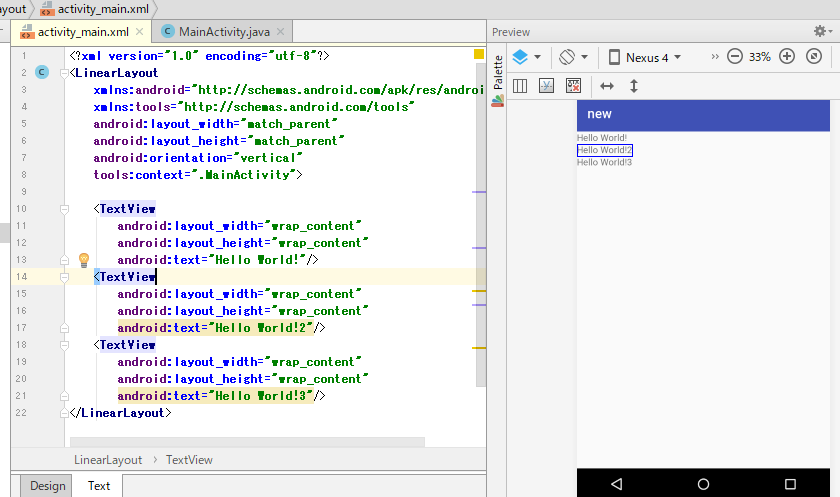
<?xml version="1.0" encoding="utf-8"?>
<LinearLayout xmlns:android="http://schemas.android.com/apk/res/android"
              android:orientation="vertical"
    android:layout_width="wrap_content"
    android:layout_height="50dp"
    android:weightSum="1">

    <TextView
        android:layout_width="wrap_content"
        android:layout_height="wrap_content"
        android:textAppearance="?android:attr/textAppearanceLarge"
        android:text="Large Text"
        android:id="@+id/textView" />

    <TextView
        android:layout_width="match_parent"
        android:layout_height="wrap_content"
        android:textAppearance="?android:attr/textAppearanceMedium"
        android:text="Medium Text"
        android:id="@+id/textView2"
        android:layout_weight="0.08" />
</LinearLayout>
rss parse
package com.capital.anew;

import android.os.Handler;
import android.support.v7.app.AppCompatActivity;
import android.os.Bundle;
import android.util.Log;
import android.view.Menu;
import android.view.MenuItem;
import android.widget.TextView;
import android.widget.Toast;

public class MainActivity extends AppCompatActivity {

    private Handler handler;
    private final String RSS_URL = "http://m-shige1979.hatenablog.com/rss";
    private TextView text1;
    private String RssText;


    @Override
    protected void onCreate(Bundle savedInstanceState) {
        super.onCreate(savedInstanceState);
        handler = new Handler();
        setContentView(R.layout.activity_main);
        text1 = (TextView)findViewById(R.id.textview1);
    }

    @Override
    public boolean onCreateOptionsMenu(Menu menu){

        MenuItem item1 = menu.add("UPDATE");
        item1.setIcon(android.R.drawable.ic_menu_upload);

        item1.setOnMenuItemClickListener(new MenuItem.OnMenuItemClickListener(){
            @Override
            public boolean onMenuItemClick(MenuItem item){

                Thread thread1 = new Thread(){
                    @Override
                    public void run(){
                        try {
                            RssText = RssParse.getRss(MainActivity.this, RSS_URL);

                            handler.post(new Runnable(){
                                @Override
                                public void run(){
                                    text1.setText(RssText);
                                    Toast.makeText(MainActivity.this, "読み込み終了", Toast.LENGTH_SHORT).show();

                                }
                            });
                        } catch (Exception e){
                            Log.d("sample", e.getMessage());
                        }
                    }
                };
                thread1.start();
                return false;
            }
        });

        item1.setShowAsAction(MenuItem.SHOW_AS_ACTION_IF_ROOM);

        getMenuInflater().inflate(R.menu.menu_main, menu);

        return true;
    }

    @Override
    public boolean onOptionsItemSelected(MenuItem item){
        int id = item.getItemId();

        if(id == R.id.action_settings){
            return true;
        }

        return super.onOptionsItemSelected(item);
    }

}
package com.capital.anew;
import android.content.Context;
import java.io.BufferedReader;
import java.io.IOException;
import java.io.InputStreamReader;
public class parse {
public static String getRss(Context context, String url)
throws IOException {
StringBuilder sb = new StringBuilder();
AndroidHttpClient client = AndroidHttpClient.newInstance(“TEST”);
HttpGet get = new HttpGet(url);
try {
HttpResponse response = client.execute(get);
BufferedReader br = new BufferedReader(new InputStreamReader(response.getEntity().getContent()));
String line = null;
while((line = br.readLine()) != null){
sb.append(line);
}
} finally {
client.close();
}
return sb.toString();
}
}
[/code]
activity_main.xml
整形していきます。
android unresolved dependencies error when creating a new project
エラーログに記載のdependenciesを修正する
dependencies {
    implementation fileTree(dir: 'libs', include: ['*.jar'])
    implementation 'com.android.support:appcompat-v7:26.1.0'
    testImplementation 'junit:junit:4.12'
    androidTestImplementation 'com.android.support.test:runner:1.0.2'
    androidTestImplementation 'com.android.support.test.espresso:espresso-core:3.0.2'
}
Gradle Build Runningがやけに時間がかかる。
そもそもandroid sdkとは?
Android SDK【Android Software Development Kit】
Android OSを搭載したスマートフォンやタブレット端末で動作するプログラムを開発するために必要なソフトウェアをひとまとめにしたパッケージで、コンパイラやデバッガ、ライブラリ、デバイスドライバ、ドキュメント、サンプルコード、パソコン上で端末を再現するエミュレータなどで構成される。
constraint-layout:1.1.2を1.1.0にしたらエラーが消えた。1.1.2は新しいversionだから、新しすぎると駄目なのか。Gradle build finished. 謎だ。
implementation 'com.android.support.constraint:constraint-layout:1.1.2'
implementation 'com.android.support.constraint:constraint-layout:1.1.0'
photoshopでバナーを作ろう
なんだ、このクオリティの低さは。。フロントの人が言ってが、上手い人の真似した方が早いな。

classとidの違い
■class:
「種別名を割り当てる」
→ 同じclass名を、1ページ中に何度でも使える。
■id:
「固有の名前を割り当てる」
→ 同じid名は、1ページ中に1度しか使えない。
<!-- .content#title -->
<!-- /.content#title -->
mac terminalからgit clone
quick time playerで撮ってみた。しかしyoutubeの収益化って4000時間、チャンネル登録1000人が条件なんだ。1分の動画なら、60 * 4000 = 24万回再生。どうなんだろう、そこそこハードル高そうに見えるが。
centosでgrepする
まず、vagrantにログインして、適当にディレクトリを作ります。
[vagrant@localhost ~]$ mkdir grep
[vagrant@localhost ~]$ cd grep
[vagrant@localhost grep]$ git version
git version 2.2.1
git hubから適当に機械学習のコードをgit cloneしてきます。
[vagrant@localhost grep]$ git clone https://github.com/nyk510/machine-learning.git
Cloning into 'machine-learning'...
remote: Counting objects: 112, done.
Receiving objects: 100% (112/112), 2.49 MiB | 673.00 KiB/s, done.
remote: Total 112 (delta 0), reused 0 (delta 0), pack-reused 112
Resolving deltas: 100% (55/55), done.
[vagrant@localhost grep]$ ls
machine-learning
[vagrant@localhost machine-learning]$ ls
black_scholes.py  figures  gibbs_sampling.py  prml  readme.md  requirements.txt
では、適当にblack_scholes.pyでSIGMAが使われている箇所を抜き出しています。
[vagrant@localhost machine-learning]$ grep SIGMA black_scholes.py
SIGMA = 0.30
d = -(np.math.log(S_0 / K) + ((r - SIGMA * SIGMA / 2.) * T)) / (SIGMA * np.power(T, 0.5))
V_c = S_0 * stats.norm.cdf(-d + SIGMA * np.power(T, .5)) - K * np.exp(-r * T) * stats.norm.cdf(-d)
V_p = K * np.exp(-r * (T - t)) * stats.norm.cdf(d) - S_0 * stats.norm.cdf(d - SIGMA * np.power(T - t, 0.5))
    s_j_t = S_0 * np.exp((r - SIGMA * SIGMA / 2.) * T + SIGMA * rand_n * np.power(T, 0.5))
    s_j_t = S_0 * np.exp((r - SIGMA * SIGMA / 2.) * T + SIGMA * rand_n * np.power(T, 0.5))
行番号をつけたい時は grepに -nをつける
[vagrant@localhost machine-learning]$ grep -n SIGMA black_scholes.py
18:SIGMA = 0.30
22:d = -(np.math.log(S_0 / K) + ((r - SIGMA * SIGMA / 2.) * T)) / (SIGMA * np.po      wer(T, 0.5))
23:V_c = S_0 * stats.norm.cdf(-d + SIGMA * np.power(T, .5)) - K * np.exp(-r * T)       * stats.norm.cdf(-d)
24:V_p = K * np.exp(-r * (T - t)) * stats.norm.cdf(d) - S_0 * stats.norm.cdf(d -       SIGMA * np.power(T - t, 0.5))
29:    s_j_t = S_0 * np.exp((r - SIGMA * SIGMA / 2.) * T + SIGMA * rand_n * np.p      ower(T, 0.5))
35:    s_j_t = S_0 * np.exp((r - SIGMA * SIGMA / 2.) * T + SIGMA * rand_n * np.p      ower(T, 0.5))
ファイル名のみ
[vagrant@localhost machine-learning]$ grep -l SIGMA *
black_scholes.py
grep: figures: ディレクトリです
grep: prml: ディレクトリです
ファイル名と行番号は”-rn”
[vagrant@localhost machine-learning]$ grep -rn import *.py
black_scholes.py:9:import numpy as np
black_scholes.py:10:import matplotlib.pyplot as plt
black_scholes.py:11:import scipy.stats as stats
gibbs_sampling.py:7:import numpy as np
gibbs_sampling.py:8:import matplotlib.pyplot as plt
gibbs_sampling.py:9:import scipy.stats as stats
あーこれこれ、やりたかったの。
Power-shellでgrepのようなことをしたい
powershellを起動し、Select-String “search name”で検索する。
file
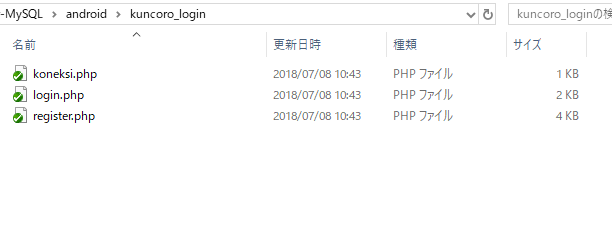
powershell
> select-string "server" koneksi.php

koneksi.php:3:  $server         = "localhost"; //sesuaikan dengan nama server
koneksi.php:8:  $connect = mysql_connect($server, $user, $password) or die ("Koneksi gagal!");
koneksi.php:12: // $con = mysqli_connect($server, $user, $password, $database);
select-string はslsでも代替可能。
> sls "user" koneksi.php

koneksi.php:4:  $user           = "root"; //sesuaikan username
koneksi.php:8:  $connect = mysql_connect($server, $user, $password) or die ("Koneksi gagal!");
koneksi.php:12: // $con = mysqli_connect($server, $user, $password, $database);
unixのcatとのようなコマンドはmore
n> more koneksi.php
        /* ===== www.dedykuncoro.com ===== */
        $server         = "localhost"; //sesuaikan dengan nama server
        $user           = "root"; //sesuaikan username
        $password       = "enter"; //sesuaikan password
        $database       = "kuncoro_login"; //sesuaikan target databese

        $connect = mysql_connect($server, $user, $password) or die ("Koneksi gagal!");
        mysql_select_db($database) or die ("Database belum siap!");

        /* ====== UNTUK MENGGUNAKAN MYSQLI DI UNREMARK YANG INI, YANG MYSQL_CONNECT DI REMARK ======= */
        // $con = mysqli_connect($server, $user, $password, $database);
        // if (mysqli_connect_errno()) {
        //      echo "Gagal terhubung MySQL: " . mysqli_connect_error();
        // }
複数ファイルを検索する場合は、ワイルドカードを使う。
 sls "user" *.php

koneksi.php:4:  $user           = "root"; //sesuaikan username
koneksi.php:8:  $connect = mysql_connect($server, $user, $password) or die ("Koneksi gagal!");
koneksi.php:12: // $con = mysqli_connect($server, $user, $password, $database);
login.php:7:    $username = $_POST["username"];
login.php:10:   if ((empty($username)) || (empty($password))) {
login.php:17:   $query = mysql_query("SELECT * FROM users WHERE username='$username' AND password='$password'");
login.php:24:           $response->message = "Selamat datang ".$row['username'];
login.php:26:           $response->username = $row['username'];
login.php:32:           $response->message = "Username atau password salah";
login.php:44:   // $username = $_POST["username"];
login.php:47:   // if ((empty($username)) || (empty($password))) {
login.php:54:   // $query = mysqli_query($con, "SELECT * FROM users WHERE username='$username' AND password='$password'")
;
login.php:61:   //      $response->message = "Selamat datang ".$row['username'];
login.php:63:   //      $response->username = $row['username'];
login.php:69:   //      $response->message = "Username atau password salah";
register.php:7: $username = $_POST["username"];
register.php:11:        if ((empty($username))) {
register.php:14:                $response->message = "Kolom username tidak boleh kosong";
register.php:27:                if (!empty($username) && $password == $confirm_password){
register.php:28:                        $num_rows = mysql_num_rows(mysql_query("SELECT * FROM users WHERE username='".$username."'"));
register.php:31:                                $query = mysql_query("INSERT INTO users (id, username, password) VALUES(0,'".$username."','".$passw
ord."')");
register.php:42:                                        $response->message = "Username sudah ada";
register.php:48:                                $response->message = "Username sudah ada";
register.php:62:        // $username = $_POST["username"];
register.php:66:        // if ((empty($username))) {
register.php:69:        //      $response->message = "Kolom username tidak boleh kosong";
register.php:82:                // if (!empty($username) && $password == $confirm_password){
register.php:83:                //      $num_rows = mysqli_num_rows(mysqli_query($con, "SELECT * FROM users WHERE username='".$username."
'"));
register.php:86:                //              $query = mysqli_query($con, "INSERT INTO users (id, username, password) VALUES(0,'".$username."'
,'".$password."')");
register.php:97:                //                      $response->message = "Username sudah ada";
register.php:103:               //              $response->message = "Username sudah ada";
ほお~
TortoiseGitとは
TortoiseGitは、GitのクライアントツールでWindowsのシェルエクステンションとして機能
では、試しに、Android-Login-Register-MySQLをgit cloneしてみましょう。
https://github.com/dedykuncoro/Android-Login-Register-MySQL
コマンドラインのgit cloneではなく、GUIで提供されます。
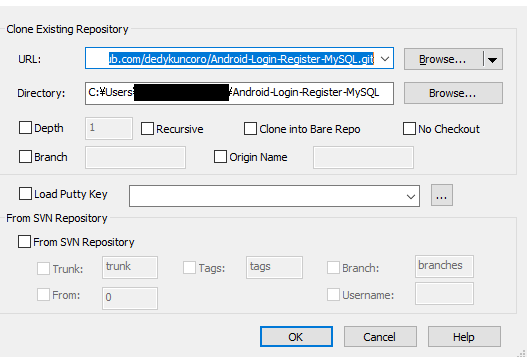
URLがcloneするurl
Directoryが保存するローカルのパス
Depth, Recursive, Clone into Bare Repo, Branch, Origin Nameがありますね。
Load Putty Key, SVN Repositoryもあります。SVNはsubversionでしょう。
Subversionはめっきり見なくなりました。
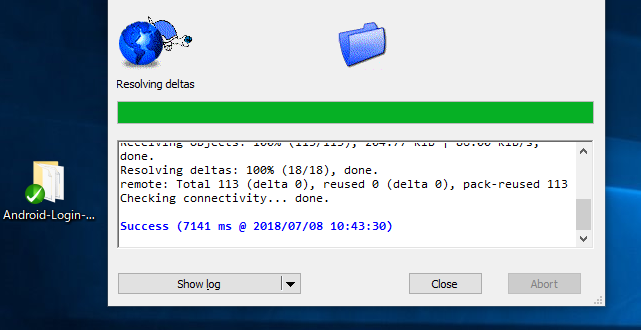
OKを押下でCloneされています。