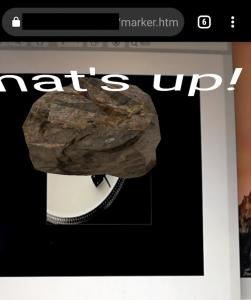
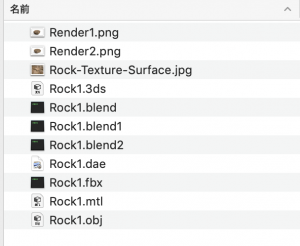
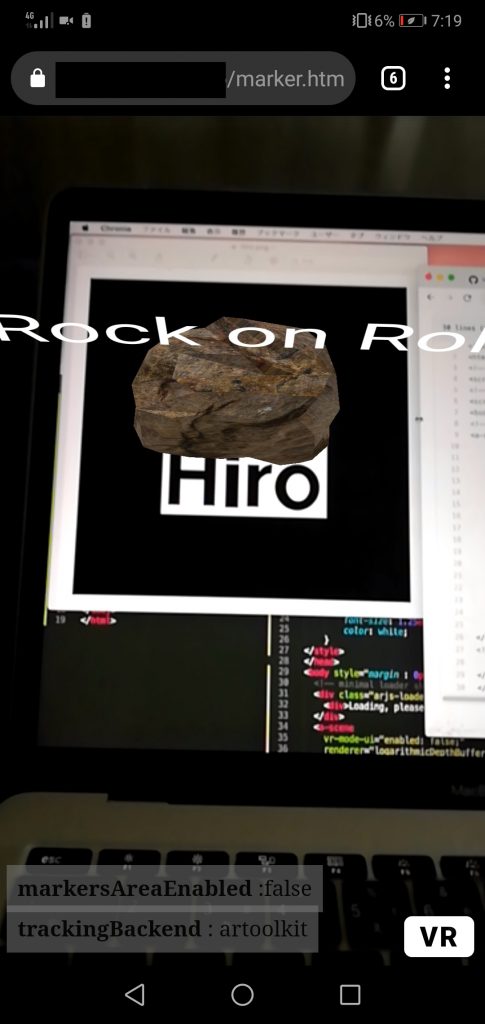
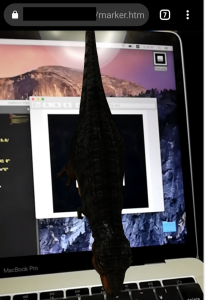
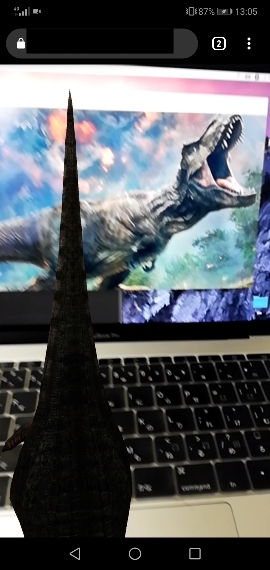
[AR] AR.jsを触ってみよう

Github:https://github.com/AR-js-org/AR.js

<script src="https://cdn.jsdelivr.net/gh/aframevr/aframe@1c2407b26c61958baa93967b5412487cd94b290b/dist/aframe-master.min.js"></script>
<script src="https://raw.githack.com/AR-js-org/AR.js/master/aframe/build/aframe-ar-nft.js"></script>

<style>
  .arjs-loader {
    height: 100%;
    width: 100%;
    position: absolute;
    top: 0;
    left: 0;
    background-color: rgba(0, 0, 0, 0.8);
    z-index: 9999;
    display: flex;
    justify-content: center;
    align-items: center;
  }

  .arjs-loader div {
    text-align: center;
    font-size: 1.25em;
    color: white;
  }
</style>

<body style="margin : 0px; overflow: hidden;">
  <!-- minimal loader shown until image descriptors are loaded -->
  <div class="arjs-loader">
    <div>Loading, please wait...</div>
  </div>
  <a-scene
    vr-mode-ui="enabled: false;"
    renderer="logarithmicDepthBuffer: true;"
    embedded
    arjs="trackingMethod: best; sourceType: webcam;debugUIEnabled: false;"
  >
    <!-- we use cors proxy to avoid cross-origin problems -->
    <a-nft
      type="nft"
      url="https://arjs-cors-proxy.herokuapp.com/https://raw.githack.com/AR-js-org/AR.js/master/aframe/examples/image-tracking/nft/trex/trex-image/trex"
      smooth="true"
      smoothCount="10"
      smoothTolerance=".01"
      smoothThreshold="5"
    >
      <a-entity
        gltf-model="https://arjs-cors-proxy.herokuapp.com/https://raw.githack.com/AR-js-org/AR.js/master/aframe/examples/image-tracking/nft/trex/scene.gltf"
        scale="5 5 5"
        position="50 150 0"
      >
      </a-entity>
    </a-nft>
    <a-entity camera></a-entity>
  </a-scene>
</body>

なんだこれ。

拡張現実の用途としては、
### AR 用途例
– パイロットの訓練プログラム(airflight)
– ARによる遠隔手術(medical)
– 内部の臓器確認(medical)
– ハリーポッター(game)
– スポーツ観戦 アメフト・サッカー・野球・バスケ・ゴルフ(sports)
– テクノスポーツ(sports)
– クリアサイト・グラウンドビュー(car)
– 通り建物のナビゲーション(car)
– dressing(fashion)
– リップクリーム(fashion)
– ARメジャー(home)
– 家電スイッチ操作(home)
– 実物大家具(home)
– 立体表示(education)
– 道案内(travel)
– 距離、所要時間、方角(travel)
– 城再現(travel)
– AR占い(product)
– AR動画(ad)

うん、口紅のARサービスは良いね。
洋服のAR作ってみるか、Java Springと組み合わせて。
その前に色々な技術的課題がありそうやな。

[VR] A-FrameでVR開発の雰囲気を体感しよう

– VRは、C+やC#で開発することが多い
– Unityを使う
– JSのAPIであるWebVRでVRヘッドセットの位置・向き・傾きや加速度などの情報を取得できる
– VRコンテンツをWebで作る場合、ThreeJSを採用するしてWebGLで作っていくことが多い
– A-Frameというフレームワークがある

早速A-Frameを使っていきましょう。

<!DOCTYPE html>
<html lang="en">
<head>
	<meta charset="UTF-8">
	<title>A-Frame</title>
	<script src="https://aframe.io/releases/0.9.2/aframe.min.js"></script>
</head>
<body>
	<a-scene>
		<a-box position="-0.5 4 -3" rotation="0 45 0" color="#ffaaaa"></a-box>
		<a-plane position="0 0 -4" rotation="-84 177 -78" width="6" height="6" color="#aaaaff"></a-plane>
		<a-sky color="#ffffee"></a-sky>
		<a-camera position="0 2 3.7"></a-camera>
	</a-scene>
</body>
</html>

dynamic-bodyとstatic-bodyを追加

<a-box dynamic-body position="-0.5 8 -3" rotation="0 45 0" color="#ffaaaa"></a-box>
		<a-plane static-body position="0 0 -4" rotation="-84 177 -78" width="6" height="6" color="#aaaaff"></a-plane>

文字を追加する
a-textは日本語対応していないので、以下のサイトでfontを作成する必要がある
https://msdf-bmfont.donmccurdy.com/

<a-scene>
		<a-box src="" dynamic-body position="-0.5 8 -3" rotation="0 45 0" color="#fff4ee"></a-box>
		<a-plane static-body position="0 0 -4" rotation="-84 177 -78" width="6" height="6" color="#aaaaff"></a-plane>
		<a-text position="-5 1 -3" scale="2 2 2" value="ストップ安" font="custom-msdf.json"
        font-image="custom-msdf.png" color="black" negate="false"></a-text>
		<a-sky color="#ffff"></a-sky>
		<a-camera position="0 2 3.7"></a-camera>
	</a-scene>

コンポーネントは色々あるみたい。
どっちかというと、触ってみたいのは拡張現実の方かな。

[tesseract4.1.1] 免許証とマイナンバーはどこまで読み取れるのか

tesseractで免許証、マイナンバーは読み取れるのか?

$ tesseract -v
tesseract 4.1.1-rc2-25-g9707

// 運転免許 表
$ tesseract car_1.jpg output -l jpn
sl率 4*********** *

11*018 148ョlコ

// 運転免許 裏
$ tesseract car_2.jpg output -l jpn

// マイナンバー 表
$ tesseract my_1.jpg output -l jpn
個人番号
カード

性別 男

// マイナンバー 裏
$ tesseract my_2.jpg output -l jpn
れます

まともに読み取れたのは免許証番号ぐらい。
なるほど、精度の問題か。

[HTML5] mp4再生の書き方

– movはsafariにしか対応していないので、mp4にする
– controlsでコントロールパネル表示

<video src="test.mp4" controls width="400px" height="200px"></video>

– 自動再生するには”autoplay” を入れるだけ
– クリックすると、遷移させるには普通にaタグ

<a href="/test.html"><video src="test.mp4" autoplay muted controls width="100%" height="500px"></video></a>

OK

[amazon linux2] PHP7.4でQRコードを生成する

$ require endroid/qr-code
Problem 1
– endroid/qr-code[3.9.0, …, 3.9.3] require ext-gd * -> it is missing from your system. Install or enable PHP’s gd extension.

$ yum list | grep gd
php-gd.x86_64 7.4.11-1.amzn2 amzn2extra-php7.4

$ sudo yum install php-gd.x86_64
$ composer require endroid/qr-code

app.php

<?php
require_once(__DIR__.'/vendor/autoload.php');

use Endroid\QrCode\QrCode;

$qrCode = new QrCode('hello qr code');

// header('Content-Type:'.$qrCode->getContentType());
// echo $qrCode->writeString();
$qrCode->writeFile(__DIR__.'/qrcode.png');

echoでブラウザで表示し、writeFileで画像を保存

OK, Let’s Go

[Laravel8.12.3] セッション時間を変更する

session.php

    'lifetime' => env('SESSION_LIFETIME', 120),

    'expire_on_close' => false,

デフォルトで120分にになっているので、ここを編集する
expire_on_closeをtrueにすると、ブラウザを閉じると、セッションが切れる

– セッションがきれた時はHandler.phpに書く
Exception/Handler.php

namespace App\Exceptions;

use Illuminate\Foundation\Exceptions\Handler as ExceptionHandler;

class Handler extends ExceptionHandler
{
    /**
     * A list of the exception types that are not reported.
     *
     * @var array
     */
    protected $dontReport = [
        //
    ];

    /**
     * A list of the inputs that are never flashed for validation exceptions.
     *
     * @var array
     */
    protected $dontFlash = [
        'password',
        'password_confirmation',
    ];

    /**
     * Register the exception handling callbacks for the application.
     *
     * @return void
     */
    public function register()
    {
        //
    }
}

Tailwind CSSのナビゲーション

### live-server
$ npm install live-server
$ npx live-server public –host=0.0.0.0
// ポートが8080になるので注意

<!DOCTYPE html>
<html lang="en">
<head>
	<meta charset="UTF-8">
	<meta name="viewport" content="width=device-width, initial-scale=1.0">
	<title>Document</title>
	<link href="https://unpkg.com/tailwindcss@^1.0/dist/tailwind.min.css" rel="stylesheet">
	<script src="https://cdn.jsdelivr.net/npm/vue/dist/vue.js"></script>
</head>
<body>
	<div id="app">
		<div>
			<header>
				<div>
					<h1>HR</h1>
						<button>
							<svg class="h-6 w-6 fill-current" viewBox="0 0 24 24">
								<path d="M24 6h-24v-4h24v4zm0 4h-24v4h24v-4zm0 8h-24v4h24v-4z"/>
							</svg>
						</button>
				</div>
			</header>
		</div>
	</div>
	<script>
		cost app = new Vue({
			el: "#app",
			data: {

			}
		});
	</script>
</body>
</html>

<!DOCTYPE html>
<html lang="en">
<head>
	<meta charset="UTF-8">
	<meta name="viewport" content="width=device-width, initial-scale=1.0">
	<meta http-equiv="X-UA-Compatible" content="ie=edge">
	<title>Document</title>
	<link href="https://unpkg.com/tailwindcss@^1.0/dist/tailwind.min.css" rel="stylesheet">
	<script src="https://cdn.jsdelivr.net/npm/vue/dist/vue.js"></script>
</head>
<body>
	<div id="app">
		<div class="bg-gray-500">
			<header class="container mx-auto text-white">
					<div class="flex justify-between items-center fixed w-full left-0 h-16 bg-gray-500 px-2 md:static">
						<h1 class="text-4xl font-semibold md:text-xl">HR</h1>
						<div>
							<button @click="isOpen = !isOpen" class="focus:outline-none">
								<svg class="h-6 w-6 fill-current" viewBox="0 0 24 24">
									<path v-show="!isOpen" d="M24 6h-24v-4h24v4zm0 4h-24v4h24v-4zm0 8h-24v4h24v-4z"/>
									<path v-show="isOpen" d="M24 20.188l-8.315-8.209 8.2-8.282-3.697-3.697-8.212 8.318-8.31-8.203-3.666 3.666 8.321 8.24-8.206 8.313 3.666 3.666 8.237-8.318 8.285 8.203z"/>
								</svg>
							</button>
						</div>
					</div>
					<div :class="isOpen ? 'block' : 'hidden'" class="fixed left-0 w-full mt-16 bg-gray-500 h-full overflow-y-scroll md:overflow-visible md:block md:static md:mt-0">
					<ul class="md:flex md:justify-end md:items-center pb-24 md:pb-0">
						<li class="border-b md:border-none"><a href="#" class="block px-8 py-2 my-4 hover:bg-gray-600 rounded">HRとは</a></li>
						<li class="border-b md:border-none"><a href="#" class="block px-8 py-2 my-4 hover:bg-gray-600 rounded">機能一覧</a></li>
						<li class="border-b md:border-none"><a href="#" class="block px-8 py-2 my-4 hover:bg-gray-600 rounded">料金プラン</a></li>
						<li class="border-b md:border-none"><a href="#" class="block px-8 py-2 my-4 hover:bg-gray-600 rounded">お知らせ</a></li>
						<li class="my-4"><a href="#" class="block px-8 py-2 my-4 bg-orange-500 hover:bg-gray-400 rounded-full">お問い合わせ</a></li>
					</ul>
					</div>
			</header>
		</div>
		<div class="container mx-auto mt-16 md:mt-0">
			<p>コンテンツ領域</p>
		</div>
	</div>
	<script>
		const app = new Vue({
			el: "#app",
			data: {
				isOpen: false,
			}
		});
	</script>
</body>
</html>

なるほど、ハンバーガーは難しいね

Tailwind CSSとは

Bootstrapでは事前に準備されているボタン、メニュー、パンくずリストなどのコンポーネントは準備されておらず、utility classを使って独自のコンポーネントを作成し、デザインを行っていく。
その為、bootstrapよりオリジナリティの高いサイトを構築できる。

<button class="bg-indigo-700 font-semibold text-white py-2 px-4 rounded">ボタン</button>

– 文字の大きさは9種類、色の数はかなりの数のutility classが準備されている。

### cdnを利用する場合

<link href="https://unpkg.com/tailwindcss@^1.0/dist/tailwind.min.css" rel="stylesheet">

### npmを使用する場合
$ npm init -y
$ npm install tailwindcss
/css/style.css を作成

@tailwind base;

@tailwind components;

@tailwind utilities;

/public/css フォルダを作成
$ npx tailwind build ./css/style.css -o ./public/css/style.css

package.jsonにbuildコマンドを追加

"scripts": {
    "test": "echo \"Error: no test specified\" && exit 1",
    "build": "tailwind build css/style.css -o public/css/style.css"
  },

/public/index.html

<!DOCTYPE html>
<html lang="en">
<head>
	<meta charset="UTF-8">
	<meta name="viewport" content="width=device-width, initial-scale=1.0">
	<title>Document</title>
	<link rel="stylesheet" href="css/style.css">
</head>
<body>
	<h1>Hello Tailwind</h1>
</body>
</html>

<h1 class="text-4xl text-green-700 text-center font-semibold">Hello Tailwind</h1>

文字の大きさにはtext-xs, txt-sm, text-base … など10の値がある
文字の太さはfont-hairline, font-thin, font-light … など9つの値がある
色はtext-{色}-{色の濃さ}で設定を行う text-green-100, text-green-200 ..など濃さは9個設定できる

<button class="bg-indigo-700 font-semibold text-white py-2 px-4 rounded">ボタン</button>

css/sytle.css

@tailwind base;
@tailwind components;
.btn {
	@apply font-semibold text-white py-2 px-4 rounded;
}
@tailwind utilities;

$ npm run build

<div class="text-center mt-10">
	<button class="bg-indigo-700 font-semibold text-white py-2 px-4 rounded">ボタン</button>
	<button class="bg-red-700 btn hover:bg-red-500">ボタン</button>
</div>

### 設定ファイルの追加
$ npx tailwind init
tailwind.config.js

module.exports = {
  future: {
    // removeDeprecatedGapUtilities: true,
    // purgeLayersByDefault: true,
  },
  purge: [],
  theme: {
    extend: {
      colors: {
        cyan: '#9cdbff',
      }
    },
  },
  variants: {},
  plugins: [],
}

$ npm run build

<button class="bg-cyan btn hover:bg-red-500 focus:outline-none focus:shadow-outline">ボタン</button>

なるほど、良く出来ている

[Laravel8.x] Laravel7.xとの違い

Laravel8系の変更点
– Jetstreamの導入
– モデルファクトリクラスの導入
– マイグレーション圧縮の導入
– ジョブバッチの導入
– レート制限の向上
– キューの向上
– ダイナミックBladeコンポーネントの導入
– Tailwindページネーションビューの導入
– 時間テストヘルパの導入
– artisan serveの向上
– イベントリスナの向上

一つ一つ見ていきましょう。

### Jetstream
ログイン、ユーザー登録、メール認証、二要素認証、セッション管理、Laravel SanctumによるAPIサポート、チーム管理
Tailwind CSSを使用してデザイン(bootstrapから変更)

### モデルのディレクトリ
app/Modelsが作られた
-> 確かにこれは良いですね。

### モデルファクトリクラス
functionの書き方から、クラスを使う書き方に変更

### マイグレーションの圧縮
マイグレーションファイルをphp artisan schema:dumpで一つのファイルに圧縮できる

### ジョブバッチ
ジョブの状況に応じて処理ができる

### リクエストレート制限の向上
何回までアクセスできるかなどを制御できる

### メンテナンスモード
許可IPアドレスからトークンに変更

### ディスパッチクロージャとcatchチェーン
Queue実行時にcatchが使えるようになった

### 動的Bladeコンポーネント
ユーザ情報を元にコンポーネントを変える場合、x-dynamic-component :component=”$componentName”と書く

### イベントリスナの向上
Event::listenメソッドを渡すだけで登録できる

### 時間テストのヘルパ
現時刻を操作できるヘルパ

### Artisan serveの向上
.envの変更が検出されると自動でリロードできる

### Tailwindページネーション
ページネータはTailwind CSSを使用する

### ルートの名前空間の工場

$ curl -sS https://getcomposer.org/installer | php
$ php composer.phar create-project –prefer-dist laravel/laravel testApp
$ php artisan –version
Laravel Framework 8.12.3

認証に関してはlivewire(js)とinertia(SinglePageApplication)が用意さてている

composer require laravel/jetstream

// Livewireスタックを使用するJetstreamをインストールする
php artisan jetstream:install livewire

// Inertiaスタックを使用するJetstreamをインストールする
php artisan jetstream:install inertia

Tailwindを復習してからlivewireで確認ってところだな。