http://knockoutjs.com/
<user-bio>
<h3>Richard</h3>
<img src="img/richard_profile.jpg" alt="Richard's profile picture">
<p>Before working at NNN, Richard...
</user-bio>
随机应变 ABCD: Always Be Coding and … : хороший
http://knockoutjs.com/
<user-bio>
<h3>Richard</h3>
<img src="img/richard_profile.jpg" alt="Richard's profile picture">
<p>Before working at NNN, Richard...
</user-bio>
$('#my-elem').click(function(e){
//the element has been clicked.. do stuff
})
document.body.innerHTML = ”;
document.body.style.background= “white”;
var num = [1, 2, 3];
for(var i = 0; i < nums.length; i++){ var num = nums[i]; var elem = document.createElement('div'); elem.textContent = num; elem.addEventListener('click', function(){ alert(num); }); document.body.appendChild(elem); } [/javascript] [javascript] getCurrentCat: function(){ return model.currentCat; }, getCats: function(){ return model.cats; }, setCurrentCat: function(cat){ model.currentCat = cat; }, incrementCounter: function(){ model.currentCat.clickCount++; catView.render(); } }; [/javascript]
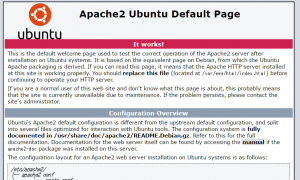
sudo apt-get install apache2

vagrant@vagrant-ubuntu-trusty-64:~$ sudo cat /etc/sudoers # # This file MUST be edited with the 'visudo' command as root. # # Please consider adding local content in /etc/sudoers.d/ instead of # directly modifying this file. # # See the man page for details on how to write a sudoers file. # Defaults env_reset Defaults mail_badpass Defaults secure_path="/usr/local/sbin:/usr/local/bin:/usr/sbin:/usr/bin:/sbin:/bin:/snap/bin" # Host alias specification # User alias specification # Cmnd alias specification # User privilege specification root ALL=(ALL:ALL) ALL # Members of the admin group may gain root privileges %admin ALL=(ALL) ALL # Allow members of group sudo to execute any command %sudo ALL=(ALL:ALL) ALL # See sudoers(5) for more information on "#include" directives: #includedir /etc/sudoers.d

Change permission
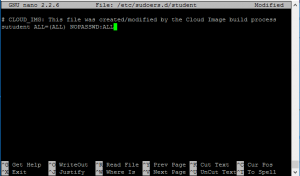
vagrant@vagrant-ubuntu-trusty-64:~$ sudo cp /etc/sudoers.d/vagrant /etc/sudoers. d/student vagrant@vagrant-ubuntu-trusty-64:~$ sudo nano /etc/sudoers.d/student
student@vagrant-ubuntu-trusty-64:~$ sudo ufw status Status: inactive
vagrant@vagrant-ubuntu-trusty-64:/$ echo $PATH /usr/local/sbin:/usr/local/bin:/usr/sbin:/usr/bin:/sbin:/bin:/usr/games:/usr/local/games
All packages list below
vagrant@vagrant-ubuntu-trusty-64:/$ cat /etc/apt/sources.list
Update software
vagrant@vagrant-ubuntu-trusty-64:~$ sudo apt-get update
install
vagrant@vagrant-ubuntu-trusty-64:~$ sudo apt-get install finger
Apache HTTP Server apache2
PostgreSQL postgresql
Memcache memcached
type finger
vagrant@vagrant-ubuntu-trusty-64:~$ finger Login Name Tty Idle Login Time Office Office Phone vagrant pts/0 Jan 18 12:14 (192.168.53.1)
vagrant@vagrant-ubuntu-trusty-64:~$ cat /etc/passwd
add user
vagrant@vagrant-ubuntu-trusty-64:~$ sudo adduser student
Adding user `student' ...
Adding new group `student' (1002) ...
Adding new user `student' (1002) with group `student' ...
Creating home directory `/home/student' ...
Copying files from `/etc/skel' ...
Enter new UNIX password:
Retype new UNIX password:
Sorry, passwords do not match
passwd: Authentication token manipulation error
passwd: password unchanged
Try again? [y/N] y
Enter new UNIX password:
Retype new UNIX password:
passwd: password updated successfully
Changing the user information for student
Enter the new value, or press ENTER for the default
Full Name []:
Room Number []:
Work Phone []:
Home Phone []:
Other []:
Is the information correct? [Y/n]
sudo file
student@vagrant-ubuntu-trusty-64:~$ sudo cat /etc/passwd [sudo] password for student: student is not in the sudoers file. This incident will be reported.
vagrant@vagrant-ubuntu-trusty-64:~$ pwd /home/vagrant
show hidden file
vagrant@vagrant-ubuntu-trusty-64:~$ ls -a . .. .bash_logout .bashrc .cache .profile .ssh
ls -al long command
vagrant@vagrant-ubuntu-trusty-64:~$ ls -al total 28 drwxr-xr-x 4 vagrant vagrant 4096 Jan 18 12:09 . drwxr-xr-x 4 root root 4096 Jan 18 12:08 .. -rw-r--r-- 1 vagrant vagrant 220 Apr 9 2014 .bash_logout -rw-r--r-- 1 vagrant vagrant 3637 Apr 9 2014 .bashrc drwx------ 2 vagrant vagrant 4096 Jan 18 12:09 .cache -rw-r--r-- 1 vagrant vagrant 675 Apr 9 2014 .profile drwx------ 2 vagrant vagrant 4096 Jan 18 12:09 .ssh
All file in root directory
Ubuntu:Ease of use on servers, desktops, laptops
https://www.ubuntu.com/
CentOS
https://www.centos.org/
RedHat:Large enterprise / corporate customers
https://www.redhat.com/en/technologies/linux-platforms/enterprise-linux
CoreOS
https://coreos.com/
getting started ubuntu
>vagrant init ubuntu/trusty64
then, start vagrant up command.
here comes
Welcome to Ubuntu 14.04.5 LTS (GNU/Linux 3.13.0-105-generic x86_64)
* Documentation: https://help.ubuntu.com/
System information as of Wed Jan 18 12:13:23 UTC 2017
System load: 0.09 Processes: 75
Usage of /: 3.5% of 39.34GB Users logged in: 0
Memory usage: 26% IP address for eth0: 10.0.2.15
Swap usage: 0% IP address for eth1: 192.168.53.10
Graph this data and manage this system at:
https://landscape.canonical.com/
Get cloud support with Ubuntu Advantage Cloud Guest:
http://www.ubuntu.com/business/services/cloud
New release '16.04.1 LTS' available.
Run 'do-release-upgrade' to upgrade to it.
Set Up Development Environment
Editor – Sublime Text
Python 2.7 – check your version by running python -V and if it’s not 2.7.
Git – download git from it’s official site.
SDK – download and install Google App Engine SDK for Python
https://cloud.google.com/appengine/downloads
def sumUp(n): total = 0 for x in range(n): total += x return total sumUp = timer.timedFunction(sumUp)
import endpoints
from protorpc import message
from protorpc import message_types
from protorpc import remote
REQUEST_CONTAINER = endpoints.ResourceContainer(
message_types.VoidMessage,
name=messages.StringField(1),
)
package = 'Hello'
class Hello(messages.Message):
"""String that stores a message."""
greeting = messages.StringField(1)
@endpoints.api(name='helloworldendpoints', version='v1')
class HelloWorldApi(remote.Service):
"""Helloworld API v1."""
@endpoints.method(message_types.VoidMessage, Hello,
path = "sayHello", http_method='GET', name = "sayHello")
def say_hello(self, request):
return Hello(greeting="Hello World")
@endpoints.method(REQUEST_CONTAINER, Hello,
path = "sayHelloByName", http_method='GET', name = "sayHelloByName")
def say_hello_by_name(self, request):
greet = "Hello {}".format(request.name)
return Hello(greeting=greet)
APPLICATION = endpoints.api_server([HelloWorldApi])
Field Classes
https://cloud.google.com/appengine/docs/python/tools/protorpc/messages/fieldclasses
API Explore
https://developers.google.com/apis-explorer/#p/
translate api
{
"data": {
"translations": [
{
"translatedText": "Hallo Welt"
},
{
"translatedText": "Mein Name ist Jeff"
}
]
}
}
from google.appengine.ext import ndb class Recipe(ndb.Model): name = StringProperty() ingredients = StringProperty(repeated=True) instructions = TextProperty() vegetarian = BooleanProperty() servings = IntegerProperty()
css trigger
https://csstriggers.com/
var isSetup = setupVariables(e);
if(isSetup){
setInterval(captureFrame.bind(self), 4);
}
else {
setTimeout(function(){
setupVariables(e);
setInterval(captureFrame.bind(self), 4);
}, 100);
}
var captureFrame = function(){
canvas.drawImage(cameraVideo, sx /scaleFactor, sy/scaleFactor, sWidth/scaleFactor,
sHeight/scaleFactor, dx, dy, dWidth, dHeight);
drawOverlay(dWidth, dHeight, scaleFactor);
if(self.onframe) self.onframe();
coordinatesHaveChanged = false;
};
gulp serve command
[vagrant@localhost qrcode]$ gulp serve [21:54:17] Using gulpfile ~/webapp/app/qrcode/gulpfile.js [21:54:17] Starting 'styles'... [21:54:18] styles all files 26.07 kB [21:54:18] Finished 'styles' after 1.46 s [21:54:18] Starting 'serve'... [21:54:19] Finished 'serve' after 505 ms [WSK] Local URL: http://localhost:3000 [WSK] External URL: http://10.0.2.15:3000 [WSK] Serving files from: .tmp [WSK] Serving files from: app
function loadImage(src, parent, callback){
var img = document.createElement('img');
img.src = src;
img.onload = callback;
parent.appendChild(img);
};
var sequence = get('example.json')
.then(doSomething)
.then(doSomethingElse);
Syntax
var promise = new Promise(function(resolve[, reject]){
var value = doSomething();
if (thingWorked){
resolve(value);
} else if (somethingWentWrong){
reject();
}
}).then(function(value) {
return nextTing(value);
}).catch(rejectFunction);