“;
foreach ($atrs as $idx => $atr){
$price = $data[idx];
$highest = max($highest, $price[2]);
$losscutLine = round($highest – $atr * ATR_N, 2);
echo implode(“,”,[
$price[0],
$highest,
$price[4],
$losscutLine,
$price[4] < $losscutLine ? '売却':'保持'
]) . "\n";
}
[/php]
phpQueryとexplode
<?php
require_once('phpquery/phpQuery/phpQuery.php');
$html = file_get_contents('');
$doc = phpQuery::newDocument($html);
$message = $doc[".message"]->text();
echo substr_count($message, '下げ');
$text = explode(" ",$message);
print_r($text);
?>

array_map()関数
array_mapは、arr1の各要素にcallback関数を適用した後、その全ての要素を含む配列を返す。
所得税の累進課税でみてみましょう。
<?php
function tax($income){
if($income < 195){
return $income *0.05;
} elseif ($income < 330){
return $income * 0.1 + 9.75;
} elseif ($income< 695) {
return $income * 0.2 + 42.75;
} elseif ($income < 900) {
return $income * 0.23 + 63.6;
} elseif ($income < 1800) {
return $income * 0.33 + 153.6;
} elseif ($income < 4000) {
return $income * 0.40 + 279.6;
} else {
return $income * 0.45 + 479.6;
}
}
$salary = array(603, 577, 404, 401, 661, 1126, 350, 2350, 210);
$pay = array_map("tax", $salary);
print_r($pay)
?>
Array ( [0] => 163.35 [1] => 158.15 [2] => 123.55 [3] => 122.95 [4] => 174.95 [5] => 525.18 [6] => 112.75 [7] => 1219.6 [8] => 30.75 )
配列から要素を削除
array_splice():
-配列を切り取る機能を利用して対象から値を削除する
-1つだけの値の削除や連続する値の削除に向いている
<?php
$target = array('東証1部','東証2部','東証マザーズ','JASDAQ','名証','札証','福証');
$split = array_splice($target, 4, 3);
var_dump($target);
var_dump($split);
?>
array(4) { [0]=> string(10) “東証1部” [1]=> string(10) “東証2部” [2]=> string(18) “東証マザーズ” [3]=> string(6) “JASDAQ” }
array(3) { [0]=> string(6) “名証” [1]=> string(6) “札証” [2]=> string(6) “福証” }
unset();
array_values();
配列を指定して、unsetで削除する
複数の値の削除に向いている
unsetで削除するだけで、indexは変更されない。
<?php
$target = array('東証1部','東証2部','東証マザーズ','JASDAQ','名証','札証','福証');
unset($target[3]);
var_dump($target);
$target = array_values($target); //indexを詰める
var_dump($target);
?>
array(6) { [0]=> string(10) “東証1部” [1]=> string(10) “東証2部” [2]=> string(18) “東証マザーズ” [4]=> string(6) “名証” [5]=> string(6) “札証” [6]=> string(6) “福証” }
array(6) { [0]=> string(10) “東証1部” [1]=> string(10) “東証2部” [2]=> string(18) “東証マザーズ” [3]=> string(6) “名証” [4]=> string(6) “札証” [5]=> string(6) “福証” }
<?php
$portfolio = array(
'みずほフィナンシャルグループ'=> '-1.05',
'三菱UFJフィナンシャル・グループ' => '-1.35',
'野村ホールディングス' => '-2.89',
'富士通' => '-2.77',
'エー・ディー・ワークス' => '+2.27',
'日経ダブルインバース上場投信' => '+1.67',
'東芝' => '-1.54'
);
foreach ($portfolio as $key => $val){
if ($val < 0){
unset($portfolio[$key]);
}
}
array_values($portfolio);
var_dump($portfolio);
?>
array(2) { [“エー・ディー・ワークス”]=> string(5) “+2.27” [“日経ダブルインバース上場投信”]=> string(5) “+1.67” }
file()関数
file()は、ファイルの内容を取得して配列に格納する
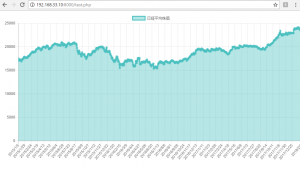
csvファイルから直近15日の日経平均を出してみましょう。
<?php
$n = 15;
$data = file('nikkei225.csv');
rsort($data);
$i = 1;
while($i < $n+1){
echo $data[$i]."<br>\n";
$i++;
}
?>
2018/2/2,23274.53,23361.67,23367.96,23122.45
2018/2/1,23486.11,23276.1,23492.77,23211.12
2018/1/9,23849.99,23948.97,23952.61,23789.03
2018/1/5,23714.53,23643,23730.47,23520.52
2018/1/4,23506.33,23073.73,23506.33,23065.2
2018/1/31,23098.29,23205.23,23375.38,23092.85
2018/1/30,23291.97,23559.33,23581.98,23233.37
2018/1/29,23629.34,23707.14,23787.23,23580.17
2018/1/26,23631.88,23757.34,23797.96,23592.28
2018/1/25,23669.49,23750.65,23828.4,23649.03
2018/1/24,23940.78,24026.43,24072.77,23917.14
2018/1/23,24124.15,23924.4,24129.34,23916.02
2018/1/22,23816.33,23797.84,23816.33,23697.81
2018/1/19,23808.06,23854.11,23872.69,23735.61
2018/1/18,23763.37,24078.93,24084.42,23699.47
FILE_IGNORE_NEW_LINES、FILE_IGNORE_NEW_LINESなどもあります。
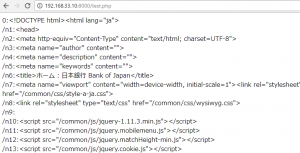
URL上のHTMLソースを取得することもできます。
<?php
$lines = @file('http://www.boj.or.jp/');
foreach( $lines as $line_num => $line) {
echo "{$line_num}:" . htmlspecialchars($line). "<br>/n";
}
?>

defineでリボ払い
define関数では、定数を定義することができる。
一度データとして格納すると変更できない。
サンプルとして、金利15%・毎月5000円支払いのリボ払いで購入した場合、何カ月で払い終えるか見てみましょう。
<?php
define("revolving", "5000");
class Card{
public $amount;
public $i = 0;
function revo(){
while($this->amount>0){
$this->amount = $this->amount * (0.15/12 + 1) - revolving;
$this->i++;
}
echo $this->i+1 ."<br>\n";
}
}
$gucci = new Card();
$gucci->amount = 50000;
$gucci->revo();
$chanel = new Card();
$chanel->amount = 80000;
$chanel->revo();
?>

dirname(__FILE__)
自身のいるディレクトリの絶対パスを返す。
<?php echo dirname(__FILE__); require_once(dirname(__FILE__)."/c.php"); require_once(dirname(__FILE__)."/../d.php"); ?>
サンプル
<?php require_once(dirname(__FILE__)."/vendor/autoload.php"); ?>
PHPExcel
<?php
$readFile = "20180202.xls";
$data = readXlsx($readFile);
print '<pre>';
var_dump($data);
print '</pre>';
function readXlsx($readFile)
{
require_once dirname(__FILE__) . '/PHPExcel/Classes/PHPExcel/IOFactory.php';
if(!file_exists($readFile)){
exit($readFile. "が見つかりません。");
}
$objPExcel = PHPExcel_IOFactory::load($readFile);
return $objPExcel->getActiveSheet()->toArray(null,true,true,true);
}
exit;
?>

多次元配列のforeach
<?php
$array = array(
"code" => '1723',
"name" => '日本電技',
"market" => 'JQ',
"price" => '3030',
"PER" => '12.0',
"PBR" => '1.37'
);
foreach($array as $key => $value){
echo $key. "の値は" .$value. "です。<br>\n";
}
?>
codeの値は1723です。
nameの値は日本電技です。
marketの値はJQです。
priceの値は3030です。
PERの値は12.0です。
PBRの値は1.37です。
では、多次元配列でみてみましょう。
<?php
$stock = array();
$stock[0]['code'] = '1968';
$stock[0]['name'] = '太平電';
$stock[0]['price'] = '2932';
$stock[0]['ratio'] = '1.52%';
$stock[1]['code'] = '1981';
$stock[1]['name'] = '協和日成';
$stock[1]['price'] = '851';
$stock[1]['ratio'] = '-1.05%';
$stock[2]['code'] = '2268';
$stock[2]['name'] = 'サーティワン';
$stock[2]['price'] = '4060';
$stock[2]['ratio'] = '+0.12%';
foreach($stock as $id){
foreach($id as $key => $value){
echo "{$key} : {$value}<br>\n";
}
echo "<hr/>\n";
}
?>

var_dump(array_column($stock, ‘name’, ‘code’)); とすると、連想配列を作れる。
<?php $stock = array(); $stock[0]['code'] = '1968'; $stock[0]['name'] = '太平電'; $stock[0]['price'] = '2932'; $stock[0]['ratio'] = '1.52%'; $stock[1]['code'] = '1981'; $stock[1]['name'] = '協和日成'; $stock[1]['price'] = '851'; $stock[1]['ratio'] = '-1.05%'; $stock[2]['code'] = '2268'; $stock[2]['name'] = 'サーティワン'; $stock[2]['price'] = '4060'; $stock[2]['ratio'] = '+0.12%'; var_dump(array_column($stock, 'name', 'code')); ?>
array(3) { [1968]=> string(9) “太平電” [1981]=> string(12) “協和日成” [2268]=> string(18) “サーティワン” }
Analytics API sample 3
<?php
require_once 'vendor/autoload.php';
$client_id = '';
$view_id = '';
$private_key = @file_get_contents('');
$from = date('Y-m-d', strtotime('-1 month'));
$to = date('Y-m-d');
$dimensions = 'ga:date';
$metrics = 'ga:visits';
$option = array(
'dimensions' => $dimensions,
'max-results' => 10,
'sort' => '-ga:visits',
'start-index' => 11,
);
if(isset($_SESSION['service_token']))
{
$client->setAccessToken($_SESSION['service_token']);
}
$scopes = array('https://www.googleapis.com/auth/analytics.readonly');
$credentials = new Google_Auth_AssertionCredentials($client_id, $scopes, $private_key);
$client = new Google_Client();
$client->setAssertionCredentials($credentials);
if($client->getAuth()->isAccessTokenExpired())
{
$client->getAuth()->refreshTokenWithAssertion($credentials);
}
$_SESSION['service_token'] = $client->getAccessToken();
$analytics = new Google_Service_Analytics($client);
$data = $analytics->data_ga->get('ga:'. $view_id, $from, $to, $metrics, $option);
$list = array();
foreach($data['rows'] as $row => $value){
$result = array();
foreach($data['columnHeaders'] as $key => $header){
$result[$header['name']] = $value[$key];
}
$list[] = $result;
}
?>
<table>
<thead>
<tr>
<th>pagepath</th>
<th>visits</th>
</tr>
</thead>
<tbody>
<?php
foreach($list as $val){
echo "<tr>";
foreach ($val as $data){
echo "<td>$data</td>";
}
echo "</tr>";
}
?>
</tbody>
</table>