相対パスは
../hoge.php
更に上は
../../hoge.php
随机应变 ABCD: Always Be Coding and … : хороший

相対パスは
../hoge.php
更に上は
../../hoge.php
inlineでやりたいところですが、複数のHTMLファイルに対して共通のCSSを適用するため、外部にフォルダを作成し、そこに入れて読み込むことが一般的かと思います。
<link rel="stylesheet" type="text/css" href="asset/css/styles.css" />
多数の人間が制作に関わった場合などは、パーツによって、このclassはxxx.cssファイル、このidはyyy.cssファイルを読み込む、など、1つのページでも複数のcssファイルを読み込むことがあります。
問題は、大規模サイトで、CSSファイルを5~6個位読み込んでいて、後からチームにジョインした人が改修しようとした際に、それぞれ書き方も別々の為、なにがなんだかわからなくなる、ということがあります。
そこで、コーディングガイドラインを作成しようとなります。
では、Googleのコーディングガイドラインをみてみましょう。
– Not reccomended
<!DOCTYPE html>
<title>HTML sucks</title>
<link rel="stylesheet" href="base.css" media="screen">
<link rel="stylesheet" href="grid.css" media="screen">
<link rel="stylesheet" href="print.css" media="print">
<h1 style="font-size: 1em;">HTML sucks</h1>
<p>I’ve read about this on a few sites but now I’m sure:
  <u>HTML is stupid!!1</u>
<center>I can’t believe there’s no way to control the styling of
  my website without doing everything all over again!</center>
-recommended
<!-- Recommended -->
<!DOCTYPE html>
<title>My first CSS-only redesign</title>
<link rel="stylesheet" href="default.css">
<h1>My first CSS-only redesign</h1>
<p>I’ve read about this on a few sites but today I’m actually
  doing it: separating concerns and avoiding anything in the HTML of
  my website that is presentational.
<p>It’s awesome!
外部ファイルは一つにして、そこから読み込むことが推奨されています。その他も参考になります。
https://google.github.io/styleguide/htmlcssguide.html#CSS_Style_Rules
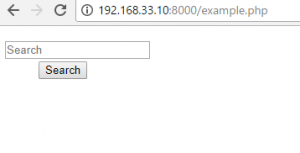
まず、スタイリングしていない状態です。
<body>
	<form action="/" name="search1" method="post">
		<dl class="search1">
			<dt><input type="text" name="search" value="" placeholder="Search"></dt>
			<dd><button>Search</button></dd>
		</dl>
</body>
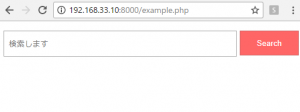
	<style>
	dl.search {
		position:relative;
	}
	dl.search dt{
		margin-right:105px;
		padding:8px;
		background-color:#fff;
		border:1px solid #aaa;
	}
	dl.search dd{
		position:absolute;
		top:0;
		right:0;
	}
	dl.search dt input{
		width:100%;
		height:24px;
		line-heigh:24px;
		background:none;
		border:none;
	}
	dl.search dd {
		position:absolute;
		top:0;
		right:0;
	}
	dl.search dd button{
		display:block;
		width:100px;
		height:42px;
		color:#fff;
		line-height:40px;
		text-align:center;
		background-color:#f66;
		border:1px solid #c66;
	}
	</style>
下記のように、ループしてnameが競合するとpostが動きません。
<?php
  			foreach($result as $key => $value){
  				echo '<form method="post" name="form1" action="result.php">
			<a href="javascript:form1.submit()">' .$value.'</a>
    		<input type="hidden" name="search" value="' .$value.'">
			</form>';
  		}
  		?>
nameをユニークにしたら、解消します。
<?php
  			foreach($result as $key => $value){
  				echo '<form method="post" name="form'.$key.'" action="result.php">
			<a href="javascript:form'.$key.'.submit()">' .$value.'</a>
    		<input type="hidden" name="search" value="' .$value.'">
			</form>';
  		}
  		?>
これを解決するのに、2時間くらいかかりました。私はいったい馬鹿??
下記コードは、Jsonの取得のところまで。
<?php

require_once('vendor/autoload.php');

$client_id = '';
$service_account_name = '';
$key_file_location = '';

$client = new Google_Client();
$client->setApplicationName('Yutube Test');
$key = file_get_contents($key_file_location);
$cred = new Google_Auth_AssertionCredentials(
	$service_account_name,
	array('https://www.googleapis.com/auth/youtube'),
	$key
);
$client->setAssertionCredentials($cred);

$youtube = new Google_Service_YouTube($client);

$array = array('viewCount','rating','date');

$query = 'X Japan';
$searchResponse = $youtube->search->listSearch('id,snippet',array(
	'q' => $query,
	'maxResults'=> 10,
	'order' => $array[0]
));
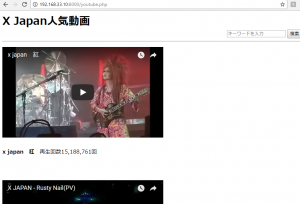
こちらがviewです。検索やソート順など、改良の余地が大いにありますね。
curl_init();により初期化
接続を行うためのcurlオブジェクトを作成します。
curl_setopt();転送用オプションを設定します。GETの場合はURLだけでOK。
curl_exec:cURL:セッションを実行する
CURLOPT_URL:provide the URL to use in the request
CURLOPT_RETURNTRANSFERにtrueを設定すると、文字列を返すようになる。変数に保存する
<?php

$url = "http://www.fsa.go.jp/";
$ch = curl_init();

curl_setopt($ch, CURLOPT_URL, $url);
curl_setopt($ch, CURLOPT_RETURNTRANSFER, true);
$html = curl_exec($ch);
var_dump($html);
curl_close($ch);

?>
http情報の取得
<?php

$url = "http://finance.yahoo.co.jp/";
$ch = curl_init();

curl_setopt($ch, CURLOPT_URL, $url);
curl_setopt($ch, CURLOPT_RETURNTRANSFER, true);
$info = curl_getinfo($ch);
curl_close($ch);

var_dump($info)

?>
array(23) { [“url”]=> string(27) “http://finance.yahoo.co.jp/” [“content_type”]=> NULL [“http_code”]=> int(0) [“header_size”]=> int(0) [“request_size”]=> int(0) [“filetime”]=> int(0) [“ssl_verify_result”]=> int(0) [“redirect_count”]=> int(0) [“total_time”]=> float(0) [“namelookup_time”]=> float(0) [“connect_time”]=> float(0) [“pretransfer_time”]=> float(0) [“size_upload”]=> float(0) [“size_download”]=> float(0) [“speed_download”]=> float(0) [“speed_upload”]=> float(0) [“download_content_length”]=> float(-1) [“upload_content_length”]=> float(-1) [“starttransfer_time”]=> float(0) [“redirect_time”]=> float(0) [“redirect_url”]=> string(0) “” [“primary_ip”]=> string(0) “” [“certinfo”]=> array(0) { } }
クラス内で定義するオブジェクト定数
<?php

class ConstClass
{
	const CONSTSTR1 = '米ダウ工業株';
	const CONSTSTR2 = '日経平均株価';

	function showConst(){
		echo self::CONSTSTR1."<br>";
		echo self::CONSTSTR2;
	}
}

$Class = new ConstClass();
$Class->showConst();

?>
米ダウ工業株
日経平均株価
<?php
const APPID = '';
$text = '6日の東京株式市場で日経平均株価は前日比の下げ幅が一時1000円を超えた。1039円安い2万1642円まで下落する場面があった。';
$to = 'en';

$ch = curl_init('https://api.datamarket.azure.com/Bing/MicrosoftTranslator/v1/Translate?Text=%27'.urlencode($text).'%27&To=%27'.$to.'%27');
curl_setopt($ch, CURLOPT_USERPWD, APPID. ':'.APPID);
curl_setopt($ch, CURLOPT_RETURNTRANSFER, true);

$result = curl_exec($ch);
$result = explode('<d:Text m:type="Edm.String">', $result);
$result = explode('</d:Text>', $result[1]);
$result = $result[0];
echo $text."->".$result;
?>
すごいね、テクノロジー
<?php
require 'TwistOAuth/build/TwistOAuth.phar';
$consumer_key = '';
$consumer_secret = '';
$access_token = '';
$access_token_secret = '';
$connection = new TwistOAuth($consumer_key, $consumer_secret, $access_token, $access_token_secret);
$tweets_params = ['q' => 'ラクオリア' ,'count' => '10'];
$tweets = $connection->get('search/tweets', $tweets_params)->statuses;
/* var_dump($tweets); */
$hash_params =['q' => '#6758', 'count' => '10', 'lang'=>'ja'];
$hash = $connection->get('search/tweets', $tweets_params)->statuses;
/* var_dump($hash); */
$users_params = ['screen_name' => '*'];
$users = $connection->get('users/show', $users_params);
/* var_dump($hash); */
$geo_params = ['geocode' => '35.658034,139.701636,0.2km' ,'count' => '10'];
$geo = $connection->get('search/tweets', $geo_params)->statuses;
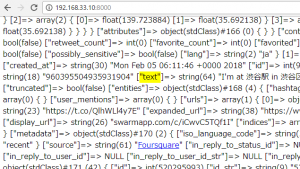
var_dump($geo);
<?php

	$files = file_get_contents('test.php');

	$fileName = "kabu".rand(1000000,9999999);

	$files = mb_convert_encoding($files, "UTF-8", "AUTO");

	$fileName = $fileName. ".php";
	$handle = fopen($fileName, 'w');

	fwrite($handle, $files);
	fclose($handle);

	print $fileName. "を生成しました。<br>\n";
?>
kabu6512964.phpを生成しました。
<?php
require_once('query/phpquery/phpQuery/phpQuery.php');
$code = 3928;
$url = 'https://hogehoge.jp?code='.$code;
$html = file_get_contents($url);
$doc = phpQuery::newDocument($html);
$message = $doc[".hogehoge"]->text();
$price = $doc[".hoge"]->text();
?>
<!DOCTYPE html>
<html lang="ja">
<head>
<title><?php echo $code."|".$message;?></title>
</head>
<body>
<b><?php echo "【".$code."】".$message;?></b>
<p>現在の株価:<?php echo $price;?></p>
</body>
</html>