2018-03-10 09:00:00
3月10日 09時
Y/m/d H:i:s
Y/n/j H:i:s
mはゼロ詰め、nはゼロつめなし。
dはゼロ詰め、jはゼロつめなし。
echo date('n月j日 h時', strtotime($date));
あれ、15時が03時になってますね。駄目ですね。
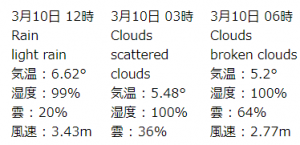
H大文字だと、15時、18時、21時と表示されました。
date('n月j日 H時', strtotime($date))
随机应变 ABCD: Always Be Coding and … : хороший

2018-03-10 09:00:00
3月10日 09時
Y/m/d H:i:s
Y/n/j H:i:s
mはゼロ詰め、nはゼロつめなし。
dはゼロ詰め、jはゼロつめなし。
echo date('n月j日 h時', strtotime($date));
あれ、15時が03時になってますね。駄目ですね。
H大文字だと、15時、18時、21時と表示されました。
date('n月j日 H時', strtotime($date))
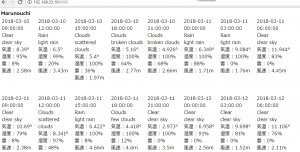
tdを8(=24/3)にして、テーブルで表示してみます。
<style>
.table1 td {
	width: 120px;
	height: 260px;
	vertical-align: top;
}

</style>
<?php

$city = "Marunouchi";
$API_KEY = "foo";
$BASE_URL = "http://api.openweathermap.org/data/2.5/forecast/?q=".$city.",jp&appid=" . $API_KEY . "";

$forecast = json_decode(file_get_contents($BASE_URL), true);

echo "<b>" . $city . "</b><br>";
$list = $forecast["list"];

echo "<table class=\"table1\">";
echo "<tr>";

$i = 1;
foreach($list as $value){
	echo "<td>";
	echo $value["dt_txt"] . "<br>";
	echo $value["weather"][0]["main"] . "<br>";
	echo $value["weather"][0]["description"] . "<br>";
	$temp = $value["main"]["temp"];
	echo "気温 : " . ($temp - 273.15) . "°<br>";
	echo "湿度 : " . $value["main"]["humidity"] . "%<br>";
	echo "雲 : " . $value["clouds"]["all"] . "%<br>";
	echo "風速 : " . $value["wind"]["speed"] . "m<br><br>";
	echo "</td>";
	if($i % 8 == 0){
	echo "</tr><tr>";
	}
	$i++;

}
echo "</tr>";
echo "</table>";
?>
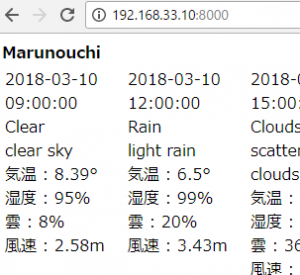
やべー
<?php

$city = "Marunouchi";
$API_KEY = "not watch";
$BASE_URL = "http://api.openweathermap.org/data/2.5/forecast/?q=".$city.",jp&appid=" . $API_KEY . "";

$forecast = json_decode(file_get_contents($BASE_URL), true);

echo $city . "<br>";
$list = $forecast["list"];
echo $list[0]["dt_txt"] . "<br>";
echo $list[0]["weather"][0]["main"] . "<br>";
echo $list[0]["weather"][0]["description"] . "<br>";
$temp = $list[0]["main"]["temp"];
echo "気温 : " . ($temp - 273.15) . "°<br>";
echo "湿度 : " . $list[0]["main"]["humidity"] . "%<br>";
echo "雲 : " . $list[0]["clouds"]["all"] . "%<br>";
echo "風速 : " . $list[0]["wind"]["speed"] . "m<br>";
?>
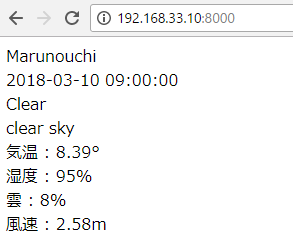
foreachに書き換えます。
echo "<b>" . $city . "</b><br>";
$list = $forecast["list"];

foreach($list as $value){
	echo $value["dt_txt"] . "<br>";
	echo $value["weather"][0]["main"] . "<br>";
	echo $value["weather"][0]["description"] . "<br>";
	$temp = $value["main"]["temp"];
	echo "気温 : " . ($temp - 273.15) . "°<br>";
	echo "湿度 : " . $value["main"]["humidity"] . "%<br>";
	echo "雲 : " . $value["clouds"]["all"] . "%<br>";
	echo "風速 : " . $value["wind"]["speed"] . "m<br><br>";
}
うわーでたー
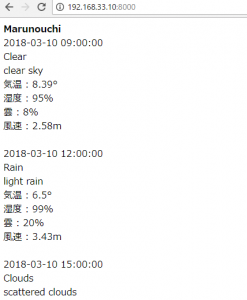
listの中身を見てみましょう。取得日を含めて5日分のデータが返ってきます。
一番下の”dt_txt”がその日時のようですね。3時間おきにあります。
09:00:00
12:00:00
15:00:00
18:00:00
21:00:00
00:00:00
03:00:00
06:00:00
[“temp”]=>float(278.11) はケルビンで、273.15を引くと℃になります。
[“pressure”]=>float(994.69) は気圧。hpa
[“deg”]=>float(55.0004) は風向き
気圧はahp
[1]=>
    array(9) {
      ["dt"]=>
      int(1520683200)
      ["main"]=>
      array(8) {
        ["temp"]=>
        float(278.11)
        ["temp_min"]=>
        float(277.249)
        ["temp_max"]=>
        float(278.11)
        ["pressure"]=>
        float(994.69)
        ["sea_level"]=>
        float(1035.79)
        ["grnd_level"]=>
        float(994.69)
        ["humidity"]=>
        int(100)
        ["temp_kf"]=>
        float(0.86)
      }
      ["weather"]=>
      array(1) {
        [0]=>
        array(4) {
          ["id"]=>
          int(500)
          ["main"]=>
          string(4) "Rain"
          ["description"]=>
          string(10) "light rain"
          ["icon"]=>
          string(3) "10n"
        }
      }
      ["clouds"]=>
      array(1) {
        ["all"]=>
        int(80)
      }
      ["wind"]=>
      array(2) {
        ["speed"]=>
        float(1.18)
        ["deg"]=>
        float(55.0004)
      }
      ["rain"]=>
      array(1) {
        ["3h"]=>
        float(0.31)
      }
      ["snow"]=>
      array(0) {
      }
      ["sys"]=>
      array(1) {
        ["pod"]=>
        string(1) "n"
      }
      ["dt_txt"]=>
      string(19) "2018-03-10 12:00:00"
    }
まず、city listをダウンロードします。
http://bulk.openweathermap.org/sample/
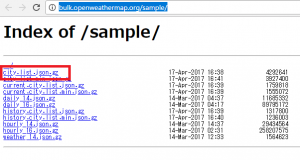
コマンドラインで、解凍します。
$ gzip -d city.list.json.gz
すると、city.list.jsonができます。
[vagrant@localhost weather]$ ls
city.list.json  index.php
jpanの国コードはjp
データを見てみましょう。
  {
    "id": 1850144,
    "name": "Tōkyō-to",
    "country": "JP",
    "coord": {
      "lon": 139.691711,
      "lat": 35.689499
    }
  },
  {
    "id": 1848354,
    "name": "Yokohama-shi",
    "country": "JP",
    "coord": {
      "lon": 139.642502,
      "lat": 35.447781
    }
  },
では、今回は丸の内(“Marunouchi”)でデータを取得してみます。
API Keyはサイトで30秒くらいで取得できます。
https://home.openweathermap.org/api_keys
<?php

$city_code = "Marunouchi";
$API_KEY = "hoge";
$BASE_URL = "http://api.openweathermap.org/data/2.5/forecast/?q=Hachioji,jp&appid=".$API_KEY."";

$forecast = json_decode(file_get_contents($BASE_URL), true);

echo "<pre>";
var_dump($forecast);
echo "</pre>";
?>
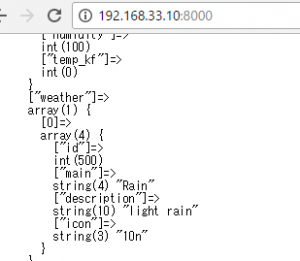
weather rain など返ってきてますね。
alter table music01 add unique (title);
入ってますね。
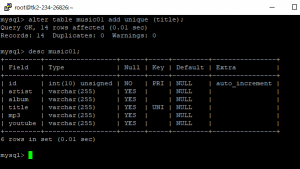
既にテーブルの中の値が重複している場合は、一度削除しなければなりません。
また、既にuniqueが設定されている場合は、上書きされて、uniqueが設定されます。
Query OK, 0 rows affected (0.02 sec)
Records: 0 Duplicates: 0 Warnings: 0
app/Vendorディレクトリに入れる
読み込むときは、
App::uses(‘ファイル名’, ‘Vendor’);
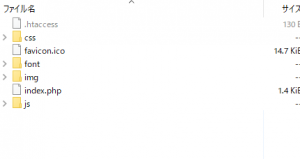
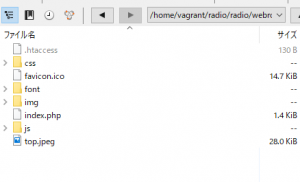
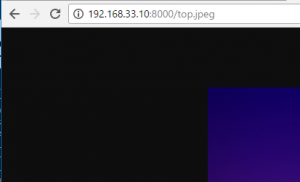
webルートにファイルを置くと、そのまま反映される。
src/Model のフォルダに先ほどつくったテーブル名で生成します。
Channel01sTable.php
<?php

namespace App\Model\Table;

use Cake\ORM\Table;

calss Channel01sTable extend Table
{
	public function initialize(array config){
		$this->addBehavior('Timestamp');
	}
}
?>
まずCakeで作っていくには、ある程度データベースの設計ができていないといけない。
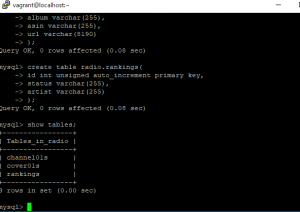
ということで、適当にcake用にデータベースをつくっていきます。テーブル名は複数形にする必要があります。
create table radio.channel01s(
	id int unsigned auto_increment primary key,
	artist varchar(255),
	album varchar(255),
        title varchar(255),
        mp3 varchar(255),
	youtube varchar(255)
);

create table radio.cover01s(
	artist varchar(255),
	album varchar(255),
	asin varchar(255),
	url varchar(8190)
);

create table radio.rankings(
	id int unsigned auto_increment primary key,
	status varchar(255),
	artist varchar(255)
);
OKですね。
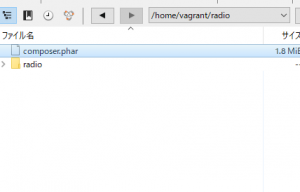
そしてcakeをディレクトリにインストールします。この瞬間なぜか緊張します。
php composer.phar create-project –prefer-dist cakephp/app radio
入ったようです。
こちらでサーバーを起動します。
bin/cake server -H 192.168.33.10 -p 8000