devtoolのelementタブで、対象のタグ上で右クリックして、copy -> copy selector
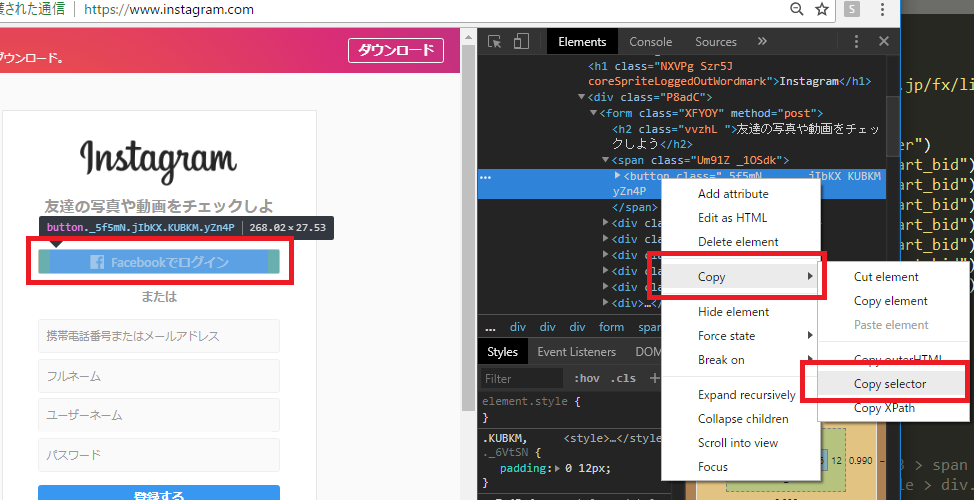
例えば、インスタ(https://www.instagram.com/)のfacebook buttonの場合だと、
#react-root > section > main > article > div.rgFsT > div:nth-child(1) > div > form > span > button
なるほど、これは便利 & 実用的かも。
随机应变 ABCD: Always Be Coding and … : хороший

devtoolのelementタブで、対象のタグ上で右クリックして、copy -> copy selector
例えば、インスタ(https://www.instagram.com/)のfacebook buttonの場合だと、
#react-root > section > main > article > div.rgFsT > div:nth-child(1) > div > form > span > button
なるほど、これは便利 & 実用的かも。
もはや、何通りもあるので、しつこいかもしれんが、、
from bs4 import BeautifulSoup
import urllib.request as req

url = "https://stocks.finance.yahoo.co.jp/stocks/detail/?code=usdjpy"
res = req.urlopen(url)

soup = BeautifulSoup(res, "html.parser")
price = soup.select_one(".stoksPrice").string
print("usd/jpy=", price)
[vagrant@localhost python]$ python3 app.py
usd/jpy= 111.110000
こんな小国の通貨だれが買うんだ、ということで
from bs4 import BeautifulSoup
import urllib.request as req

url = "https://info.finance.yahoo.co.jp/fx/list/"
res = req.urlopen(url)

soup = BeautifulSoup(res, "html.parser")
usdjpy = soup.select_one("#USDJPY_chart_bid").string
eurjpy = soup.select_one("#EURJPY_chart_bid").string
audjpy = soup.select_one("#AUDJPY_chart_bid").string
gbpjpy = soup.select_one("#GBPJPY_chart_bid").string
nzdjpy = soup.select_one("#NZDJPY_chart_bid").string
cadjpy = soup.select_one("#CADJPY_chart_bid").string
chfjpy = soup.select_one("#CHFJPY_chart_bid").string
print("usd/jpy=", usdjpy)
print("eur/jpy=", eurjpy)
print("aud/jpy=", audjpy)
print("gbp/jpy=", gbpjpy)
print("nzd/jpy=", nzdjpy)
print("cad/jpy=", cadjpy)
print("chf/jpy=", chfjpy)
全く問題なく行けますね。
[vagrant@localhost python]$ python3 app.py
usd/jpy= 111.099
eur/jpy= 129.781
aud/jpy= 82.113
gbp/jpy= 145.734
nzd/jpy= 75.621
cad/jpy= 85.127
chf/jpy= 111.916
ただ、表示するだけだと意味がないので、裁定取引にしないと意味ないですね。
例えば、
-> ある時間帯に一分毎にスクレイピングして、価格差のボラティリティが一定以上の場合は、自動でロング、ショートポジションを入れる
こんなんで勝てるか?
折角なので、apple japanを見てみましょう。
https://www.apple.com/jp/
from bs4 import BeautifulSoup

html = """
<html><body>
<div class="ac-gf-directory-column"><input class="ac-gf-directory-column-section-state" type="checkbox" id="ac-gf-directory-column-section-state-products" />
		<div class="ac-gf-directory-column-section">
			<label class="ac-gf-directory-column-section-label" for="ac-gf-directory-column-section-state-products">
		<h3 class="ac-gf-directory-column-section-title">製品情報と購入</h3>
	</label>
			<a href="#ac-gf-directory-column-section-state-products" class="ac-gf-directory-column-section-anchor ac-gf-directory-column-section-anchor-open">
				<span class="ac-gf-directory-column-section-anchor-label">メニューを開く</span>
			</a>
			<a href="#" class="ac-gf-directory-column-section-anchor ac-gf-directory-column-section-anchor-close">
				<span class="ac-gf-directory-column-section-anchor-label">メニューを閉じる</span>
			</a>
			<ul class="ac-gf-directory-column-section-list">
				<li class="ac-gf-directory-column-section-item"><a class="ac-gf-directory-column-section-link" href="/jp/mac/">Mac</a></li>
				<li class="ac-gf-directory-column-section-item"><a class="ac-gf-directory-column-section-link" href="/jp/ipad/">iPad</a></li>
				<li class="ac-gf-directory-column-section-item"><a class="ac-gf-directory-column-section-link" href="/jp/iphone/">iPhone</a></li>
				<li class="ac-gf-directory-column-section-item"><a class="ac-gf-directory-column-section-link" href="/jp/watch/">Watch</a></li>
				<li class="ac-gf-directory-column-section-item"><a class="ac-gf-directory-column-section-link" href="/jp/tv/">TV</a></li>
				<li class="ac-gf-directory-column-section-item"><a class="ac-gf-directory-column-section-link" href="/jp/music/">Music</a></li>
				<li class="ac-gf-directory-column-section-item"><a class="ac-gf-directory-column-section-link" href="/jp/itunes/">iTunes</a></li>
				<li class="ac-gf-directory-column-section-item"><a class="ac-gf-directory-column-section-link" href="/jp/ipod-touch/">iPod touch</a></li>
				<li class="ac-gf-directory-column-section-item"><a class="ac-gf-directory-column-section-link" href="/jp/shop/goto/buy_accessories">アクセサリ</a></li>
				<li class="ac-gf-directory-column-section-item"><a class="ac-gf-directory-column-section-link" href="/jp/shop/goto/giftcards">ギフトカード</a></li>
			</ul>
		</div>
	</div>
</body></html>
"""

soup = BeautifulSoup(html, 'html.parser')
h3 = soup.select_one("div.ac-gf-directory-column-section > label.ac-gf-directory-column-section-label > h3")
print("h3 =", h3.string)

li_list = soup.select("div.ac-gf-directory-column-section > ul.ac-gf-directory-column-section-list > li")
for li in li_list:
	print("li =", li.string)
[vagrant@localhost python]$ python3 app.py
h3 = 製品情報と購入
li = Mac
li = iPad
li = iPhone
li = Watch
li = TV
li = Music
li = iTunes
li = iPod touch
li = アクセサリ
li = ギフトカード
上手くいけてます。iPodの位置づけがよくわかりませんね。
h3の箇所は、
soup.select_one(“div.ac-gf-directory-column-section > label.ac-gf-directory-column-section-label > h3”)
と書いていますが、
soup.select_one(“div.ac-gf-directory-column-section > h3”)
と書くと、エラーになります。
Traceback (most recent call last):
File “app.py”, line 35, in
print(“h3 =”, h3.string)
AttributeError: ‘NoneType’ object has no attribute ‘string’
階層に沿って書かないと駄目ということでしょう。
駅データ.jpさんのxmlからparseします。
from bs4 import BeautifulSoup
import urllib.request as req

url = "http://www.ekidata.jp/api/s/1130224.xml"
res = req.urlopen(url)
soup = BeautifulSoup(res, 'html.parser')

code = soup.find("line_cd").string
line = soup.find("line_name").string
station = soup.find("station_name").string
print(code, line, station)
[vagrant@localhost python]$ python3 app.py
11302 JR山手線 東京
しかし、これ、どうやって駅のデータ収集しているんだろうか。
http://www.ekidata.jp/agreement.php
駅探など、乗り換えのサービスは素晴らしいよね。
aタグを全て取得したいとする。
from bs4 import BeautifulSoup

html = """
<html><body>
	<table id="tp_market_sub" style="margin:4px 0 0 20px; font-size:13px;">
		<tr>
		<td><a href="/news/marketnews/?b=n201807300012">シカゴ日経・ADR</a> <img src="/images/cmn/new.gif" title="new"/></td>
		<td><a href="/news/marketnews/?b=n201807300013">米国株式概況</a> <img src="/images/cmn/new.gif" title="new"/></td>
		<td><a href="/news/marketnews/?b=n201807300014">今日の注目スケジュール</a> <img src="/images/cmn/new.gif" title="new"/></td>
		</tr>
	</table>
</body></html>
"""

soup = BeautifulSoup(html, 'html.parser')

links = soup.find_all("a")

for a in links:
	href = a.attrs["href"]
	text = a.string
	print(text + " > " + href)
[vagrant@localhost python]$ python3 app.py
シカゴ日経・ADR > /news/marketnews/?b=n201807300012
米国株式概況 > /news/marketnews/?b=n201807300013
今日の注目スケジュール > /news/marketnews/?b=n201807300014
find_allで複数条件を指定したいよね。
html = """
<html><body>
	<table id="tp_market_sub" style="margin:4px 0 0 20px; font-size:13px;">
		<tr>
		<td id="tp_market_1"><a href="/news/marketnews/?b=n201807300012">シカゴ日経・ADR</a> <img src="/images/cmn/new.gif" title="new"/></td>
		<td id="tp_market_1"><a href="/news/marketnews/?b=n201807300013">米国株式概況</a> <img src="/images/cmn/new.gif" title="new"/></td>
		<td id="tp_market_2"><a href="/news/marketnews/?b=n201807300014">今日の注目スケジュール</a> <img src="/images/cmn/new.gif" title="new"/></td>
		</tr>
	</table>
</body></html>
"""

links = soup.find_all(id="tp_market_1", "a")
これだと上手くいかない。なんでだろう。。
soup.find_all(‘タグ名’, ‘属性’) だからか。。
from bs4 import BeautifulSoup

html = """
<html><body>
	<h1>決算速報 【リアルタイム配信中】</h1>
	<p>07/27 17:30 菱友システム、4-6月期(1Q)経常は7.8倍増益で着</p>
	<p>07/27 16:45 D・アクシス、上期経常を一転8%減益に下方修正</p>
</body></html>
"""

soup = BeautifulSoup(html, 'html.parser')

h1 = soup.html.body.h1
p1 = soup.html.body.p
p2 = p1.next_sibling.next_sibling

print("h1 = " + h1.string)
print("p = " + p1.string)
print("p = " + p2.string)
ここは普通ですね。
[vagrant@localhost python]$ python3 app.py
h1 = 決算速報 【リアルタイム配信中】
p = 07/27 17:30 菱友システム、4-6月期(1Q)経常は7.8倍増益で着
p = 07/27 16:45 D・アクシス、上期経常を一転8%減益に下方修正
h1が1つ、pタグが2つなんてサイトはありませんから、ここからが本番です。
html = """
<html><body>
	<h1 id="news">決算速報 【リアルタイム配信中】</h1>
	<p id="d1">07/27 17:30 菱友システム、4-6月期(1Q)経常は7.8倍増益で着</p>
	<p id="d2">07/27 16:45 D・アクシス、上期経常を一転8%減益に下方修正</p>
</body></html>
"""

soup = BeautifulSoup(html, 'html.parser')

h1 = soup.find(id="news")
p1 = soup.find(id="d1")
p2 = soup.find(id="d2")

print("h1 = " + h1.string)
print("p = " + p1.string)
print("p = " + p2.string)
[vagrant@localhost python]$ python3 app.py
h1 = 決算速報 【リアルタイム配信中】
p = 07/27 17:30 菱友システム、4-6月期(1Q)経常は7.8倍増益で着
p = 07/27 16:45 D・アクシス、上期経常を一転8%減益に下方修正
h1 = soup.find(class="new")
p1 = soup.find(class="d3")
p2 = soup.find(class="d4")
classにすると、invalid errorになる。何故だ?
[vagrant@localhost python]$ python3 app.py
File “app.py”, line 13
h1 = soup.find(class=”new”)
^
SyntaxError: invalid syntax
[vagrant@localhost python]$ pip3 install beautifulsoup4
Collecting beautifulsoup4
Downloading https://files.pythonhosted.org/packages/fe/62/720094d06cb5a92cd4b3aa3a7c678c0bb157526a95c4025d15316d594c4b/beautifulsoup4-4.6.1-py3-none-any.whl (89kB)
100% |████████████████████████████████| 92kB 180kB/s
Installing collected packages: beautifulsoup4
Successfully installed beautifulsoup4-4.6.1
You are using pip version 8.1.1, however version 18.0 is available.
You should consider upgrading via the ‘pip install –upgrade pip’ command.
ついでにpipもupgradeします。
[vagrant@localhost python]$ pip install –upgrade pip
Collecting pip
Downloading https://files.pythonhosted.org/packages/5f/25/e52d3f31441505a5f3af41213346e5b6c221c9e086a166f3703d2ddaf940/pip-18.0-py2.py3-none-any.whl (1.3MB)
100% |████████████████████████████████| 1.3MB 346kB/s
Installing collected packages: pip
Found existing installation: pip 8.1.1
Uninstalling pip-8.1.1:
Successfully uninstalled pip-8.1.1
Successfully installed pip-18.0
数年前、初めてpython触った時、beautifulsoupをインストールできなくて、pythonのスクレピングを諦めたことあったな。あの時なんでできなかったんだろう。今だと一瞬でできるな。
#!/usr/bin/env python3

# ライブラリの取り込み --- (*1)
import sys
import urllib.request as req
import urllib.parse as parse

if len(sys.argv) <= 1:
	print("USAGE: app.py (keyword)")
	sys.exit()
post = sys.argv[1]

API = "https://maps.googleapis.com/maps/api/geocode/json"
query = {
	"address": post,
    "language": "ja",
    "sensor": "false"
}
params = parse.urlencode(query)
url = API + "?" + params
print("url=", url)

with req.urlopen(url) as r:
	b = r.read()
	data = b.decode("utf-8")
	print(data)
ほう!
[vagrant@localhost python]$ python3 app.py 150-6010
url= https://maps.googleapis.com/maps/api/geocode/json?address=150-6010&sensor=false&language=ja
{
"results" : [
{
"address_components" : [
{
"long_name" : "150-6010",
"short_name" : "150-6010",
"types" : [ "postal_code" ]
},
{
"long_name" : "恵比寿",
"short_name" : "恵比寿",
"types" : [ "political", "sublocality", "sublocality_level_2" ]
},
{
"long_name" : "渋谷区",
"short_name" : "渋谷区",
"types" : [ "locality", "political" ]
},
{
"long_name" : "東京都",
"short_name" : "東京都",
"types" : [ "administrative_area_level_1", "political" ]
},
{
"long_name" : "日本",
"short_name" : "JP",
"types" : [ "country", "political" ]
}
],
"formatted_address" : "日本 〒150-6010",
"geometry" : {
"location" : {
"lat" : 35.6423633,
"lng" : 139.7134531
},
"location_type" : "APPROXIMATE",
"viewport" : {
"northeast" : {
"lat" : 35.6437122802915,
"lng" : 139.7148020802915
},
"southwest" : {
"lat" : 35.6410143197085,
"lng" : 139.7121041197085
}
}
},
"place_id" : "ChIJPwj22RWLGGARAf6hDZkG7aQ",
"types" : [ "postal_code" ]
}
],
"status" : "OK"
}
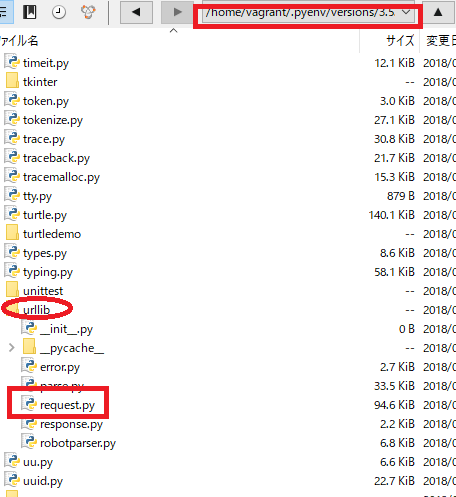
そもそも、import urllibとかしているけど、どこにあるの?
.__file__でわかる。
import datetime
import sys
print(datetime.__file__)
print(sys.__file__)
え、隠しファイル.pyenvの下にあるの? マジかよ!!!
[vagrant@localhost python]$ python3 app.py
/home/vagrant/.pyenv/versions/3.5.2/lib/python3.5/datetime.py
Traceback (most recent call last):
File “app.py”, line 4, in
print(sys.__file__)
AttributeError: module ‘sys’ has no attribute ‘__file__’
urllibの下にrequest.pyがありますね。なるほど。
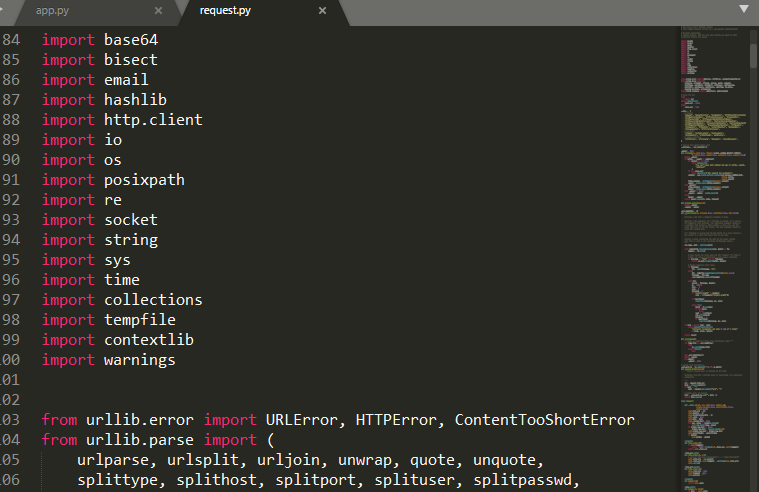
request.pyの中身をみてみます。2674行ですね。
なるほど、これはすげーや。
Google Map Apiにパラメーターを送ります。
import urllib.request
import urllib.parse

API = "https://maps.googleapis.com/maps/api/geocode/json"

values = {
	"address": "160-0002",
	"language": "ja",
	"sensor": "false"
}
params = urllib.parse.urlencode(values)

url = API + "?" + params
print("url=", url)

data = urllib.request.urlopen(url).read()
text = data.decode("utf-8")
print(text)
url= https://maps.googleapis.com/maps/api/geocode/json?sensor=false&address=160-0002&language=ja
{
“results” : [
{
“address_components” : [
{
“long_name” : “160-0002”,
“short_name” : “160-0002”,
“types” : [ “postal_code” ]
},
{
“long_name” : “四谷坂町”,
“short_name” : “四谷坂町”,
“types” : [ “political”, “sublocality”, “sublocality_level_2” ]
},
{
“long_name” : “新宿区”,
“short_name” : “新宿区”,
“types” : [ “locality”, “political” ]
},
{
“long_name” : “東京都”,
“short_name” : “東京都”,
“types” : [ “administrative_area_level_1”, “political” ]
},
{
“long_name” : “日本”,
“short_name” : “JP”,
“types” : [ “country”, “political” ]
}
],
“formatted_address” : “日本 〒160-0002”,
“geometry” : {
“bounds” : {
“northeast” : {
“lat” : 35.6920455,
“lng” : 139.7292123
},
“southwest” : {
“lat” : 35.6885298,
“lng” : 139.7245306
}
},
“location” : {
“lat” : 35.6907555,
“lng” : 139.7272033
},
“location_type” : “APPROXIMATE”,
“viewport” : {
“northeast” : {
“lat” : 35.6920455,
“lng” : 139.7292123
},
“southwest” : {
“lat” : 35.6885298,
“lng” : 139.7245306
}
}
},
“place_id” : “ChIJoebNl_SMGGAR4LtICJbkh5I”,
“types” : [ “postal_code” ]
}
],
“status” : “OK”
}
ビットコインでいきたい。
bitflyerから取得する。
import urllib.request
import urllib.parse

url = "https://api.bitflyer.jp/v1/getboard"

# values = {
# 	"product_code": "BTC_JPY",
# }
# params = urllib.parse.urlencode(values)

# url = API + "?" + params
# print("url=", url)

data = urllib.request.urlopen(url).read()
text = data.decode("utf-8")
print(text)
Traceback (most recent call last):
File “app.py”, line 14, in
data = urllib.request.urlopen(url).read()
File “/home/vagrant/.pyenv/versions/3.5.2/lib/python3.5/urllib/request.py”, line 163, in urlopen
return opener.open(url, data, timeout)
File “/home/vagrant/.pyenv/versions/3.5.2/lib/python3.5/urllib/request.py”, line 472, in open
response = meth(req, response)
File “/home/vagrant/.pyenv/versions/3.5.2/lib/python3.5/urllib/request.py”, line 582, in http_response
‘http’, request, response, code, msg, hdrs)
File “/home/vagrant/.pyenv/versions/3.5.2/lib/python3.5/urllib/request.py”, line 510, in error
return self._call_chain(*args)
File “/home/vagrant/.pyenv/versions/3.5.2/lib/python3.5/urllib/request.py”, line 444, in _call_chain
result = func(*args)
File “/home/vagrant/.pyenv/versions/3.5.2/lib/python3.5/urllib/request.py”, line 590, in http_error_default
raise HTTPError(req.full_url, code, msg, hdrs, fp)
urllib.error.HTTPError: HTTP Error 403: Forbidden
HTTP Error 403: Forbiddenと出ています。
>特定のアクセス者にページを表示する権限が付与されず、アクセスが拒否されたことを示すもの。また、サイトの制作者側の設計ミスによる障害やサイトが非常に混雑している時、URLが間違っている場合にも表示される事がある。
なに!!!!!!!?
CCさん。大塚さん、顔が広いらしいですね。
url = "https://coincheck.com/api/ticker"
あら、いけますね♪ 403は、後で確認しましょう。
[vagrant@localhost python]$ python3 app.py
{“last”:911398.0,”bid”:911266.0,”ask”:911422.0,”high”:916800.0,”low”:895000.0,”volume”:2483.42296672,”timestamp”:1532828344}