[vagrant@localhost myblog]$ php artisan serve –host 192.168.35.10 –port 8000
Laravel development server started:
[Sun Sep 9 11:44:40 2018] 192.168.35.1:57031 [200]: /favicon.ico
まじかー

いやー困るわ~
随机应变 ABCD: Always Be Coding and … : хороший
[vagrant@localhost myblog]$ php artisan serve –host 192.168.35.10 –port 8000
Laravel development server started:
[Sun Sep 9 11:44:40 2018] 192.168.35.1:57031 [200]: /favicon.ico
まじかー

いやー困るわ~
/routes/web.php
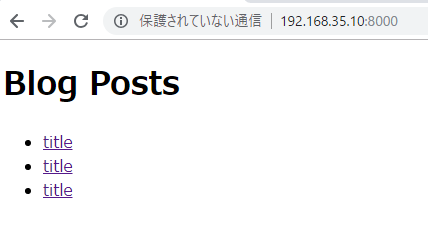
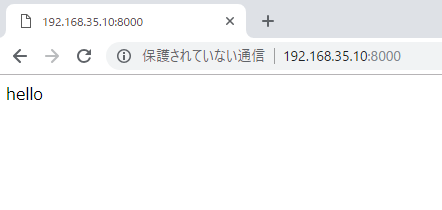
Route::get('/', 'PostsController@index');
php artisanでPostControllerをつくる
[vagrant@localhost myblog]$ php artisan make:controller PostController
Controller created successfully.
あ、PostsControllerでした。
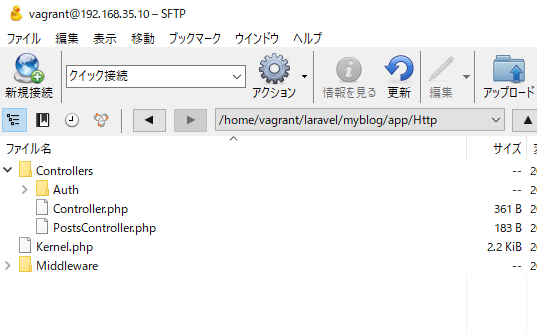
[vagrant@localhost myblog]$ php artisan make:controller PostsController
Controller created successfully.
app/Httpの中に作られます。

ipアドレスを調べる。コマンドはip a
[vagrant@localhost myblog]$ ip a
1: lo:
link/loopback 00:00:00:00:00:00 brd 00:00:00:00:00:00
inet 127.0.0.1/8 scope host lo
inet6 ::1/128 scope host
valid_lft forever preferred_lft forever
2: eth0:
link/ether 08:00:27:a9:1b:8f brd ff:ff:ff:ff:ff:ff
inet 10.0.2.15/24 brd 10.0.2.255 scope global eth0
inet6 fe80::a00:27ff:fea9:1b8f/64 scope link
valid_lft forever preferred_lft forever
3: eth1:
link/ether 08:00:27:cb:a5:1b brd ff:ff:ff:ff:ff:ff
inet 192.168.35.10/24 brd 192.168.35.255 scope global eth1
inet6 fe80::a00:27ff:fecb:a51b/64 scope link
valid_lft forever preferred_lft forever
クラスを呼んでいる書き方だが、独特ですな。
[vagrant@localhost myblog]$ php artisan tinker
Psy Shell v0.9.8 (PHP 7.1.21 — cli) by Justin Hileman
>>> App\Post::find(3)->toArray();
=> [
“id” => 3,
“title” => “title 3”,
“body” => “body 3”,
“created_at” => “2018-09-08 23:32:01”,
“updated_at” => “2018-09-08 23:32:01”,
]
>>> App\Post::where(‘id’, ‘>’, 1)->orderBy(‘created_at’,’desc’)->get()->toArray();
=> [
[
“id” => 3,
“title” => “title 3”,
“body” => “body 3”,
“created_at” => “2018-09-08 23:32:01”,
“updated_at” => “2018-09-08 23:32:01”,
],
[
“id” => 2,
“title” => “title 2”,
“body” => “body 2”,
“created_at” => “2018-09-08 23:31:24”,
“updated_at” => “2018-09-08 23:31:24”,
],
]
update
>>> $post = App\Post::find(3);
=> App\Post {#2893
id: “3”,
title: “title 3”,
body: “body 3”,
created_at: “2018-09-08 23:32:01”,
updated_at: “2018-09-08 23:32:01”,
}
>>> $post->title = ‘title 3 updated’;
=> “title 3 updated”
>>> $post->save();
=> true
delete
>>> $post = App\Post::find(3);
=> App\Post {#2908
id: "3",
title: "title 3 updated",
body: "body 3",
created_at: "2018-09-08 23:32:01",
updated_at: "2018-09-09 00:18:20",
}
>>> $post->delete();
=> true
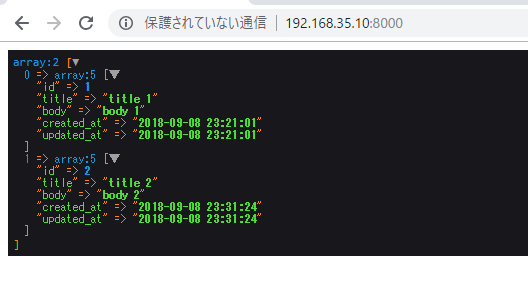
>>> App\Post::all()->toArray();
=> [
[
"id" => 1,
"title" => "title 1",
"body" => "body 1",
"created_at" => "2018-09-08 23:21:01",
"updated_at" => "2018-09-08 23:21:01",
],
[
"id" => 2,
"title" => "title 2",
"body" => "body 2",
"created_at" => "2018-09-08 23:31:24",
"updated_at" => "2018-09-08 23:31:24",
],
]
[vagrant@localhost myblog]$ php artisan tinker
Psy Shell v0.9.8 (PHP 7.1.21 — cli) by Justin Hileman
>>> $post = new App\Post();
=> App\Post {#2900}
>>> $post->title = 'title 1';
=> "title 1"
>>> $post->body = 'body 1';
=> "body 1"
>>> $post->save();
=> true
>>> App\Post::all();
=> Illuminate\Database\Eloquent\Collection {#2908
all: [
App\Post {#2909
id: "1",
title: "title 1",
body: "body 1",
created_at: "2018-09-08 23:21:01",
updated_at: "2018-09-08 23:21:01",
},
],
}
>>> App\Post::all()->toArray();
=> [
[
"id" => 1,
"title" => "title 1",
"body" => "body 1",
"created_at" => "2018-09-08 23:21:01",
"updated_at" => "2018-09-08 23:21:01",
],
]
sqliteで見てみます。
[vagrant@localhost myblog]$ sqlite3 database/database.sqlite SQLite version 3.6.20 Enter ".help" for instructions Enter SQL statements terminated with a ";" sqlite> select * from posts; 1|title 1|body 1|2018-09-08 23:21:01|2018-09-08 23:21:01
appの中のpost.php
namespace App;
use Illuminate\Database\Eloquent\Model;
class Post extends Model
{
//
protected $fillable = ['title', 'body'];
}
[vagrant@localhost myblog]$ php artisan tinker
Psy Shell v0.9.8 (PHP 7.1.21 — cli) by Justin Hileman
>>> App\Post::create([‘title’=>’title 2’, ‘body’=>’body 2’]);
=> App\Post {#2898
title: “title 2”,
body: “body 2”,
updated_at: “2018-09-08 23:31:24”,
created_at: “2018-09-08 23:31:24”,
id: 2,
}
>>> App\Post::create([‘title’=>’title 3’, ‘body’=>’body 3’]);
=> App\Post {#2906
title: “title 3”,
body: “body 3”,
updated_at: “2018-09-08 23:32:01”,
created_at: “2018-09-08 23:32:01”,
id: 3,
}
>>> App\Post::all()->toArray();
=> [
[
“id” => 1,
“title” => “title 1”,
“body” => “body 1”,
“created_at” => “2018-09-08 23:21:01”,
“updated_at” => “2018-09-08 23:21:01”,
],
[
“id” => 2,
“title” => “title 2”,
“body” => “body 2”,
“created_at” => “2018-09-08 23:31:24”,
“updated_at” => “2018-09-08 23:31:24”,
],
[
“id” => 3,
“title” => “title 3”,
“body” => “body 3”,
“created_at” => “2018-09-08 23:32:01”,
“updated_at” => “2018-09-08 23:32:01”,
],
]

php artisan make:mode hoge opiton と打つようです。
[vagrant@localhost myblog]$ php artisan make:model Post –migration
Model created successfully.
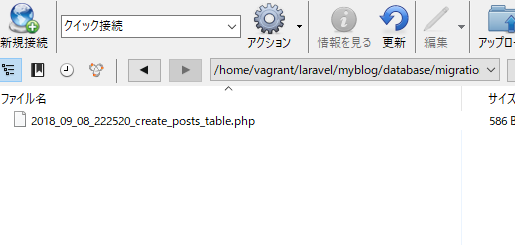
Created Migration: 2018_09_08_222520_create_posts_table
なんじゃこりゃー 全く覚えてないぞ。。
migration fileが作られる。
root -> database -> migration

migration file
upがこのmigrationで行いたい処理、downが巻き戻したい時
use Illuminate\Support\Facades\Schema;
use Illuminate\Database\Schema\Blueprint;
use Illuminate\Database\Migrations\Migration;
class CreatePostsTable extends Migration
{
/**
* Run the migrations.
*
* @return void
*/
public function up()
{
Schema::create('posts', function (Blueprint $table) {
$table->increments('id');
$table->timestamps();
});
}
/**
* Reverse the migrations.
*
* @return void
*/
public function down()
{
Schema::dropIfExists('posts');
}
}
timestampはcreated at and updated atを管理する。
<?php
return [
/*
|--------------------------------------------------------------------------
| Application Name
|--------------------------------------------------------------------------
|
| This value is the name of your application. This value is used when the
| framework needs to place the application's name in a notification or
| any other location as required by the application or its packages.
|
*/
'name' => env('APP_NAME', 'Laravel'),
/*
|--------------------------------------------------------------------------
| Application Environment
|--------------------------------------------------------------------------
|
| This value determines the "environment" your application is currently
| running in. This may determine how you prefer to configure various
| services the application utilizes. Set this in your ".env" file.
|
*/
'env' => env('APP_ENV', 'production'),
/*
|--------------------------------------------------------------------------
| Application Debug Mode
|--------------------------------------------------------------------------
|
| When your application is in debug mode, detailed error messages with
| stack traces will be shown on every error that occurs within your
| application. If disabled, a simple generic error page is shown.
|
*/
'debug' => env('APP_DEBUG', false),
/*
|--------------------------------------------------------------------------
| Application URL
|--------------------------------------------------------------------------
|
| This URL is used by the console to properly generate URLs when using
| the Artisan command line tool. You should set this to the root of
| your application so that it is used when running Artisan tasks.
|
*/
'url' => env('APP_URL', 'http://localhost'),
/*
|--------------------------------------------------------------------------
| Application Timezone
|--------------------------------------------------------------------------
|
| Here you may specify the default timezone for your application, which
| will be used by the PHP date and date-time functions. We have gone
| ahead and set this to a sensible default for you out of the box.
|
*/
'timezone' => 'Asia/Tokyo',
/*
|--------------------------------------------------------------------------
| Application Locale Configuration
|--------------------------------------------------------------------------
|
| The application locale determines the default locale that will be used
| by the translation service provider. You are free to set this value
| to any of the locales which will be supported by the application.
|
*/
'locale' => 'ja',
/*
|--------------------------------------------------------------------------
| Application Fallback Locale
|--------------------------------------------------------------------------
|
| The fallback locale determines the locale to use when the current one
| is not available. You may change the value to correspond to any of
| the language folders that are provided through your application.
|
*/
'fallback_locale' => 'en',
/*
|--------------------------------------------------------------------------
| Encryption Key
|--------------------------------------------------------------------------
|
| This key is used by the Illuminate encrypter service and should be set
| to a random, 32 character string, otherwise these encrypted strings
| will not be safe. Please do this before deploying an application!
|
*/
'key' => env('APP_KEY'),
'cipher' => 'AES-256-CBC',
/*
|--------------------------------------------------------------------------
| Autoloaded Service Providers
|--------------------------------------------------------------------------
|
| The service providers listed here will be automatically loaded on the
| request to your application. Feel free to add your own services to
| this array to grant expanded functionality to your applications.
|
*/
'providers' => [
/*
* Laravel Framework Service Providers...
*/
Illuminate\Auth\AuthServiceProvider::class,
Illuminate\Broadcasting\BroadcastServiceProvider::class,
Illuminate\Bus\BusServiceProvider::class,
Illuminate\Cache\CacheServiceProvider::class,
Illuminate\Foundation\Providers\ConsoleSupportServiceProvider::class,
Illuminate\Cookie\CookieServiceProvider::class,
Illuminate\Database\DatabaseServiceProvider::class,
Illuminate\Encryption\EncryptionServiceProvider::class,
Illuminate\Filesystem\FilesystemServiceProvider::class,
Illuminate\Foundation\Providers\FoundationServiceProvider::class,
Illuminate\Hashing\HashServiceProvider::class,
Illuminate\Mail\MailServiceProvider::class,
Illuminate\Notifications\NotificationServiceProvider::class,
Illuminate\Pagination\PaginationServiceProvider::class,
Illuminate\Pipeline\PipelineServiceProvider::class,
Illuminate\Queue\QueueServiceProvider::class,
Illuminate\Redis\RedisServiceProvider::class,
Illuminate\Auth\Passwords\PasswordResetServiceProvider::class,
Illuminate\Session\SessionServiceProvider::class,
Illuminate\Translation\TranslationServiceProvider::class,
Illuminate\Validation\ValidationServiceProvider::class,
Illuminate\View\ViewServiceProvider::class,
/*
* Package Service Providers...
*/
/*
* Application Service Providers...
*/
App\Providers\AppServiceProvider::class,
App\Providers\AuthServiceProvider::class,
// App\Providers\BroadcastServiceProvider::class,
App\Providers\EventServiceProvider::class,
App\Providers\RouteServiceProvider::class,
],
/*
|--------------------------------------------------------------------------
| Class Aliases
|--------------------------------------------------------------------------
|
| This array of class aliases will be registered when this application
| is started. However, feel free to register as many as you wish as
| the aliases are "lazy" loaded so they don't hinder performance.
|
*/
'aliases' => [
'App' => Illuminate\Support\Facades\App::class,
'Artisan' => Illuminate\Support\Facades\Artisan::class,
'Auth' => Illuminate\Support\Facades\Auth::class,
'Blade' => Illuminate\Support\Facades\Blade::class,
'Broadcast' => Illuminate\Support\Facades\Broadcast::class,
'Bus' => Illuminate\Support\Facades\Bus::class,
'Cache' => Illuminate\Support\Facades\Cache::class,
'Config' => Illuminate\Support\Facades\Config::class,
'Cookie' => Illuminate\Support\Facades\Cookie::class,
'Crypt' => Illuminate\Support\Facades\Crypt::class,
'DB' => Illuminate\Support\Facades\DB::class,
'Eloquent' => Illuminate\Database\Eloquent\Model::class,
'Event' => Illuminate\Support\Facades\Event::class,
'File' => Illuminate\Support\Facades\File::class,
'Gate' => Illuminate\Support\Facades\Gate::class,
'Hash' => Illuminate\Support\Facades\Hash::class,
'Lang' => Illuminate\Support\Facades\Lang::class,
'Log' => Illuminate\Support\Facades\Log::class,
'Mail' => Illuminate\Support\Facades\Mail::class,
'Notification' => Illuminate\Support\Facades\Notification::class,
'Password' => Illuminate\Support\Facades\Password::class,
'Queue' => Illuminate\Support\Facades\Queue::class,
'Redirect' => Illuminate\Support\Facades\Redirect::class,
'Redis' => Illuminate\Support\Facades\Redis::class,
'Request' => Illuminate\Support\Facades\Request::class,
'Response' => Illuminate\Support\Facades\Response::class,
'Route' => Illuminate\Support\Facades\Route::class,
'Schema' => Illuminate\Support\Facades\Schema::class,
'Session' => Illuminate\Support\Facades\Session::class,
'Storage' => Illuminate\Support\Facades\Storage::class,
'URL' => Illuminate\Support\Facades\URL::class,
'Validator' => Illuminate\Support\Facades\Validator::class,
'View' => Illuminate\Support\Facades\View::class,
],
];
databaseの中に、database.sqliteをつくります。

.envファイルはデータベースの設定など
APP_NAME=Laravel
APP_ENV=local
APP_KEY=base64:1LNmq7ddRBeSYc8ZX+tFVOaTec8lP4q5uq0F4HKTHM0=
APP_DEBUG=true
APP_URL=http://localhost
LOG_CHANNEL=stack
DB_CONNECTION=sqlite
BROADCAST_DRIVER=log
CACHE_DRIVER=file
QUEUE_CONNECTION=sync
SESSION_DRIVER=file
SESSION_LIFETIME=120
REDIS_HOST=127.0.0.1
REDIS_PASSWORD=null
REDIS_PORT=6379
MAIL_DRIVER=smtp
MAIL_HOST=smtp.mailtrap.io
MAIL_PORT=2525
MAIL_USERNAME=null
MAIL_PASSWORD=null
MAIL_ENCRYPTION=null
PUSHER_APP_ID=
PUSHER_APP_KEY=
PUSHER_APP_SECRET=
PUSHER_APP_CLUSTER=mt1
MIX_PUSHER_APP_KEY="${PUSHER_APP_KEY}"
MIX_PUSHER_APP_CLUSTER="${PUSHER_APP_CLUSTER}"
まずphpのバージョンを上げます。
[vagrant@localhost app]$ sudo yum install -y --enablerepo=remi-php71 php
7.1.21が入りました。準備OK!
[vagrant@localhost app]$ php -v
PHP 7.1.21 (cli) (built: Aug 15 2018 18:11:46) ( NTS )
Copyright (c) 1997-2018 The PHP Group
Zend Engine v3.1.0, Copyright (c) 1998-2018 Zend Technologies
[vagrant@localhost app]$ sqlite3 –version
3.6.20
composerを入れる

php -r “copy(‘https://getcomposer.org/installer’, ‘composer-setup.php’);”
php -r “if (hash_file(‘SHA384’, ‘composer-setup.php’) === ‘544e09ee996cdf60ece3804abc52599c22b1f40f4323403c44d44fdfdd586475ca9813a858088ffbc1f233e9b180f061’) { echo ‘Installer verified’; } else { echo ‘Installer corrupt’; unlink(‘composer-setup.php’); } echo PHP_EOL;”
php composer-setup.php
php -r “unlink(‘composer-setup.php’);”
laravelを入れる
php composer.phar create-project --prefer-dist laravel/laravel myblog
あれ、5.7.2になってしまった。
[vagrant@localhost myblog]$ php artisan –version
Laravel Framework 5.7.2
循環参照を持つゴミの回収
gc_disable()
Garbage Collectionとは
⇒動的に確保したメモリ領域のうち、不要になった領域を自動的に解放する機能
あ、C言語でやりましたね。
メモリ不足の例
$a1 = range(1, 200000); echo '1'; $a2 = range(1, 200000); echo '2'; $a3 = range(1, 200000); echo '3'; $a4 = range(1, 200000); echo '4'; $a5 = range(1, 200000); echo '5';
[vagrant@localhost test]$ php index.php
1234PHP Fatal error: Allowed memory size of 134217728 bytes exhausted (tried to allocate 32 bytes) in /home/vagrant/test/index.php on line 7
なるほど。。
memory_limit = 128M
$a1 = range(1, 200000); echo '1'; $a1 = range(1, 200000); echo '2'; $a1 = range(1, 200000); echo '3'; $a1 = range(1, 200000); echo '4'; $a1 = range(1, 200000); echo '5';
[vagrant@localhost test]$ php index.php
12345[vagrant@localhost test]$
これならいける。
⇒phpにgarbage collectionがあるから。
循環参照
参照関係に循環があると、たまっていきメモリ不足になる
php5.2まで辿れなくなるよう自分でunsetしなければいけなかった
到達できるオブジェクトのみ残す
よくみたら、cyberduckの接続にwebDAVありますね。。

WebDAV,FTP,FTP-SSL,SFTP,Windows Azure Storage, Backblaze B2 Cloud Storage, DRACOON, Google Cloud Stroage, Amazon S3, Rackspace Cloud Files, Swift, Dropbox, Google Drive, Microsoft One Drive
なるほど、オンラインストレージはそれぞれ独自の通信技術を使っているのですな。なんだかなー