板倉聖宣訳:磁石(および電気)論

ウィリアム・ギルバート原著(コルチェスター出身、ロンドンの医師):doctrina nostra & scientia magnetica

– アリストテレス、テオフラストス、プトレマイオス、ヒッポクラテス、ガレノスには敬意を払うべき
– 書物からの推論を採用せずに、実験をするべきである

### 磁石
magnes lapis(マグネスの石)が鉄の鉱脈の中に発見された
鉄の力強い吸引力が研究された
磁気の南北に向く運動が発見されていた
パラケルススは「天界には磁石の能力を付与された星がある」と断言していた
ナポリ王国の船乗りたちは方位針を使っていた
位置の変化による磁気偏角の違いなどから、特殊の星による影響とする考えを否定した
磁石はその性質の顕著な極[polos]を有する
磁石にも二つの極を持っており、極に近いほど強い力を得る
回転針によって磁極を確認した
磁石は自然な位置関係にあるときは引っ張るが、逆の位置関係にあるときは退ける
N極とS極は互いに誘う
ギリシア人は琥珀のことをエレクトロンと呼んでいた

実験が大事というのはプログラミングにも通じるところがあるように思います。

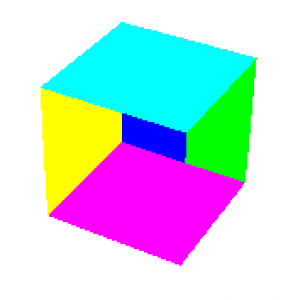
[C言語]GLUTの隠面消去処理

#include <stdlib.h>
#include <GL/glut.h>

GLdouble vertex[][3] = {
	{0.0, 0.0, 0.0},
	{1.0, 0.0, 0.0},
	{1.0, 1.0, 0.0},
	{0.0, 1.0, 0.0},
	{0.0, 0.0, 1.0},
	{1.0, 0.0, 1.0},
	{1.0, 1.0, 1.0},
	{0.0, 1.0, 1.0}
};

int face[][4] = {
	{0, 1, 2, 3},
	{1, 5, 6, 2},
	{5, 4, 7, 6},
	{4, 0, 3, 7},
	{4, 5, 1, 0},
	{3, 2, 6, 7},
};

GLdouble color[][3] = {
	{1.0, 0.0, 0.0},
	{0.0, 1.0, 0.0},
	{0.0, 0.0, 1.0},
	{1.0, 1.0, 0.0},
	{1.0, 0.0, 1.0},
	{0.0, 1.0, 1.0},
};

void idle(void){
	glutPostRedisplay();
}

void display(void){
	int i;
	int j;
	static int r = 0; /* 回転角 */

	glClear(GL_COLOR_BUFFER_BIT);
	
	glLoadIdentity();

	/* 視点位置と視点方向 */
	gluLookAt(3.0, 4.0, 5.0, 0.0, 0.0, 0.0, 0.0, 1.0, 0.0);

	/* 図形の回転 */
	glRotated((double)r, 0.0, 1.0, 0.0);

	/* 図形の描画 */
	glBegin(GL_QUADS);
	for(j = 0; j < 6; ++j){
		glColor3dv(color&#91;j&#93;);
		for(i = 0; i < 4; ++i){
			glVertex3dv(vertex&#91;face&#91;j&#93;&#91;i&#93;&#93;);
		}
	}
	glEnd();
	
	glutSwapBuffers();

	/* 一周回ったら回転角を0に戻す */
	if(++r >= 360) r = 0;
}

void resize(int w, int h){
	glViewport(0, 0, w, h);

	/* 透視変換行列の設定 */
	glMatrixMode(GL_PROJECTION);
	glLoadIdentity();
	gluPerspective(30.0, (double)w / (double)h, 1.0, 100.0);

	/* モデルビュー変換行列の設定*/
	glMatrixMode(GL_MODELVIEW);
}

void mouse(int button, int state, int x, int y){
	switch(button){
		case GLUT_LEFT_BUTTON:
			if(state == GLUT_DOWN){
				glutIdleFunc(idle);
			} else {
				glutIdleFunc(0);
			}
			break;
		case GLUT_RIGHT_BUTTON:
			if (state == GLUT_DOWN){
				glutPostRedisplay();
			}
			break;
		default:
			break;
	}
}

void keyboard(unsigned char key, int x, int y){
	switch(key){
		case 'q':
		case 'Q':
		case '\033':
			exit(0);
		default:
			break;
	}
}

void init(void){
	glClearColor(1.0, 1.0, 1.0, 1.0); 
}

int main(int argc, char *argv[]){
	glutInit(&argc, argv);
	glutInitDisplayMode(GLUT_RGBA); 
	glutCreateWindow(argv[0]); 
	glutDisplayFunc(display);
	glutReshapeFunc(resize);
	glutMouseFunc(mouse);
	glutKeyboardFunc(keyboard);
	init();
	glutMainLoop(); 
	return 0;
}

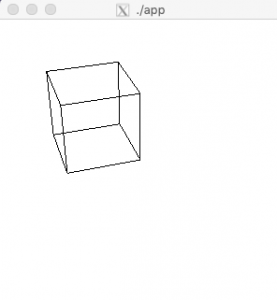
[C言語]GLUTでアニメーション

– プログラム中でウィンドウの再描画イベントを発生させるには, glutPostRedisplay() 関数を用いる
– 繰り返し描画を行うには, 描画の度に座標変換の行列を設定する必要がある
– 座標変換のプロセス
 L 図形の空間中での位置を決める「モデリング変換」
 L その空間を視点から見た空間に直す「ビューイング (視野) 変換」
 L その空間をコンピュータ内の空間にあるスクリーンに投影する「透視変換」
 L スクリーン上の図形をディスプレイ上の表示領域に切り出す「ビューポート変換」

#include <stdlib.h>
#include <GL/glut.h>

GLdouble vertex[][3] = {
	{0.0, 0.0, 0.0},
	{1.0, 0.0, 0.0},
	{1.0, 1.0, 0.0},
	{0.0, 1.0, 0.0},
	{0.0, 0.0, 1.0},
	{1.0, 0.0, 1.0},
	{1.0, 1.0, 1.0},
	{0.0, 1.0, 1.0}
};

int edge[][2] = {
	{0, 1},
	{1, 2},
	{2, 3},
	{3, 0},
	{4, 5},
	{5, 6},
	{6, 7},
	{7, 4},
	{0, 4},
	{1, 5},
	{2, 6},
	{3, 7}
};

void idle(void){
	glutPostRedisplay();
}

void display(void){
	int i;
	static int r = 0; /* 回転角 */

	glClear(GL_COLOR_BUFFER_BIT);
	
	glLoadIdentity();

	/* 視点位置と視点方向 */
	gluLookAt(3.0, 4.0, 5.0, 0.0, 0.0, 0.0, 0.0, 1.0, 0.0);

	/* 図形の回転 */
	glRotated((double)r, 0.0, 1.0, 0.0);

	/* 図形の描画 */
	glColor3d(0.0, 0.0, 0.0);
	glBegin(GL_LINES);
	for(i = 0; i < 12; ++i){
		glVertex3dv(vertex&#91;edge&#91;i&#93;&#91;0&#93;&#93;);
		glVertex3dv(vertex&#91;edge&#91;i&#93;&#91;1&#93;&#93;);
	}
	glEnd();
	glFlush(); 

	/* 一周回ったら回転角を0に戻す */
	if(++r >= 360) r = 0;
}

void resize(int w, int h){
	glViewport(0, 0, w, h);

	/* 透視変換行列の設定 */
	glMatrixMode(GL_PROJECTION);
	glLoadIdentity();
	gluPerspective(30.0, (double)w / (double)h, 1.0, 100.0);

	/* モデルビュー変換行列の設定*/
	glMatrixMode(GL_MODELVIEW);
}

void mouse(int button, int state, int x, int y){
	switch(button){
		case GLUT_LEFT_BUTTON:
			if(state == GLUT_DOWN){
				glutIdleFunc(idle);
			} else {
				glutIdleFunc(0);
			}
			break;
		case GLUT_RIGHT_BUTTON:
			if (state == GLUT_DOWN){
				glutPostRedisplay();
			}
			break;
		default:
			break;
	}
}

void keyboard(unsigned char key, int x, int y){
	switch(key){
		case 'q':
		case 'Q':
		case '\033':
			exit(0);
		default:
			break;
	}
}

void init(void){
	glClearColor(1.0, 1.0, 1.0, 1.0); 
}

int main(int argc, char *argv[]){
	glutInit(&argc, argv);
	glutInitDisplayMode(GLUT_RGBA); 
	glutCreateWindow(argv[0]); 
	glutDisplayFunc(display);
	glutReshapeFunc(resize);
	glutMouseFunc(mouse);
	glutKeyboardFunc(keyboard);
	init();
	glutMainLoop(); 
	return 0;
}

[C言語]GLUTで三次元図形

#include <GL/glut.h>

void display(void){
	glClear(GL_COLOR_BUFFER_BIT);
	glRotated(25.0, 0.0, 1.0, 0.0);
	glBegin(GL_POLYGON);
	glColor3d(1.0, 0.0, 0.0);
	glVertex2d(-0.9, -0.9);
	glColor3d(0.0, 1.0, 0.0);
	glVertex2d(0.9, -0.9);
	glColor3d(0.0, 0.0, 1.0);
	glVertex2d(0.9, 0.9);
	glColor3d(1.0, 1.0, 0.0);
	glVertex2d(-0.9, 0.9);
	glEnd();
	glFlush(); 
}

void init(void){
	glClearColor(1.0, 1.0, 1.0, 1.0); 
}

int main(int argc, char *argv[]){
	glutInit(&argc, argv);
	glutInitDisplayMode(GLUT_RGBA); 
	glutCreateWindow(argv[0]); 
	glutDisplayFunc(display); 
	init();
	glutMainLoop(); 
	return 0;
}
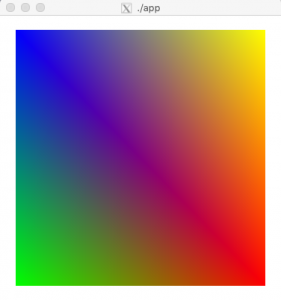

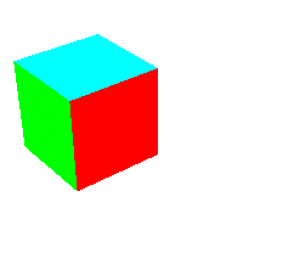
glRotated() による回転の行列が積算されている

### 線画を表示する

#include 

GLdouble vertex[][3] = {
	{0.0, 0.0, 0.0},
	{1.0, 0.0, 0.0},
	{1.0, 1.0, 0.0},
	{0.0, 1.0, 0.0},
	{0.0, 0.0, 1.0},
	{1.0, 0.0, 1.0},
	{1.0, 1.0, 1.0},
	{0.0, 1.0, 1.0}
};

int edge[][2] = {
	{0, 1},
	{1, 2},
	{2, 3},
	{3, 0},
	{4, 5},
	{5, 6},
	{6, 7},
	{7, 4},
	{0, 4},
	{1, 5},
	{2, 6},
	{3, 7}
};

void display(void){
	int i;

	glClear(GL_COLOR_BUFFER_BIT);
	
	/* 図形の描画 */
	glColor3d(0.0, 0.0, 0.0);
	glBegin(GL_LINES);
	for(i = 0; i < 12; ++i){
		glVertex3dv(vertex[edge[i][0]]);
		glVertex3dv(vertex[edge[i][1]]);
	}
	glEnd();
	glFlush(); 
}

void resize(int w, int h){
	glViewport(0, 0, w, h);

	glLoadIdentity();
	gluPerspective(30.0, (double)w / (double)h, 1.0, 100.0);
	glTranslated(0.0, 0.0, -5.0);
}

void init(void){
	glClearColor(1.0, 1.0, 1.0, 1.0); 
}

int main(int argc, char *argv[]){
	glutInit(&argc, argv);
	glutInitDisplayMode(GLUT_RGBA); 
	glutCreateWindow(argv[0]); 
	glutDisplayFunc(display);
	glutReshapeFunc(resize);
	init();
	glutMainLoop(); 
	return 0;
}
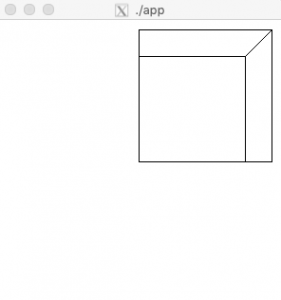
### 視点の位置を変更する
(3,4,5) の位置から原点 (0,0,0) を眺める

void resize(int w, int h){
	glViewport(0, 0, w, h);

	glLoadIdentity();
	gluPerspective(30.0, (double)w / (double)h, 1.0, 100.0);
	gluLookAt(3.0, 4.0, 5.0, 0.0, 0.0, 0.0, 0.0, 1.0, 0.0);
}
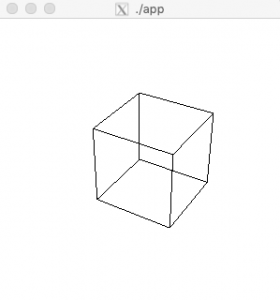
凄い。

[C言語]GLUTでキーボードの入力を読み取る

キーボード入力にはglutKeyboardFunc()を使う

#include 
#include 
#include 

#define MAXPOINTS 100 /* 記憶する点の数 */
GLint point[MAXPOINTS][2]; /* 座標を記憶する配列 */
int pointnum = 0; /* 記憶した座標の数 */
int rubberband = 0;  /* ラバーバンドの消去 */

void display(void){
	int i;

	glClear(GL_COLOR_BUFFER_BIT);

	if(pointnum > 1){
		glColor3d(0.0, 0.0, 0.0);
		glBegin(GL_LINES);
		for (i = 0; i < pointnum; ++i){
			glVertex2iv(point[i]);
		}
		glEnd();
	}
	glFlush(); 
}

void resize(int w, int h){
	glViewport(0, 0, w, h);
	glLoadIdentity();
	glOrtho(-0.5, (GLdouble)w - 0.5, (GLdouble)h - 0.5, -0.5, -1.0, 1.0);
}

void mouse(int button, int state, int x, int y){

	switch(button){
		case GLUT_LEFT_BUTTON:
			point[pointnum][0] = x;
			point[pointnum][1] = y;
			if(state == GLUT_UP){
				glColor3d(0.0, 0.0, 0.0);
				glBegin(GL_LINES);
				glVertex2iv(point[pointnum - 1]);
				glVertex2iv(point[pointnum]);
				glEnd();
				glFlush();

				rubberband = 0;
			} else {
			}
			if(pointnum < MAXPOINTS - 1) ++pointnum;
			break;
		case GLUT_MIDDLE_BUTTON:
			break;
		case GLUT_RIGHT_BUTTON:
			break;
		default:
			break;
	}
}

void motion(int x, int y){
	static GLint savepoint[2];

	/* 論理演算機能 ON */
	glEnable(GL_COLOR_LOGIC_OP); // 引数capに指定した機能を使用可能にする。
	glLogicOp(GL_INVERT); // 論理演算のタイプを指定

	glBegin(GL_LINES);
	if(rubberband){
		glVertex2iv(point[pointnum - 1]);
		glVertex2iv(savepoint);
	}
	/* 新しいラバーバンドを描く */
	glVertex2iv(point[pointnum - 1]);
	glVertex2i(x, y);
	glEnd();

	glFlush();

	/* 論理演算機能 OFF */
	glLogicOp(GL_COPY);
	glDisable(GL_COLOR_LOGIC_OP);

	/* 今描いたラバーバンドの端点を保存 */
	savepoint[0] = x;
	savepoint[1] = y;

	/* 今描いたラバーバンドは次のタイミングで消す*/
	rubberband = 1;
}

void keyboard(unsigned char key, int x, int y){
	switch(key){
		case 'q':
		case 'Q':
		case '\033':   /* '\033'はESCのASCIIコード */
			exit(0);
		default:
			break;
	}
}

void init(void){
	glClearColor(1.0, 1.0, 1.0, 1.0); 
}

int main(int argc, char *argv[]){
	glutInitWindowPosition(100, 100);
	glutInitWindowSize(320, 240);
	glutInit(&argc, argv);
	glutInitDisplayMode(GLUT_RGBA); 
	glutCreateWindow(argv[0]); 
	glutDisplayFunc(display); 
	glutReshapeFunc(resize);
	glutMouseFunc(mouse);
	glutMotionFunc(motion); // マウスを動かした時に実行する引数を与える
	glutKeyboardFunc(keyboard);
	init();
	glutMainLoop(); 
	return 0;
}

exit(0)で終了する。
なるほど、viなどもq, Q, \033でexit(0)の処理を入れているのか。

[C言語]GLUTのマウスをドラッグ

#include 
#include 

#define MAXPOINTS 100 /* 記憶する点の数 */
GLint point[MAXPOINTS][2]; /* 座標を記憶する配列 */
int pointnum = 0; /* 記憶した座標の数 */
int rubberband = 0;  /* ラバーバンドの消去 */

void display(void){
	int i;

	glClear(GL_COLOR_BUFFER_BIT);

	if(pointnum > 1){
		glColor3d(0.0, 0.0, 0.0);
		glBegin(GL_LINES);
		for (i = 0; i < pointnum; ++i){
			glVertex2iv(point[i]);
		}
		glEnd();
	}
	glFlush(); 
}

void resize(int w, int h){
	glViewport(0, 0, w, h);
	glLoadIdentity();
	glOrtho(-0.5, (GLdouble)w - 0.5, (GLdouble)h - 0.5, -0.5, -1.0, 1.0);
}

void mouse(int button, int state, int x, int y){

	switch(button){
		case GLUT_LEFT_BUTTON:
			point[pointnum][0] = x;
			point[pointnum][1] = y;
			if(state == GLUT_UP){
				glColor3d(0.0, 0.0, 0.0);
				glBegin(GL_LINES);
				glVertex2iv(point[pointnum - 1]);
				glVertex2iv(point[pointnum]);
				glEnd();
				glFlush();

				rubberband = 0;
			} else {
			}
			if(pointnum < MAXPOINTS - 1) ++pointnum;
			break;
		case GLUT_MIDDLE_BUTTON:
			break;
		case GLUT_RIGHT_BUTTON:
			break;
		default:
			break;
	}
}

void motion(int x, int y){
	static GLint savepoint[2];

	/* 論理演算機能 ON */
	glEnable(GL_COLOR_LOGIC_OP); // 引数capに指定した機能を使用可能にする。
	glLogicOp(GL_INVERT); // 論理演算のタイプを指定

	glBegin(GL_LINES);
	if(rubberband){
		glVertex2iv(point[pointnum - 1]);
		glVertex2iv(savepoint);
	}
	/* 新しいラバーバンドを描く */
	glVertex2iv(point[pointnum - 1]);
	glVertex2i(x, y);
	glEnd();

	glFlush();

	/* 論理演算機能 OFF */
	glLogicOp(GL_COPY);
	glDisable(GL_COLOR_LOGIC_OP);

	/* 今描いたラバーバンドの端点を保存 */
	savepoint[0] = x;
	savepoint[1] = y;

	/* 今描いたラバーバンドは次のタイミングで消す*/
	rubberband = 1;
}

void init(void){
	glClearColor(1.0, 1.0, 1.0, 1.0); 
}

int main(int argc, char *argv[]){
	glutInitWindowPosition(100, 100);
	glutInitWindowSize(320, 240);
	glutInit(&argc, argv);
	glutInitDisplayMode(GLUT_RGBA); 
	glutCreateWindow(argv[0]); 
	glutDisplayFunc(display); 
	glutReshapeFunc(resize);
	glutMouseFunc(mouse);
	glutMotionFunc(motion); // マウスを動かした時に実行する引数を与える
	init();
	glutMainLoop(); 
	return 0;
}

キャプチャ

ラバーバンド:ゴムのひものように伸び縮み

何を論理演算してるのかよくわからんな。

[C言語]GLUTのマウス読み取りの仕組み

glutMouseFunc()でマウスボタンの操作を知る

#include <stdio.h>
#include <GL/glut.h>

void display(void){
	glClear(GL_COLOR_BUFFER_BIT);
	glFlush(); 
}

void resize(int w, int h){
	glViewport(0, 0, w, h);
	glLoadIdentity();
}

void mouse(int button, int state, int x, int y){
	switch(button){
		case GLUT_LEFT_BUTTON:
			printf("left");
			break;
		case GLUT_MIDDLE_BUTTON:
			printf("middle");
			break;
		case GLUT_RIGHT_BUTTON:
			printf("right");
			break;
		default:
			break;
	}

	printf(" button is ");

	switch(state){
		case GLUT_UP:
			printf("up");
			break;
		case GLUT_DOWN:
			printf("down");
			break;
		default:
			break;
	}

	printf(" at (%d, %d)\n", x, y);
}

void init(void){
	glClearColor(1.0, 1.0, 1.0, 1.0); 
}

int main(int argc, char *argv[]){
	glutInitWindowPosition(100, 100);
	glutInitWindowSize(320, 240);
	glutInit(&argc, argv);
	glutInitDisplayMode(GLUT_RGBA); 
	glutCreateWindow(argv[0]); 
	glutDisplayFunc(display); 
	glutReshapeFunc(resize);
	glutMouseFunc(mouse);
	init();
	glutMainLoop(); 
	return 0;
}

$ ./app
libGL error: No matching fbConfigs or visuals found
libGL error: failed to load driver: swrast
left button is down at (172, 123)
left button is up at (172, 123)
right button is down at (188, 65)
right button is up at (188, 65)
right button is down at (188, 65)
right button is up at (186, 123)
left button is down at (186, 123)
left button is up at (109, 116)
left button is down at (207, 222)
left button is up at (207, 222)
left button is down at (103, 74)
left button is up at (102, 170)

お、大分シューティングゲームのイメージが出来てきました。
### ボタンを押した位置から離した位置まで線を引く

#include <stdio.h>
#include <GL/glut.h>

void display(void){
	glClear(GL_COLOR_BUFFER_BIT);
	glFlush(); 
}

void resize(int w, int h){
	glViewport(0, 0, w, h);
	glLoadIdentity();
	glOrtho(-0.5, (GLdouble)w - 0.5, (GLdouble)h - 0.5, -0.5, -1.0, 1.0);
}

void mouse(int button, int state, int x, int y){

	static int x0, y0;

	switch(button){
		case GLUT_LEFT_BUTTON:
			if(state == GLUT_UP){
				glColor3d(0.0, 0.0, 0.0);
				glBegin(GL_LINES);
				glVertex2i(x0, y0);
				glVertex2i(x, y);
				glEnd();
				glFlush();
			} else {
				x0 = x;
				y0 = y;
			}
			break;
		case GLUT_MIDDLE_BUTTON:
			break;
		case GLUT_RIGHT_BUTTON:
			break;
		default:
			break;
	}

}

void init(void){
	glClearColor(1.0, 1.0, 1.0, 1.0); 
}

int main(int argc, char *argv[]){
	glutInitWindowPosition(100, 100);
	glutInitWindowSize(320, 240);
	glutInit(&argc, argv);
	glutInitDisplayMode(GLUT_RGBA); 
	glutCreateWindow(argv[0]); 
	glutDisplayFunc(display); 
	glutReshapeFunc(resize);
	glutMouseFunc(mouse);
	init();
	glutMainLoop(); 
	return 0;
}

すげえええええええええええええええ
マウス処理そのものやんか

### 配列に位置を記憶する

#include 
#include 

#define MAXPOINTS 100 /* 記憶する点の数 */
GLint point[MAXPOINTS][2]; /* 座標を記憶する配列 */
int pointnum = 0; /* 記憶した座標の数 */

void display(void){
	int i;

	glClear(GL_COLOR_BUFFER_BIT);

	if(pointnum > 1){
		glColor3d(0.0, 0.0, 0.0);
		glBegin(GL_LINES);
		for (i = 0; i < pointnum; ++i){
			glVertex2iv(point[i]);
		}
		glEnd();
	}
	glFlush(); 
}

void resize(int w, int h){
	glViewport(0, 0, w, h);
	glLoadIdentity();
	glOrtho(-0.5, (GLdouble)w - 0.5, (GLdouble)h - 0.5, -0.5, -1.0, 1.0);
}

void mouse(int button, int state, int x, int y){

	switch(button){
		case GLUT_LEFT_BUTTON:
			point[pointnum][0] = x;
			point[pointnum][1] = y;
			if(state == GLUT_UP){
				glColor3d(0.0, 0.0, 0.0);
				glBegin(GL_LINES);
				glVertex2iv(point[pointnum - 1]);
				glVertex2iv(point[pointnum]);
				glEnd();
				glFlush();
			} else {
			}
			if(pointnum < MAXPOINTS - 1) ++pointnum;
			break;
		case GLUT_MIDDLE_BUTTON:
			break;
		case GLUT_RIGHT_BUTTON:
			break;
		default:
			break;
	}

}

void init(void){
	glClearColor(1.0, 1.0, 1.0, 1.0); 
}

int main(int argc, char *argv[]){
	glutInitWindowPosition(100, 100);
	glutInitWindowSize(320, 240);
	glutInit(&argc, argv);
	glutInitDisplayMode(GLUT_RGBA); 
	glutCreateWindow(argv[0]); 
	glutDisplayFunc(display); 
	glutReshapeFunc(resize);
	glutMouseFunc(mouse);
	init();
	glutMainLoop(); 
	return 0;
}

画面のマウス操作そのもの。
なるほど、OSはこういうGLエンジンも使ってるってことか。

GLUTの座標軸

#include <GL/glut.h>

void display(void){
	glClear(GL_COLOR_BUFFER_BIT);
	glColor3d(1.0, 0.0, 0.0); // 描画する色指定
	glBegin(GL_POLYGON);
	glVertex2d(-0.9, -0.9);
	glVertex2d(0.9, -0.9);
	glVertex2d(0.9, 0.9);
	glVertex2d(-0.9, 0.9);
	glEnd();
	glFlush(); 
}

void resize(int w, int h){
	glViewport(0, 0, w, h); // ビューポート
	glLoadIdentity(); // 単位行列
	glOrtho(-w / 200.0, w / 200.0, -h / 200.0, h / 200.0, -1.0, 1.0); // 変換行列
}

void init(void){
	glClearColor(1.0, 1.0, 1.0, 1.0); 
}

int main(int argc, char *argv[]){
	glutInit(&argc, argv);
	glutInitDisplayMode(GLUT_RGBA); 
	glutCreateWindow(argv[0]); 
	glutDisplayFunc(display); 
	glutReshapeFunc(resize); // リサイズされた時に実行する関数のポインタ
	init();
	glutMainLoop(); 
	return 0;
}

int main(int argc, char *argv[]){
	glutInitWindowPosition(100, 100);
	glutInitWindowSize(320, 240);
	glutInit(&argc, argv);
	glutInitDisplayMode(GLUT_RGBA); 
	glutCreateWindow(argv[0]); 
	glutDisplayFunc(display); 
	glutReshapeFunc(resize);
	init();
	glutMainLoop(); 
	return 0;
}

ウィンドウの開く位置、サイズを決める

GLUTでウィンドウを塗り潰す

### ウィンドウ塗りつぶし

#include <GL/glut.h>

void display(void){
	glClear(GL_COLOR_BUFFER_BIT); // ウィンドウを塗り潰す GL_COLOR_BUFFER_BITはメモリのカラーバッファ
	glFlush(); // OpenGLの命令を全部実行
}

void init(void){
	glClearColor(0.5, 0.5, 1.0, 1.0); // 値は0~1, glutMainLoopの前に実行する
}

int main(int argc, char *argv[]){
	glutInit(&argc, argv);
	glutInitDisplayMode(GLUT_RGBA);  // RGBA
	glutCreateWindow(argv[0]); 
	glutDisplayFunc(display); 
	init();
	glutMainLoop(); 
	return 0;
}

### 二次元図形

void display(void){
	glClear(GL_COLOR_BUFFER_BIT);
	glColor3d(1.0, 0.0, 0.0); // 描画する色指定
	glBegin(GL_POLYGON);
	glVertex2d(-0.9, -0.9);
	glVertex2d(0.9, -0.9);
	glVertex2d(0.9, 0.9);
	glVertex2d(-0.9, 0.9);
	glEnd();
	glFlush(); 
}

void init(void){
	glClearColor(1.0, 1.0, 1.0, 1.0); 
}

glVertexはphotoshopみたいに裏っ側でピクセル計算してるのかな?

GLUTでウィンドウを開く

OpenGLはSilicon Graphics社が開発したOSに依存しない三次元のグラフィックスライブラリ
AUXライブラリを改良したものがGLUT
※LinuxやMacintoshではMesaの上にAUXライブラリやGLUTが移植されている

freeglut

### GLUTインストール
$ sudo apt-get install freeglut3 freeglut3-dev

#include <GL/glut.h>

void display(void){

}

int main(int argc, char *argv[]){
	glutInit(&argc, argv);  // GLUTおよびOpenGL環境を初期化。引数がある時はこの後処理
	glutCreateWindow(argv[0]); // windowを開く、以降描画は開いたウィンドウに対して行われる
	glutDisplayFunc(display); // ウィンドウ内に描画するポインタ
	glutMainLoop(); // 無限ループ、イベントの待ち受け
	return 0;
}