[JavaScript] 配列・二次元配列・連想配列の違い

– letは再代入不可、varは再代入可

### 普通の配列処理

<script>
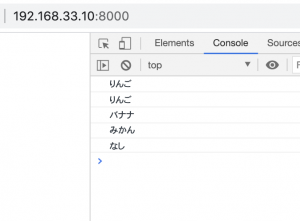
		let fruits = ['りんご', 'バナナ', 'みかん']

		console.log(fruits[0])

		fruits.push('なし')

		fruits.forEach(function(item,index, array){
			console.log(item)
		})
	</script>

### 二次元配列

	<script>
		let fruits = [
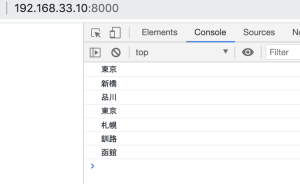
			["新橋", "品川", "東京"],
			["札幌", "釧路", "函館"]
		]
		console.log(fruits[0][2])
		// fruits.forEach(function(value){
		// 	console.log(value);
		// })
		fruits.forEach(function(value){
			value.forEach(function(key){
				console.log(key);
			})
		})
	</script>

ここまではわかる。続いて、連想配列

### 連想配列
セミコロンで繋げる

	<script>
		let ary = { 
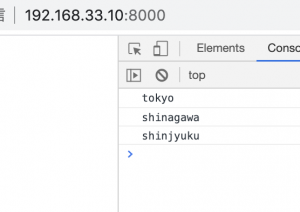
			tokyoto: ['tokyo','shinagawa','shinjyuku'],
			hokkaido: ['sapporo','kushiro','tomato'] }
		console.log(ary['tokyoto'])
	</script>
let ary = { 
			tokyoto: ['tokyo','shinagawa','shinjyuku'],
			hokkaido: ['sapporo','kushiro','tomato'] }

		ary.tokyoto.forEach(function(value){
			console.log(value);
		})

OK, 連想配列と多次元配列の扱いは理解した。

[Laravel8.15.0]Jetstreamによる権限付与

middlewareでユーザーroleを判定して出し分けようかと考えていたが、Laravel8系から実装された新機能として、Jetstreamチーム版でユーザの役割・権限を簡単に設定できるそうなので、それを使ってみて、Jetstreamが良いかMiddleware制御が良いか判断したい。

jetstream付きでインストールするにはインストーラーでインストールする必要がある為、

$ composer global require laravel/installer
$ export PATH=”/home/vagrant/.config/composer/vendor/bin:$PATH”
$ laravel new jettest –jet
$ cd jettest
$ php artisan –version
Laravel Framework 8.15.0

mysql> create database jetstream;
.env

DB_DATABASE=jetstream

$ php artisan migrate
mysql> show tables;
+————————+
| Tables_in_jetstream |
+————————+
| failed_jobs |
| migrations |
| password_resets |
| personal_access_tokens |
| sessions |
| team_user |
| teams |
| users |
+————————+
8 rows in set (0.00 sec)
-> teams, team_user テーブルが出来ている

mysql> describe teams;
+—————+—————–+——+—–+———+—————-+
| Field | Type | Null | Key | Default | Extra |
+—————+—————–+——+—–+———+—————-+
| id | bigint unsigned | NO | PRI | NULL | auto_increment |
| user_id | bigint unsigned | NO | MUL | NULL | |
| name | varchar(255) | NO | | NULL | |
| personal_team | tinyint(1) | NO | | NULL | |
| created_at | timestamp | YES | | NULL | |
| updated_at | timestamp | YES | | NULL | |
+—————+—————–+——+—–+———+—————-+
6 rows in set (0.00 sec)

// Team版のLivewireをインストール
$ php artisan jetstream:install livewire –teams
$ npm install && npm run dev
$ php artisan serve –host 192.168.33.10 –port 8000

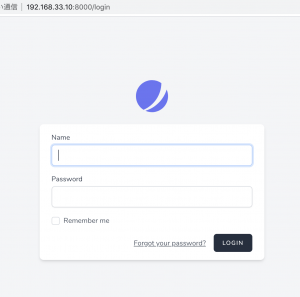
register
L 2つのユーザを作成します。

hpscript
hpscript@gmail.com

yamada
yamada@gmail.com

login後
manage team “Team Settings, Create New Team”が追加されています。

### Team Setting
Team Name: Let’s Go
Add Team Member: メンバーのEmailを追加

### 役割、権限の編集
– “general”の権限を追加します
app/Providers/JetstreamServiceProvider.php

protected function configurePermissions()
    {
        Jetstream::defaultApiTokenPermissions(['read']);

        Jetstream::role('admin', __('Administrator'), [
            'create',
            'read',
            'update',
            'delete',
        ])->description(__('Administrator users can perform any action.'));

        Jetstream::role('editor', __('Editor'), [
            'read',
            'create',
            'update',
        ])->description(__('Editor users have the ability to read, create, and update.'));

        Jetstream::role('general', __('General'), [
            'general',
        ])->description(__('General'));
    }

Roleにgeneralが追加されました。

hpscript@gmail.comでログインして、yamada@gmail.comを”general”のroleで追加します。

mysql> select * from team_user;
+—-+———+———+———+———————+———————+
| id | team_id | user_id | role | created_at | updated_at |
+—-+———+———+———+———————+———————+
| 1 | 1 | 2 | general | 2020-11-18 05:37:18 | 2020-11-18 05:37:18 |
+—-+———+———+———+———————+———————+
1 row in set (0.00 sec)

resources/views/test.blade.php

<!DOCTYPE html>
<html lang="en">
<head>
	<meta charset="UTF-8">
	<title>Document</title>
</head>
<body>
	<h1>jetstream test</h1>
</body>
</html>

routes/web.php

Route::get('/test', '\App\Http\Controllers\TestController@index');

$ php artisan make:controller TestController

app/Http/Controllers/TestController.php

class TestController extends Controller
{
    //
    public function index()
    {    
        return view('test.index');
    }
}

app/Http/Controllers/TestController.php

public function index(Request $request)
    {    
    	$team = $request->user()->currentTeam;

    	if(auth()->user()->hasTeamPermission($team, 'read')){
    		return view('test');
    	}
        return view('dashboard');
    }

yamadaでログインして、current teamをlet’s goにする。

そして、/testを叩くと、dashboardにリダイレクトされる。

簡単なのかややこしいのかわからんが、roleって概念だから、teamとはちょっと違う気がするんだような。
さて、頑張って設計書作るかー モチベーションを上げないと。。。

[PHP7.4.11] 二次元配列に空白の列を追加してCSVでダウンロード

### CSVの作成
– 文字化けしないよう、stream_filter_prepend($f,’convert.iconv.utf-8/cp932′);の一文を挿入する

$ary = [
	["名前", "年齢", "血液型", "備考"],
	["山田", "12", "O",""],
	["田中", "20", "A",""],
	["吉田", "18", "AB",""],
	["伊藤", "19", "B", "エンジニア"]
]; 

$filename = "test.csv";
$f = fopen($filename, "w");
stream_filter_prepend($f,'convert.iconv.utf-8/cp932');
if($f) {
	foreach($ary as $line){
		fputcsv($f, $line);
	}
}

fclose($f);

### 配列にカラムを追加

$ary = [
	// ["名前", "年齢", "血液型", "備考"],
	["山田", "12", "O",""],
	["田中", "20", "A",""],
	["吉田", "18", "AB",""],
	["伊藤", "19", "B", "エンジニア"]
]; 
$column = ["名前", "年齢", "血液型", "備考"];

array_unshift($ary,$column);

### 配列の途中に空白を追加

$column = ["名前", "年齢", "血液型", "備考"];

array_splice($column, 1, 0, "");

echo "<pre>";
var_dump($column);
echo "</pre>";

### 二次元配列の途中に空白を追加

// DBから抽出
$ary = [
	["山田", "12", "O",""],
	["田中", "20", "A",""],
	["吉田", "18", "AB",""],
	["伊藤", "19", "B", "エンジニア"]
]; 

// 空白追加
foreach($ary as $key => $value){
	 array_splice($ary[$key], 1, 0, "");
}

// カラム追加
$column = ["名前", "無記入", "年齢", "血液型", "備考"];
array_unshift($ary, $column);

echo "<pre>";
var_dump($ary);
echo "</pre>";

これでCSVをエクスポートすると…

### csv.fileのダウンロード

$filename = "test.csv";
header('Content-Type: application/octet-stream');
header('Content-Length: '.filesize($filename));
header('Content-Disposition: attachment; filename=test.csv');

readfile($filename);

作成とダウンロードを一緒にやる場合の方が多いと思うが、予め作成したcsvファイルをダウンロードするだけ、ということも可能。
OK, 次行こう。

[PHP7.4.11] 配列の足し算

$ary = [
	"いちご" => 1,
	"バナナ" => 2
];

foreach($ary as $key => $value){
	if($key == "いちご"){
		$ary["いちご"] = $value + 3;
	}
}
echo "<pre>";
var_dump($ary);
echo "</pre>";


なるほど、これを応用する

$ary = [
	"A商事" => 1200,
	"B商事" => 2000
];


$name ="C商事";
$subtotal = 2000;

foreach($ary as $key => $value){
	if($key == $name){
		$ary[$key] = $value + $subtotal;
	} else {
		$ary[$name] = $subtotal;
	}
}

echo "<pre>";
var_dump($ary);
echo "</pre>";

OK, これをLaravelでやりたい。

[PHP7.4.11] 多次元配列

$ary = [
	"fruits" => ["apple", "banana"],
	"animal" => ["monkey", "cat"]
];

$ary["fruits"][] = "kui";

foreach($ary as $key => $value){
	echo "-" . $key . "<br>";
	foreach($value as $k => $v){
		echo $v . " ";
	}
	echo "<br>";
}

– 二次元配列の中に配列を入れたい

$ary = [
	"A商事" => [
		"注文1" => ["商品1", "500円", "3個", "1500円"],
		"注文2" => ["商品2", "600円", "2個", "1200円"]
	],
	"B商事" => [
		"注文3" => ["商品3", "700円", "1個", "700円"]
	]
];

$ary["B商事"]["注文4"] = ["商品4", "200円", "10個", "2000円"];

echo "<pre>";
var_dump($ary);
echo "</pre>";

これを呼び出したい

foreach($ary as $key => $value){
	echo "-". $key . "<br>";
	foreach($value as $k => $v){
		echo $k. ":";
		foreach($v as $n => $data){
			echo $data . " ";
		}
	}
	echo "<br>";
}

OK、 これに$keyごとの小計を加えたい

[PHP7.4.11] 二次元配列

配列の中に配列

$ary = [
["a", "b", "c", "d"],
["e", "f", "g", "h"],
["i", "j", "k", "l"]
];

echo "<pre>";
var_dump($ary);
echo "</pre>";

配列の追加

$ary = [
// 省略
];

$ary[] = ["m", "n", "o", "p"];

多次元配列

$ary = [
	"fruits" => ["apple", "banana"],
	"animal" => ["monkey", "cat"]
];

多次元配列の追加

$ary = [
	"fruits" => ["apple", "banana"],
	"animal" => ["monkey", "cat"]
];

$ary_b = [
	"contory" => ["japan","usa"]
];


echo "<pre>";
var_dump(array_merge($ary, $ary_b));
echo "</pre>";

ただこれ、下のようにやると、fruitsが上書きされてしまうな。

$ary = [
	"fruits" => ["apple", "banana"],
	"animal" => ["monkey", "cat"]
];

$ary_b = [
	"fruits" => ["kui"]
];

こうすると上手くいく

$ary = [
	"fruits" => ["apple", "banana"],
	"animal" => ["monkey", "cat"]
];

$ary["fruits"][] = "kui";

echo "<pre>";
var_dump($ary);
echo "</pre>";

OK, これを応用して考える

[Python3.8.5] Stripeを試してみたい

Stripe手数料:3.6%
-> smartHR, Booking.com, slack, shopify, freee, cookpad
-> Ruby, Java, Scala and Javascript

### Stripeの特徴
– 初期費用がかからず、事前審査不要
– 少額の場合は他社より料率・振込手数料が安価
– 決済画面への遷移がなくて決済フォームもシンプル
– 顧客へ返金時に返金手数料はかからないものの、元の決済手数料は一切返金なし

### 実装方法
自前でサーバを用意するパターン(custom payment flow)と、ドロップインソリューション(prebuild checkout page)といって Stripeが用意した決済画面を利用する方法がある。

docs: https://stripe.com/docs/payments/accept-a-payment?integration=elements

$ python3 –version
Python 3.8.5
$ pip3 install stripe
$ pip3 install flask

server.py

import os
from flask import Flask, jsonify, request

import stripe

stripe.api_key = 'sk_test_***'

app = Flask(__name__,
			static_url_path='',
			static_folder='.')

YOUR_DOMAIN = '192.168.33.10:5000'

@app.route('/create-session', methods=['POST'])
def create_checkout_session():
	try:
		checkout_session = stripe.checkout.Session.create(
			payment_method_types=['card'],
			line_items=[
				{
					'price_data': {
						'currency': 'usd',
						'unit_amount': 2000,
						'product_data': {
							'name': 'Stubborn Attachments',
							'images': ['https://i.imgur.com/EHyR2nP.png'],
						},
					},
					'quantity': 1,
				},
			],
			mode='payment',
			success_url=YOUR_DOMAIN + '/success.html',
			cancel_url=YOUR_DOMAIN + '/cancel.html',
		)
		return jsonify({'id': checkout_session.id})
	except Exception as e:
		return jsonify(error=str(e)), 403

if __name__ == '__main__':
	app.run(host='0.0.0.0')

success.html

<!DOCTYPE html>
<html lang="en">
<head>
	<meta charset="UTF-8">
	<title>Thanks for your order!</title>
	<link rel="stylesheet" href="">
</head>
<body>
	<section>
		<p>
			We appreciate your business! If you have any questions, please email <a href="mailto:info@hpscript.com">info@hpscript.com</a>.
		</p>
	</section>
</body>
</html>

cancel.html

<!DOCTYPE html>
<html lang="en">
<head>
	<meta charset="UTF-8">
	<title>Checkout canceled</title>
	<link rel="stylesheet" href="">
</head>
<body>
	<section>
		<p>
			Forgot to add something to your car? Shop around then come back to pay!
		</p>
	</section>
</body>
</html>

checkout.html

<!DOCTYPE html>
<html lang="en">
<head>
	<meta charset="UTF-8">
	<title>Buy cool new product</title>
	<link rel="stylesheet" href="">
	<script src="https://polyfill.io/v3/polyfill.min.js?version=3.52.1&features=fetch"></script>
	<script src="https://js.stripe.com/v3/"></script>
</head>
<body>
	<section>
		<div class="product">
			<img src="https://i.imgur.com/EHyR2nP.png" alt="The cover of Stubborn Attachments">
			<div class="description">
				<h3>Stubborn Attachments</h3>
				<h5>$20.00</h5>
			</div>
		</div>
		<button id="checkout-button">Checkout</button>
	</section>
</body>
<script type="text/javascript">
	var stripe = Stripe("pk_test_***");
	var checkoutButton = document.getElementById("checkout-button");

	checkoutButton.addEventListener("click", function(){
		fetch("/create-session", {
			method: "POST",
		})
			.then(function (response){
				return response.json();
			})
			.then(function (session){
				return stripe.redirectToCheckout({ sessionId: session.id });
			})
			.then(function(result){
				if(result.error){
					alert(result.error.message);
				}
			})
			.catch(function(error){
				console.error("Error:", error);
			});
	});
</script>
</html>

$ ls
cancel.html checkout.html other server.py style.css success.html

$ python3 server.py

ん? strip.jsはhttpsでないとダメっぽい。。

[paypal] APIを使ってみる

Basic Integrationに沿ってやっていきます。
https://developer.paypal.com/docs/checkout/integrate/#

– Render the PayPal Smart Payment Buttons
– Set up a one-time transaction and immediately capture the funds into your account
– Test the button and take it live on your site

まず前提として、paypalアカウントが必要。
paypalアカウントでdeveloperサイトにログインする。
https://developer.paypal.com/developer/applications

create appとすると、paypal account, client ID, secretが生成されるのでメモしておく。

<!DOCTYPE html>
<html lang="en">
<head>
	<meta name="viewport" content="width=device-width, initial-scale=1">
	<meta http-equiv="X-UA-Compatible" content="IE=edge" />
	<meta charset="UTF-8">
	<title>Document</title>
</head>
<body>
	<script
    src="https://www.paypal.com/sdk/js?client-id=${clientId}"></script>
    <div id="paypal-button-container"></div>
    <script>
		paypal.Buttons().render('#paypal-button-container');
    </script>
</body>
</html>

$ python3 -m http.server 8000

やばっ

valueは$USっぽいです。

<script>
		paypal.Buttons({
			createOrder: function(data, actions){
				return actions.order.create({
					purchase_units: [{
						amount: {
							value: '0.01'
						}
					}]
				});
			},
			onApprove: function(data, actions){
				return actions.order.capture().then(function(details){
					alert('Transaction completed by ' + details.payer.name.given_name);
				});
			}
		}).render('#paypal-button-container');
    </script>

productionではbusinessアカウントが必要っぽい。
$0.01がカゴに入ってます。

なるほど、JSで管理するんやな、日本はpaypalは普及してませんが、イメージは掴めました。

[jdk14.0.2] 基礎4

ArrayList

import java.util.*;

public class MyApp {

	public static void main(String[] args){

		List<Integer> sales = new ArrayList<>();

		sales.add(10);
		sales.add(20);
		sales.add(30);

		for (int i = 0; i < sales.size(); i++){
			System.out.println(sales.get(i));
		}

		sales.set(0, 100);
		sales.remove(2);

		for (Integer sale: sales){
			System.out.println(sale);
		}
	}
}

HashSet // 重複しない、順番が定まらない
L TreeSet, LinkedHashSet

public static void main(String[] args){

		// HashSet<Integer> = new HashSet<>();
		Set<Integer> sales = new HashSet<>();

		sales.add(10);
		sales.add(20);
		sales.add(30);
		sales.add(10);

		System.out.println(sales.size());
		for(Integer sale:sales){
			System.out.println(sale);
		}

		sales.remove(30);

		for(Integer sale:sales){
			System.out.println(sale);
		}
	}

HashMap

public class MyApp {

	public static void main(String[] args){
		// HashMap: key value
		// HashMap<String, Integer> sales = new HashMap<>();
		Map<String, Integer> sales = new HashMap<>();

		sales.put("tom", 10);
		sales.put("bob", 20);
		sales.put("steve", 30);

		System.out.println(sales.get("tom"));
		System.out.println(sales.size());

		for(Map.Entry<String, Integer> sale: sales.entrySet()){
			System.out.println(sale.getKey() + ":" + sale.getValue());
		}

		sales.put("tom", 100);
		sales.remove("steve");

		for(Map.Entry<String, Integer> sale: sales.entrySet()){
			System.out.println(sale.getKey() + ":" + sale.getValue());
		}
	}
}

StreamAPI

public static void main(String[] args){
		List<Integer> sales = new ArrayList<>(Arrays.asList(12, 30, 22, 4, 9));

		// for(Integer sale: sales){
		// 	System.out.println(sale);
		// }
		sales
			.stream()
			.filter(e-> e % 3 == 0)
			.map(e-> "(" + e + ")")
			.forEach(System.out::println);
		
	}

LocalDateTime class

import java.time.*;
import java.time.format.DateTimeFormatter;

public class MyApp {

	public static void main(String[] args){
		LocalDateTime d = LocalDateTime.now();

		System.out.println(d.getYear());
		System.out.println(d.getMonth().getValue());

		System.out.println(d.plusMonths(2).minusDays(3));

		DateTimeFormatter dtf = DateTimeFormatter.ofPattern("yyyy!MM!dd!");
		System.out.println(d.format(dtf));
	}
}

[jdk14.0.2] 基礎3

exception

class MyException extends Exception {
	public MyException(String s){
		super(s);
	}
}

public class MyApp {

	public static void div(int a, int b){
		try {
			if(b < 0){
				throw new MyException("not minus!");
			}
			System.out.println(a / b);
		} catch(ArithmeticException e){
			System.err.println(e.getMessage());
		} catch(MyException e){
			System.err.println(e.getMessage());
		} finally {
			System.out.println(" -- end -- ");
		}
	}

	public static void main(String[] args){
		div(3, 0);
		div(5, -2);
	}
}

wrapper class

public class MyApp {

	public static void main(String[] args){
		// Integer i = new Integer(32);
		// int n = i.intValue();
		Integer i = 32; // auto boxing 参照型
		int n = i; // auto unboxing
		System.out.println();
	}
}

generics 型の汎用化

class MyData<T> {
	public void getThree(T x){
		System.out.println(x);
		System.out.println(x);
		System.out.println(x);
	}
}

public class MyApp {

	public static void main(String[] args){
		MyData<Integer> i = new MyData<>(); //参照型
		i.getThree(32);

		MyData<String> s = new MyData<>(); //参照型
		s.getThree("What's up");
	}
}

Thread

class MyRunnable implements Runnable {
	@Override
	public void run(){
		for (int i = 0; i < 500; i++){
			System.out.print('*');
		}
	}
}

public class MyApp {

	public static void main(String[] args){
		MyRunnable r = new MyRunnable();

		Thread t = new Thread(r);
		t.start();

		for (int i = 0; i < 500; i++){
			System.out.print('.');
		}
	}
}

無名クラス

public class MyApp {

	public static void main(String[] args){
		new Thread(new Runnable() {
			@Override
			public void run(){
				for (int i = 0; i < 500; i++){
					System.out.print('*');
				}
			}
		}).start();

		for (int i = 0; i < 500; i++){
			System.out.print('.');
		}
	}
}

ラムダ式

new Thread(()-> {
			for (int i = 0; i < 500; i++){
				System.out.print('*');
			}
		}).start();

		for (int i = 0; i < 500; i++){
			System.out.print('.');
		}

String

public class MyApp {

	public static void main(String[] args){
		String s = "abcdef";
		System.out.println(s.length());
		System.out.println(s.substring(2, 5));
		System.out.println(s.replaceAll("ab", "AB"));

		String s1 = "ab";
		String s2 = "ab";

		if(s1.equals(s2)){
			System.out.println("same!");
		}

		if(s1 == s2){
			System.out.println("same!same!");
		}

		String ss1 = new String("abc");
		String ss2 = new String("abc");

		if(ss1 == ss2){
			System.out.println("same!same!same!");
		}
	}
}

printf

public class MyApp {

	public static void main(String[] args){

		int score = 50;
		double height = 165.8;
		String name ="hpscript";

		System.out.printf("name: %-10s, score: %10d, height: %5.2f\n", name, score, height);

		String s = String.format("name: %10s, score: %-10d, height: %5.2f\n", name, score, height);
		System.out.println(s);
	}
}

random

import java.util.Random;

public class MyApp {

	public static void main(String[] args){

		double d = 53.234;
		
		System.out.println(Math.ceil(d));
		System.out.println(Math.floor(d));
		System.out.println(Math.round(d));
		System.out.println(Math.PI);

		Random r = new Random();
		System.out.println(r.nextDouble()); // 0 - 1
		System.out.println(r.nextInt(100));
		System.out.println(r.nextBoolean());
	}
}