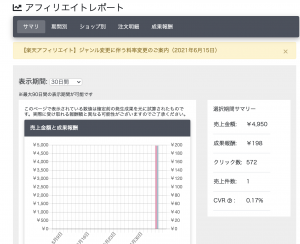
以前、バッチ処理で楽天の商品を紹介するtwitterボットのアカウントを2つ作成したのですが、ついに報酬が発生しました! 4,950円の商品が1つ売れたみたい。 不労所得で商品が売れる瞬間って面白いですね。

もっと自動化したいのう。
随机应变 ABCD: Always Be Coding and … : хороший
以前、バッチ処理で楽天の商品を紹介するtwitterボットのアカウントを2つ作成したのですが、ついに報酬が発生しました! 4,950円の商品が1つ売れたみたい。 不労所得で商品が売れる瞬間って面白いですね。

もっと自動化したいのう。
### Getting and preparing data
$ wget https://dl.fbaipublicfiles.com/fasttext/data/cooking.stackexchange.tar.gz && tar xvzf cooking.stackexchange.tar.gz
$ ls
cooking.stackexchange.id
$ head cooking.stackexchange.txt
__label__sauce __label__cheese How much does potato starch affect a cheese sauce recipe?
__label__food-safety __label__acidity Dangerous pathogens capable of growing in acidic environments
__label__cast-iron __label__stove How do I cover up the white spots on my cast iron stove?
“__label__” prefix is how fasttext recognize difference of word and label.
$ wc cooking.stackexchange.txt
15404 169582 1401900 cooking.stackexchange.txt
-> split example and validation
$ head -n 12404 cooking.stackexchange.txt > cooking.train
$ tail -n 3000 cooking.stackexchange.txt > cooking.valid
### train_supervised
training.py
import fasttext model = fasttext.train_supervised(input="cooking.train")
$ python3 training.py
Read 0M words
Number of words: 14543
Number of labels: 735
Floating point exception
何故だ〜〜〜〜〜〜〜〜〜〜
$ git clone https://github.com/facebookresearch/fastText.git
$ cd fastText
$ make
$ pip3 install cython
$ pip3 install fasttext
$ install requests requests_oauthlib
Twitterの開発者向けのページから、consumer key, consumer secret, access token, access token secretを取得します。
tweet_get.py
import re
import json
import MeCab
from requests_oauthlib import OAuth1Session
CK = ""
CS = ""
AT = ""
AS = ""
API_URL = "https://api.twitter.com/1.1/search/tweets.json?tweet_mode=extended"
KEYWORD = "芸能 OR アニメ OR 漫画 OR TV OR ゲーム"
CLASS_LABEL = "__label__1"
def main():
tweets = get_tweet()
surfaces = get_surfaces(tweets)
write_txt(surfaces)
def get_tweet():
params = {'q' : KEYWORD, 'count' : 20}
twitter = OAuth1Session(CK, CS, AT, AS)
req = twitter.get(API_URL, params = params)
results = []
if req.status_code == 200:
tweets = json.loads(req.text)
for tweet in tweets['statuses']:
results.append(tweet['full_text'])
return results
else:
print ("Error: %d" % req.status_code)
def get_surfaces(contents):
results = []
for row in contents:
content = format_text(row)
tagger = MeCab.Tagger('')
tagger.parse('')
surf = []
node = tagger.parseToNode(content)
while node:
surf.append(node.surface)
node = node.next
results.append(surf)
return results
def write_txt(contents):
try:
if(len(contents) > 0):
fileName = CLASS_LABEL + ".txt"
labelText = CLASS_LABEL + ","
f = open(fileName,'a')
for row in contents:
spaceTokens = "".join(row);
result = labelText + spaceTokens + "\n"
f.write(result)
f.close()
print(str(len(contents))+"行を書き込み")
except Exception as e:
print("テキストの書き込みに失敗")
print(e)
def format_text(text):
text=re.sub(r'https?://[\w/:%#\$&\?\(\)~\.=\+\-…]+', "", text)
text=re.sub(r'@[\w/:%#\$&\?\(\)~\.=\+\-…]+', "", text)
text=re.sub(r'&[\w/:%#\$&\?\(\)~\.=\+\-…]+', "", text)
text=re.sub(';', "", text)
text=re.sub('RT', "", text)
text=re.sub('\n', " ", text)
return text
if __name__ == '__main__':
main()

1.エンタメ、2.美容、3.住まい/暮らし のキーワードで集めます。
__label__1: エンタメ
-> 芸能 OR アニメ OR 漫画 OR TV OR ゲーム
__label__2: 美容
-> 肌 OR ヨガ OR 骨盤 OR ウィッグ OR シェイプ
__label__3: 住まい/暮らし
-> リフォーム OR 住宅 OR 家事 OR 収納 OR 食材
label1〜3のテキストを結合させます
$ cat __label__1.txt __label__2.txt __label__3.txt > model.txt
$ ls
__label__1.txt __label__3.txt model.txt
__label__2.txt fastText tweet_get.py
learning.py
import sys import fasttext as ft argvs = sys.argv input_file = argvs[1] output_file = argvs[2] classifier = ft.supervised(input_file, output_file)
$ python3 learning.py model.txt model
raise Exception(“`supervised` is not supported any more. Please use `train_supervised`. For more information please refer to https://fasttext.cc/blog/2019/06/25/blog-post.html#2-you-were-using-the-unofficial-fasttext-module”)
Exception: `supervised` is not supported any more. Please use `train_supervised`.
model = ft.train_supervised(input_file)
$ python3 learning.py model.txt ftmodel
Read 0M words
Number of words: 6
Number of labels: 135
Floating point exception
おかしいな、number of labelsが135ではなく3のはずなんだけど。。。
### TfIdf
Tf = Term Frequency
Idf = Inverse Document Frequency
Tfはドキュメント内の単語の出現頻度、Idfは全ての文章内の単語の出現頻度の逆数
TfIdfを使うと、いろいろな文章に出てくる単語は無視して、ある文章に何回も出てくる単語は重要な語として扱う
def get_vector_by_text_list(_items): count_vect = TfidfVectorizer(analyzer=_split_to_words) # count_vect = CountVectorizer(analyzer=_split_to_words) box = count_vect.fit_transform(_items) X = box.todense() return [X,count_vect]
MLPClassifierとは、Multi-layer Perceptron classifierの略で多層パーセプトロンと呼ばれる分類器のモデル
$ pip3 install numpy
$ pip3 install scikit-learn
$ pip3 install pandas
scikit-learnはpythonで使用できる機械学習ライブラリ
ニュースコーパスは livedoorニュースコーパス を使用します。
livedoor ニュースコーパス
$ ls
text
$ cd text
$ ls
CHANGES.txt dokujo-tsushin livedoor-homme smax
README.txt it-life-hack movie-enter sports-watch
app.py kaden-channel peachy topic-news
app.py
import os, os.path
import csv
f = open('corpus.csv', 'w')
csv_writer = csv.writer(f, quotechar="'")
files = os.listdir('./')
datas = []
for filename in files:
if os.path.isfile(filename):
continue
category = filename
for file in os.listdir('./'+filename):
path = './'+filename+'/'+file
r = open(path, 'r')
line_a = r.readlines()
text = ''
for line in line_a[2:]:
text += line.strip()
r.close()
datas.append()
print(text)
csv_writer.writerows(datas)
f.close()
$python3 app.py
以下のようなCSVファイルが生成されます。

### NNの仕組み
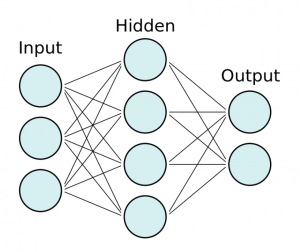
– 全てのテキストを形態素に分解し、全ての単語を把握した後、全ての単語に対してテキストに出現するかと言うベクトルを作成する。
– その後、ニューラルネットワークに対し、このベクトルを入力とし、出力をカテゴリとして学習を行う
nlp_tasks.py
# -*- coding: utf-8 -*-
#! /usr/bin/python3
import MeCab
from sklearn.feature_extraction.text import CountVectorizer
def _split_to_words(text):
tagger = MeCab.Tagger('-O wakati')
try:
res = tagger.parse(text.strip())
except:
return[]
return res
def get_vector_by_text_list(_items):
count_vect = CountVectorizer(analyzer=_split_to_words)
box = count_vect.fit_transform(_items)
X = box.todense()
return [X,count_vect]
models というフォルダを作成する
main.py
# -*- coding: utf-8 -*-
#! /usr/bin/python3
import pandas as pd
import numpy as np
from sklearn.preprocessing import LabelEncoder
from sklearn.externals import joblib
import os.path
import nlp_tasks
from sklearn.neural_network import MLPClassifier # アルゴリズムのmlp
def train():
classifier = MyMLPClassifier()
classifier.train('corpus.csv')
def predict():
classifier = MyMLPClassifier()
classifier.load_model()
result = classifier.predict(u"競馬の3歳馬日本一を決めるG1レース、「第88回日本ダービー」が行われ、4番人気のシャフリヤールが優勝しました。")
print(result)
class MyMLPClassifier():
model = None
model_name = "mlp"
def load_model(self):
if os.path.exists(self.get_model_path())==False:
raise Exception('no model file found!')
self.model = joblib.load(self.get_model_path())
self.classes = joblib.load(self.get_model_path('class')).tolist()
self.vectorizer = joblib.load(self.get_model_path('vect'))
self.le = joblib.load(self.get_model_path('le'))
def get_model_path(self, type='model'):
return 'models/'+self.model_name+"_"+type+".pkl"
def get_vector(self,text)
return self.vectorizer.transform()
def train(self, csvfile):
df = pd.read_csv(cavfile,names=('text','category'))
X, vectorizer = nlp_tasks.get_vector_by_text_list(df["text"])
le = LabelEncoder()
le.fit(df['category'])
Y = le.transform(df['category'])
model = MLPClassifier(max_iter=300, hidden_layer_sizes=(100,),verbose=10,)
model.fit(X, Y)
# save models
joblib.dump(model, self.get_model_path())
joblib.dump(le.classes_, self.get_model_path("class"))
joblib.dump(vectorizer, self.get_model_path("vect"))
joblib.dump(le, self.get_model_path("le"))
self.model = model
self.classes = le.classes_.tolist()
self.vectorizer = vectorizer
def predict(self, query):
X = self.vectorizer.transform([query])
key = self.model.predict(X)
return self.classes[key[0]]
if __name__ == '__main__':
train()
#predict()
$ ls
corpus.csv main.py models nlp_tasks.py text
$ python3 main.py
Iteration 1, loss = 4.24610757
Iteration 2, loss = 2.08110509
Iteration 3, loss = 1.70032200
Iteration 4, loss = 1.49572560
// 省略
Iteration 136, loss = 0.00257828
Training loss did not improve more than tol=0.000100 for 10 consecutive epochs. Stopping.

if __name__ == '__main__':
# train()
predict()
$ python3 main.py
sports-watch
まじかーーーーーーーーーーーーーーーーーー
Sugeeeeeeeeeeeeeeeeeeeeeeeeeeeeeee
自然言語処理では、辞書に存在する単語が、文章中に存在するかどうかをチェックしていくが、その辞書を通常、gazetteerと言う
### gazetterの中の単語が文章中にあれば出力
import MeCab
text = '今日は晴れかな?'
weather_set = set(['晴れ','天気','雨'])
mecab = MeCab.Tagger("-Ochasen")
tokens = mecab.parse(text)
token = tokens.split("\n")
for ele in token:
element = ele.split("\t")
if element[0] == "EOS":
break
surface = element[0]
if surface in weather_set:
print(surface)
$ python3 app.py
晴れ
### カテゴリ分類
– カテゴリに対応したgazetterを用意する必要がある
– gazetterはweb上から検索する手法がよく取られる
– 文章を大規模に集積したものをコーパスと言う
– gazetteerの網羅率を上げることが分類精度において重要
import MeCab
text = '東京駅まで電車でどれ位かかりますか?'
weather_set = set(['晴れ','天気','雨','曇り'])
navi_set = set(['渋谷','東京','電車','地図'])
mecab = MeCab.Tagger("-Ochasen")
# def classify_category(text):
tokens = mecab.parse(text)
token = tokens.split("\n")
weather_score = 0
navi_score = 0
for ele in token:
element = ele.split("\t")
if element[0] == "EOS":
break
surface = element[0]
if surface in weather_set:
weather_score += 1
if surface in navi_set:
navi_score += 1
if weather_score > navi_score:
print("天気")
elif weather_score < navi_score:
print("ナビゲーション")
else:
print("ジャンル判定不能")
$ python3 app.py
ナビゲーション
これ、Yahoo!掲示板で売り煽りが多いか、買い煽りが多いか自動判定したいな。
メモリーが足りないので、vagrantfileでメモリを増やしてmakeする必要があります。
swapファイルで1G増やしてもダメなので、一旦vagrant haltして、4Gまで増やします。
Vagrantfile
config.vm.provider "virtualbox" do |vb|
# Display the VirtualBox GUI when booting the machine
# vb.gui = true
# Customize the amount of memory on the VM:
vb.customize ["modifyvm", :id, "--memory", 4096]
end
$ vagrant up
$ vagrant ssh
$ free
total used free shared buff/cache available
Mem: 4039428 415580 3183212 544 440636 3408324
Swap: 0 0 0
$ ./mecab-ipadic-neologd/bin/install-mecab-ipadic-neologd -n -y
$ sudo sed -i -e “s|^dicdir.*$|dicdir = /usr/local/lib/mecab/dic/mecab-ipadic-neologd|” $(mecab-config –sysconfdir)/mecabrc
$ echo すもももももももものうち | me
すもももももももものうち 名詞,固有名詞,一般,*,*,*,すもももももももものうち,スモモモモモモモモノウチ,スモモモモモモモモノウチ
EOS
ec2でもメモリーはコンソールから自由に増やせるので、これで解決ですね。
おっけいいいいいいいいいいいいい
$ pip3 install jieba
import jieba.posseg as pseg
fen_cixing = pseg.cut("学习辉煌党史重温峥嵘岁月发扬延安精神奋斗新的征程")
for word, flag in fen_cixing:
print(word, flag)
$ python3 app.py
Building prefix dict from the default dictionary …
Loading model from cache /tmp/jieba.cache
Loading model cost 0.618 seconds.
Prefix dict has been built successfully.
学习 v
辉煌 a
党史 n
重温 n
峥嵘岁月 i
发扬 v
延安精神 nr
奋斗 v
新 a
的 uj
征程 n
OK これは使えるっぽい^^
よっしゃああああああああああああああああああああ
$ pip3 install nltk
### 分かち書き
nltk.download('punkt')
### 品詞の取得
import nltk
nltk.download('averaged_perceptron_tagger')
# -*- coding:utf-8 -*-
import nltk
nltk.download('punkt')
s = "The Brooklyn Nets appeared to be well on their way to taking a 3-0 series lead over the Boston Celtics Friday night, as they erupted out of the TD Garden gates on a 19-4 run in the first four minutes of action."
morph = nltk.word_tokenize(s)
print(morph)
$ python3 app.py
[nltk_data] Downloading package punkt to /home/vagrant/nltk_data…
[nltk_data] Package punkt is already up-to-date!
[‘The’, ‘Brooklyn’, ‘Nets’, ‘appeared’, ‘to’, ‘be’, ‘well’, ‘on’, ‘their’, ‘way’, ‘to’, ‘taking’, ‘a’, ‘3-0’, ‘series’, ‘lead’, ‘over’, ‘the’, ‘Boston’, ‘Celtics’, ‘Friday’, ‘night’, ‘,’, ‘as’, ‘they’, ‘erupted’, ‘out’, ‘of’, ‘the’, ‘TD’, ‘Garden’, ‘gates’, ‘on’, ‘a’, ’19-4′, ‘run’, ‘in’, ‘the’, ‘first’, ‘four’, ‘minutes’, ‘of’, ‘action’, ‘.’]
うおおおおおおおおおおおおおお
ガチSugeeeeeeeeeeeeee
import nltk
nltk.download('punkt')
nltk.download('averaged_perceptron_tagger')
s = "The Brooklyn Nets appeared to be well on their way to taking a 3-0 series lead over the Boston Celtics Friday night, as they erupted out of the TD Garden gates on a 19-4 run in the first four minutes of action."
morph = nltk.word_tokenize(s)
pos = nltk.pos_tag(morph)
print(pos)
$ python3 app.py
[nltk_data] Downloading package punkt to /home/vagrant/nltk_data…
[nltk_data] Package punkt is already up-to-date!
[nltk_data] Downloading package averaged_perceptron_tagger to
[nltk_data] /home/vagrant/nltk_data…
[nltk_data] Unzipping taggers/averaged_perceptron_tagger.zip.
[(‘The’, ‘DT’), (‘Brooklyn’, ‘NNP’), (‘Nets’, ‘NNPS’), (‘appeared’, ‘VBD’), (‘to’, ‘TO’), (‘be’, ‘VB’), (‘well’, ‘RB’), (‘on’, ‘IN’), (‘their’, ‘PRP$’), (‘way’, ‘NN’), (‘to’, ‘TO’), (‘taking’, ‘VBG’), (‘a’, ‘DT’), (‘3-0’, ‘JJ’), (‘series’, ‘NN’), (‘lead’, ‘NN’), (‘over’, ‘IN’), (‘the’, ‘DT’), (‘Boston’, ‘NNP’), (‘Celtics’, ‘NNPS’), (‘Friday’, ‘NNP’), (‘night’, ‘NN’), (‘,’, ‘,’), (‘as’, ‘IN’), (‘they’, ‘PRP’), (‘erupted’, ‘VBD’), (‘out’, ‘IN’), (‘of’, ‘IN’), (‘the’, ‘DT’), (‘TD’, ‘NNP’), (‘Garden’, ‘NNP’), (‘gates’, ‘NNS’), (‘on’, ‘IN’), (‘a’, ‘DT’), (’19-4′, ‘JJ’), (‘run’, ‘NN’), (‘in’, ‘IN’), (‘the’, ‘DT’), (‘first’, ‘JJ’), (‘four’, ‘CD’), (‘minutes’, ‘NNS’), (‘of’, ‘IN’), (‘action’, ‘NN’), (‘.’, ‘.’)]
英語は誰でも意味わかるからな。
英語じゃなくて、中国語で分かち書きをやりたいな。
$ sudo yum install python3-devel
$ pip3 install pyicu
$ pip3 install pycld2
$ pip3 install morfessor
$ python3 app.py
Traceback (most recent call last):
File “app.py”, line 3, in
from polyglot.detect import Detector
File “/home/vagrant/.local/lib/python3.7/site-packages/polyglot/detect/__init__.py”, line 1, in
from .base import Detector, Language
File “/home/vagrant/.local/lib/python3.7/site-packages/polyglot/detect/base.py”, line 11, in
from icu import Locale
ImportError: cannot import name ‘Locale’ from ‘icu’ (/home/vagrant/.local/lib/python3.7/site-packages/icu/__init__.py)
何故だ?
とりあえずnltkを使うか。。。