[Go] Revelでcreate application

app/views/App/index.html

    <div class="span6">
      {{template "flash.html" .}}
      <form action="/App/Hello" method="GET">
        <input type="text" name="myName"/><br><br>
        <input type="submit" value="Say hello!"/>
      </form>
    </div>

app/controllers/app.go

func (c App) Hello(myName string) revel.Result {
	return c.Render(myName)
}

conf/route

GET	/App/Hello	App.Hello

$ /home/vagrant/go/bin/revel run -a myapp
コンパイルし直す
http://192.168.34.10:9000/App/Hello?myName=test

### validation

func (c App) Hello(myName string) revel.Result {
	c.Validation.Required(myName).Message("Your name is required")
	c.Validation.MinSize(myName, 3).Message("Your name is not long enough!")

	if c.Validation.HasErrors(){
		c.Validation.Keep()
		c.FlashParams()
		return c.Redirect(App.Index)
	}

	return c.Render(myName)
}
<div class="span6">
      {{template "flash.html" .}}
      <form action="/App/Hello" method="GET">
        {{with $field := field "myName" .}}
        <input type="text" name="{{$field.Name}}" value="{{$field.Flash}}"/>
        {{end}}
        <br><br>
        <input type="submit" value="Say hello!"/>
      </form>
    </div>

OK, 後はMySQL連携

[Go] Revelでroutingとテンプレート

### Request Flow
conf/route

GET     /                                       App.Index

App.IndexとはApp ControllerのIndexメソッドに飛ぶということ

### Controller
app/controllers/app.go

package controllers

import (
	"github.com/revel/revel"
)

type App struct {
	*revel.Controller
}

func (c App) Index() revel.Result {
	greeting := "Alopha World"
	return c.Render(greeting)
}

### Template
app/views/App/index.html

{{set . "title" "Home"}}
{{template "header.html" .}}

<header class="jumbotron" style="background-color:#A9F16C">
  <div class="container">
    <div class="row">
      <h1>{{.greeting}}</h1>
      <p></p>
    </div>
  </div>
</header>

<div class="container">
  <div class="row">
    <div class="span6">
      {{template "flash.html" .}}
    </div>
  </div>
</div>

{{template "footer.html" .}}

なるほど、だいたい掴めた。直感的に分かりやすい。
よし、Revelで書こう

[Go] Revelのinstallとrun -a myapp

Revelの特徴: MVCモデル, 自動コンパイル

ドキュメントを読んでも埒が明かないので、公式のTutorialを始めます。

$ go version
go version go1.15.14 linux/amd64

To get the Revel framework
$ go get github.com/revel/revel
$ go get github.com/revel/cmd/revel

$ export PATH=”/home/vagrant/go/bin”
$ revel
Usage:
revel [OPTIONS]
// 省略

$ /home/vagrant/go/bin/revel new -a myapp
Revel executing: create a skeleton Revel application
Your application has been created in:
/home/vagrant/go/src/github.com/me/revel/myapp

You can run it with:
revel run -a myapp

$ cd myapp
$ /home/vagrant/go/bin/revel run -a myapp
http://192.168.34.10:9000/

OK, keep going

[音声認識] Juliusで独自辞書を作成

辞書ファイルを作成するには、「語彙」「音素」「構文」が必要

語彙: Juliusに認識させたい単語を定義
音素: 語彙の読みを定義
構文: 認識する文章の構成を定義

### 読みファイルの作成
/julius/dict/greeting.yomi
L 平仮名で作成

おはよう	おはよう
ございます ございます
こんにちは こんにちわ
こんばんは こんばんわ

### 音素ファイルの作成
$ iconv -f utf8 -t eucjp dict/greeting.yomi | gramtools/yomi2voca/yomi2voca.pl | iconv -f eucjp -t utf8 > dict/greeting.phone

perl: warning: Setting locale failed.
perl: warning: Please check that your locale settings:
LANGUAGE = (unset),
LC_ALL = (unset),
LANG = “ja_JP.UTF-8”
are supported and installed on your system.
perl: warning: Falling back to the standard locale (“C”).

どうやらjuliusはeucではなくutf8になってるらしい

$ iconv dict/greeting.yomi | gramtools/yomi2voca/yomi2voca.pl > dict/greeting.phone

/julius/dict/greeting.phone

おはよう	o h a y o u
ございます	g o z a i m a s u
こんにちは	k o N n i ch i w a
こんばんは	k o N b a N w a

### 構文ファイルの作成
greeting.grammar
L NS_Bが文書の開始、NS_Eが文章の終了 2行目以降がGREETで認識される読みの文字列

S : NS_B GREET NS_E
GREET : OHAYOU
GREET : OHAYOU GOZAIMASU
GREET : KONNICHIWA
GREET : KONBANWA

### 語彙ファイルの作成
各音素に対して、構文で割り振った読みと、開始終了を表すNS_B、NS_Eを設定

% OHAYOU
おはよう	o h a y o u
% GOZAIMASU
ございます	g o z a i m a s u
% KONNICHIWA
こんにちは	k o N n i ch i w a
% KONBANWA
こんばんは	k o N b a N w a
% NS_B
s		silB
% NS_E
/s	silE

辞書ファイルを作成する
$ cp -b gramtools/mkdfa/mkfa-1.44-flex/mkfa gramtools/mkdfa/mkfa
$ cp -b gramtools/dfa_minimize/dfa_minimize gramtools/mkdfa/dfa_minimize
$ cp -b gramtools/dfa_determinize/dfa_determinize gramtools/mkdfa/dfa_determinize

$ gramtools/mkdfa/mkdfa.pl dict/greeting
// 省略
now reversing dict/greeting.dfa into NFA “dict/greeting.dfa.forward_nfa”
executing [gramtools/mkdfa/dfa_determinize dict/greeting.dfa.forward_nfa -o dict/greeting.dfa.forward_beforeminimize]
6 categories, 6 nodes, 7 arcs
-> determinized: 5 nodes, 7 arcs
executing [gramtools/mkdfa/dfa_minimize dict/greeting.dfa.forward_beforeminimize -o dict/greeting.dfa.forward]
6 categories, 5 nodes, 7 arcs
-> minimized: 5 nodes, 7 arcs

generated: dict/greeting.dfa dict/greeting.term dict/greeting.dict dict/greeting.dfa.forward

### 辞書を指定
$ julius/julius -C ../ja_model/am-gmm.jconf -nostrip -gram dict/greeting -input mic

なるほど、辞書の作り方はOK
次はGoやな

[Python] リストで重複を調べる

& 演算子で取得

l1 = ['今日', '形態素', '解析', '研究']
l2 = ['明日', '研究', '麦芽', '形態素']

l1l2 = set(l1) & set(l2)
print(l1l2)

$ python3 app.py
{‘研究’, ‘形態素’}

lenを使って重複率を調べて分岐処理を行う

l1 = ['今日','の','形態素', '解析', '研究']
l2 = ['明日', '研究', '麦芽', '形態素', '研究']

l1l2 = set(l1) & set(l2)

if(len(l1l2) / len(l1) > 0.2):
	print('重複した文章です')
else:
	print('異なる文章です')

$ python3 app.py
重複した文章です

OK、意外と直ぐに行けた

Pythonでメモ帳にテキストデータを追加して保存

f = open('myfile.txt', 'w')
f = open('myfile.txt', 'a')
f = open('myfile.txt', 'x')

‘w’を指定した場合は新規に作成、上書き
‘a’を指定した場合は最後に追加で書き込み
‘x’はファイルが存在していた場合は、FileExistsError

– timedelta(hours=+9)として、日本時間の日時でテキストファイルを作ります。
– f.write(‘\n’)でコメントごとに改行を入れるようにします。

#! /usr/bin/python3
# -*- coding: utf-8 -*-
from datetime import datetime, timedelta, timezone
JST = timezone(timedelta(hours=+9), 'JST')

today = str(datetime.now(JST).date())

f = open(today +'.txt', 'a')
f.write('そしてアメリカのナイジャ・ヒューストンです')
f.write('\n')
f.close()

f = open(today +'.txt', 'a')
f.write('おっ お〜、ヤバ いややっぱ勝負強いっすよね〜')
f.write('\n')
f.close()

f = open(today +'.txt', 'a')
f.write('今日イチの雄叫びとガッツポーズが此処まで聞こえてきます')
f.write('\n')
f.close()

$ python3 app.py
そしてアメリカのナイジャ・ヒューストンです
おっ お〜、ヤバ いややっぱ勝負強いっすよね〜
今日イチの雄叫びとガッツポーズが此処まで聞こえてきます

OK

[Node.js] S3からjsonをdownload

$ npm install aws-sdk

s3.js

const express = require('express')
const AWS = require('aws-sdk')
var fs = require('fs')

const app = express()

const s3Client = new AWS.S3({
	accessKeyId: '',
	secretAccessKey: '',
	region: 'ap-northeast-1'
})

const params = {
	Bucket: 'hogehoge',
	Key: 'address.json',
}

s3Client.getObject(params, function(err, data){
	if(err){
		console.log(err, err.stack);
	} else {
		var object = JSON.parse(data.Body.toString());
		fs.writeFile('hoge.json', JSON.stringify(object), function(err, result){
			if(err) console.log('error', err);
		});
	}
})


const jsonObject = JSON.parse(fs.readFileSync('hoge.json', 'utf8'));
console.log(jsonObject);


app.listen(8000, () => console.log('Server Now Running'));

これをgraphQLに応用すると、mysqlから取得した場合も、connection.queryで一時保存し、jsonを読み込んでfilterで処理できますね。ちょっと冗長ではありますが。

  connection.query(
    'SELECT * FROM master_zip',
    (error, results) => {
      var object = JSON.parse(JSON.stringify(results));
      fs.writeFile('address.json', JSON.stringify(object), function(err, result){
        if(err) console.log('error', err);
      });
    }
);

var getAddress = function(args){

	var zip_code = args.zip_code;
  const jsonObject = JSON.parse(fs.readFileSync('address.json', 'utf8'));

  return jsonObject.filter(address => {
      return address.zip_code == zip_code;
  })[0];
}

[Node.js] mysql2パッケージを使う

$ npm install mysql2

接続

var express = require('express');
const mysql = require('mysql2');

const app = express();

const db_setting = {
	host: 'localhost',
	user: 'root',
	password: 'hoge',
	database: 'test'
}
let mycon = null;

(async() => {
	try {
		mycon = await mysql.createConnection(db_setting);
		mycon.connect(function(err){
			if(err){
				console.log(err);
			} else {
				console.log("success");
			}
		});
	} catch(e){
		console.log(e);
	}
	if(mycon){
		mycon.end();
	}
})();

app.listen(8000);

うーむ、asyncの外で使いたいんだよなあ

[Node.js] mysqlと連携

1. mysqlパッケージをインストール
$ npm install mysql

var express = require('express');
var mysql = require('mysql');

const app = express();

const connection = mysql.createConnection({
	host: 'localhost',
	user: 'root',
	password: 'hoge',
	database: 'test'
});

connection.connect((err) => {
	if(err){
		console.log('error connecting:' + err.stack);
		return;
	}
	console.log('success');
});

app.get('/', (req, res) => {
	connection.query(
		'SELECT * FROM master_zip',
		(error, results) => {
			console.log(results);
		}
	);
});

app.listen(8000);

$ node app.js
success
[
RowDataPacket {
zip_code: ‘1690075’,
pref_name: ‘東京都’,
city_name: ‘新宿区’,
town_name: ”,
area_name: ‘高田馬場’
},
// 省略
]

mysql.createConnectionで接続して、connection.queryでqueryを実行するのね
基本はわかりました。

ただ、これをconnection.queryの外に変数を出そうとするとできない。

var getAddress = function(args){

	var zip_code = args.zip_code;

	const connection = mysql.createConnection({
		host: 'localhost',
		user: 'root',
		password: 'password',
		database: 'test'
	});
	// conection.queryは非同期関数なので外に出せない
	connection.query(
		'SELECT * FROM master_zip',
		(error, results) => {
			var db_results = JSON.parse(JSON.stringify(results));
			}
	);
	return db_results.filter(address => {
 			return address.zip_code == zip_code;
	})[0];
}

なかなか複雑…

[Node.js] GraphQLで更新する

var schema = buildSchema(`
	type Query {
		course(id: Int!): Course
		courses(topic: String):[Course]
	},
	type Mutation {
		updateCourseTopic(id: Int!, topic: String!): Course
	}
	type Course {
		id: Int
		title: String
		author: String
		description: String
		topic: String
		url: String
	}
`);

// 省略

var updateCourseTopic = function({id, topic}){
	coursesData.map(course => {
		if(course.id === id){
			course.topic = topic;
			return course;
		}
	});
	return coursesData.filter(course => course.id === id)[0];
}
var root = {
	course: getCourse,
	courses: getCourses,
	updateCourseTopic: updateCourseTopic
};

$ node server2.js

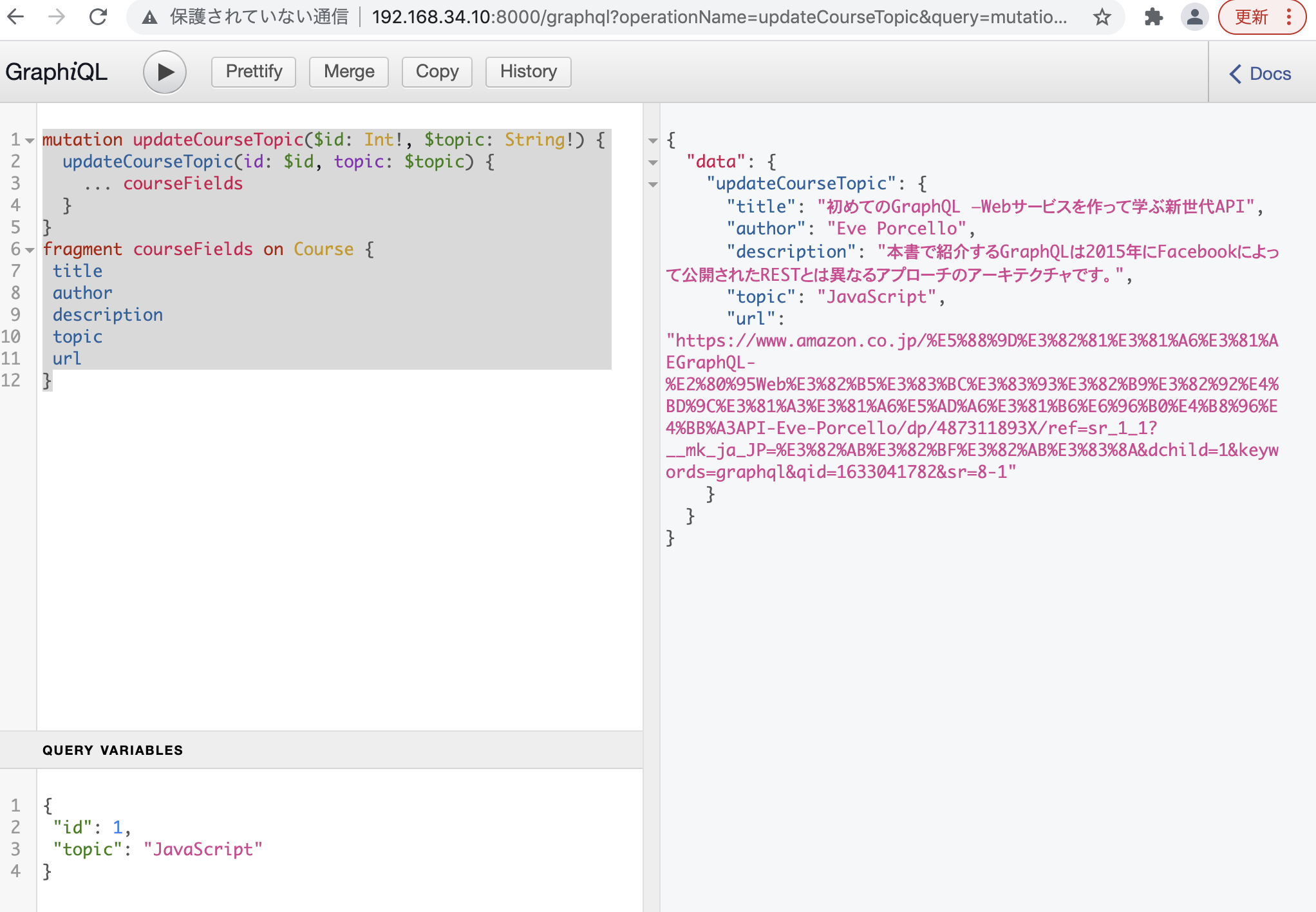
mutation updateCourseTopic($id: Int!, $topic: String!) {
  updateCourseTopic(id: $id, topic: $topic) {
    ... courseFields 
  }
}
fragment courseFields on Course {
 title
 author
 description
 topic
 url
}

{
 "id": 1,
 "topic": "JavaScript"
}

何となく使い方はわかりました。