1. まずgetパラメータでpageの値を取得する
string型での取得
	var page int
	var s string=c.Params.Get("page")
	page, _ = strconv.Atoi(s)
	fmt.Println(page)
http://192.168.34.10:9000/paging?page=1
-> 1
2. ページのスタートと終わりの値を計算
例えば、1ページ5つの値のみを表示するとする場合、l(limit)=5として、startとendの値を求めます。
	var l int = 5
	var start, end int
	start = (p - 1) * l
	end = start + l
	fmt.Println(start)
	fmt.Println(end)
http://192.168.34.10:9000/paging?page=2
2 // 2ページ目
5 // start
10 // end
3. 配列からスライス(要素を取り出す)
	text := [15][2]string{
		{"1","content"},
		{"2","content"},
		{"3","content"},
		{"4","content"},
		{"5","content"},
		{"6","content"},
		{"7","content"},
		{"8","content"},
		{"9","content"},
		{"10","content"},
		{"11","content"},
		{"12","content"},
		{"13","content"},
		{"14","content"},
		{"15","content"},
	}
	fmt.Println(text[start:end])
http://192.168.34.10:9000/paging?page=2
-> [[6 content] [7 content] [8 content] [9 content] [10 content]]
4.全部をつなげて、templeteに出力
func (c App) Paging() revel.Result {

	var p int
	var s string=c.Params.Get("page")
	p, _ = strconv.Atoi(s)
	fmt.Println(p)

	var l int = 5
	var start, end int
	start = (p - 1) * l
	end = start + l
	fmt.Println(start)
	fmt.Println(end)

	text := [15][2]string{
		{"1","content"},
		{"2","content"},
		{"3","content"},
		{"4","content"},
		{"5","content"},
		{"6","content"},
		{"7","content"},
		{"8","content"},
		{"9","content"},
		{"10","content"},
		{"11","content"},
		{"12","content"},
		{"13","content"},
		{"14","content"},
		{"15","content"},

	}
	fmt.Println(text[start:end])
	content := text[start:end]
	return c.Render(content)
}
html側
    <h1>paging</h1>
    <ul>
    {{range .content}}
    <li>{{ index . 0 }} {{.}}</li>
    {{end}}
    </ul>
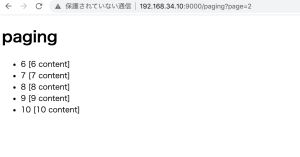
問題は、view側のページネーションのbuttonをどう実装するか…
0から作るの大変だな..