こちらのサイトでアドレスを入力する
https://ipfs.io/ipfs/QmVAwVKys271P5EQyEfVSxm7BJDKWt42A2gHvNmxLjZMps/
結果
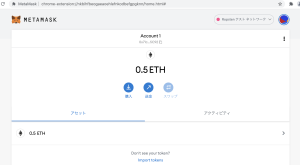
こちらだと反応しなかったのだが、何故だろうか…
https://faucet.metamask.io/
随机应变 ABCD: Always Be Coding and … : хороший

こちらのサイトでアドレスを入力する
https://ipfs.io/ipfs/QmVAwVKys271P5EQyEfVSxm7BJDKWt42A2gHvNmxLjZMps/
結果
こちらだと反応しなかったのだが、何故だろうか…
https://faucet.metamask.io/
web3.jsはcdnで実装する
weiからethに変更するのも、web3.utils.fromWei(result, ‘ether’);で一発
<div class="container">
		<a href="/"><h1 class="title">My Ethereum</h1></a><br>
		<nav class="panel">
		  <p class="panel-heading">
		    Balance
		  </p>
		  <div class="box">
		    <div class="field">
				<label class="label">Ethereum Address</label>
				<div class="control">
					<input class="input" type="text" id="wallet" placeholder="wallet address">
				</div>
			</div>
		  </div>

		 </nav>
		<p>Please enter the wallet address and press the button</p>
		<input type="submit" class="button is-link" id="btn" value="Check" onclick="OnButtonClick();">
		<br>
		<br>
		<br>

		<article class="message">
		<div class="message-header">
		    <p>Balance</p>
		  </div>
		  <div class="message-body">
		  	<div id="resArea"></div>

		  </div>
		</article>
		<br>
		<a href="" target="_blank">BLOCK Chain explore</a>
	</div>
	<script src="https://cdnjs.cloudflare.com/ajax/libs/web3/1.7.0-rc.0/web3.min.js"></script>
	<script>
		let resArea = document.getElementById('resArea');
		let wallet = document.getElementById('wallet');

		function OnButtonClick() {
			main();

		}
		async function main(){
			var web3 = new Web3();
			web3.setProvider(new web3.providers.HttpProvider('http://192.168.33.10:8545'));
			web3.eth.getBalance(wallet.value).then((result, error) => {
				const balance = web3.utils.fromWei(result, 'ether');
				console.log(balance);
				resArea.innerHTML = balance + " eth";
			});

		}

	</script>
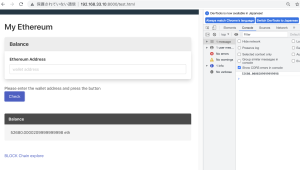
なるほどー
送信する場合も同じ
<script src="https://cdnjs.cloudflare.com/ajax/libs/web3/1.7.0-rc.0/web3.min.js"></script>
	<script>
		let resArea = document.getElementById('resArea');
		let wallet = document.getElementById('wallet');
		let volume = document.getElementById('volume');

		function OnButtonClick() {
			main();

		}
		async function main(){
			var web3 = new Web3();
			web3.setProvider(new web3.providers.HttpProvider('http://192.168.33.10:8545'));
			web3.eth.sendTransaction({from: "0x6752a913de4f4530ed3f071371db8d70acc42fce", to:wallet.value, value: volume.value});
			web3.eth.getBalance(wallet.value).then((result, error) => {
				console.log(result);
				resArea.innerHTML = result;
			});

		}

	</script>
自分で作ると時間かかるね
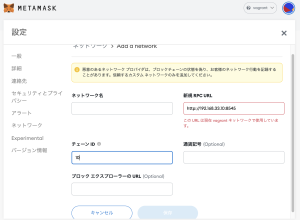
Metamaskで新規 RPC URLにhttp://192.168.33.10:8545 とする。
chainIDはgenesis.jsonの10で設定する
  "config": {
        "chainId": 10,
        "homesteadBlock": 0,
        "eip150Block": 0,
        "eip155Block": 0,
        "eip158Block": 0
    },
import tokenでbroser-solidityのコントラクトのアドレスと作成したコインを入力する
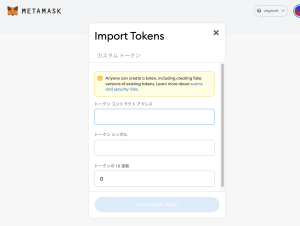
transferでmetamaskのアドレスを入力する
personal.unlockAccount(eth.accounts[0],”pass1″)
“0x71c9f1D5bE00173ae7B774bDBE2112cdD03C5C92”, 20000000
transactionが生成される
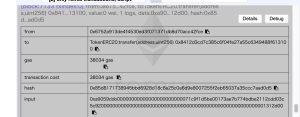
メタマスクに独自トークンが送信された
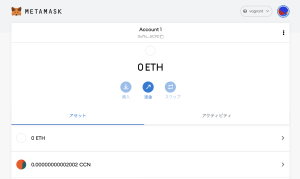
Ropstenでやりたいが、Ethの取得が中々うまくいかない。。
が、基本的な仕組みは理解した
– web3.jsとは、Ethereumネットワーク上でデータを扱えるようにするライブラリ
– HTTPまたはIPC接続を利用して、ローカルまたはリモートのEthereumブロックチェーンのnodeとやり取りできる
$ npm install web3@0.20.0
### geth起動
$ geth –networkid “15” –nodiscover –port 30304 –datadir ./ console 2>> ./geth_err.log
> admin.startRPC(‘0.0.0.0’, 8545, ”, ‘eth,net,web3,personal’)
true
### web3によるアカウント作成
var Web3 = require('web3');
var web3 = new Web3();
web3.setProvider(new web3.providers.HttpProvider('http://192.168.33.10:8545'));
var _account = web3.personal.newAccount("test");
console.log(_account)
$ node create_account.js
0x41a4a74bfd4659b742d45d4cafe2bbbd0c6b5d65
### 残高確認
var Web3 = require('web3');
var web3 = new Web3();
web3.setProvider(new web3.providers.HttpProvider('http://192.168.33.10:8545'));
var _balance = web3.eth.getBalance("0x6752a913de4f4530ed3f071371db8d70acc42fce");
console.log(_balance)
$ node getBalance.js
BigNumber { s: 1, e: 22, c: [ 322200000, 21000000000000 ] }
### 送金
var Web3 = require('web3');
var web3 = new Web3();
web3.setProvider(new web3.providers.HttpProvider('http://192.168.33.10:8545'));
var _sendTransaction = web3.eth.sendTransaction({from: "0x6752a913de4f4530ed3f071371db8d70acc42fce", to:"0x87b2d715dafdfa88da7d76b25069162153967e23", value:200});
console.log(_sendTransaction)
実行する前に、アカウントをアンロックする
> personal.unlockAccount(eth.accounts[0],”pass1″)
true
$ node sendTransaction.js
0x61a0c52aa933c7d5448928d322b7c545726037c65a982d83f8c1669c1fd837ac
### balanceの確認
var Web3 = require('web3');
var web3 = new Web3();
web3.setProvider(new web3.providers.HttpProvider('http://192.168.33.10:8545'));
web3.eth.defaultAccount=web3.eth.accounts[0]

var abi = [{"constant":true,"inputs":[{"name":"","type":"address"}],"name":"balanceOf","outputs":[{"name":"","type":"uint256"}],"payable":false,"type":"function"},{"constant":false,"inputs":[{"name":"_to","type":"address"},{"name":"_value","type":"uint256"}],"name":"transfer","outputs":[],"payable":false,"type":"function"},{"inputs":[{"name":"initialSupply","type":"uint256"}],"payable":false,"type":"constructor"}];

var contract_address = "0x5e722e71c6bd4127eec0b4fa8c2e415755985826"
var balance_address = "0x87b2d715dafdfa88da7d76b25069162153967e23"

var _balanceOf = web3.eth.contract(abi).at(contract_address).balanceOf(balance_address);
console.log(_balanceOf);
$ node balanceOf.js
BigNumber { s: 1, e: 5, c: [ 200200 ] }
contractのaddressがあるのね。
### transfer
var Web3 = require('web3');
var web3 = new Web3();
web3.setProvider(new web3.providers.HttpProvider('http://192.168.33.10:8545'));
web3.eth.defaultAccount=web3.eth.accounts[0]

var abi = [{"constant":true,"inputs":[{"name":"","type":"address"}],"name":"balanceOf","outputs":[{"name":"","type":"uint256"}],"payable":false,"type":"function"},{"constant":false,"inputs":[{"name":"_to","type":"address"},{"name":"_value","type":"uint256"}],"name":"transfer","outputs":[],"payable":false,"type":"function"},{"inputs":[{"name":"initialSupply","type":"uint256"}],"payable":false,"type":"constructor"}];

var contract_address = "0x5e722e71c6bd4127eec0b4fa8c2e415755985826"
var transfer_address = "0x87b2d715dafdfa88da7d76b25069162153967e23"
var value = 1000

var _transfer = web3.eth.contract(abi).at(contract_address).transfer.sendTransaction(transfer_address, value);
console.log(_transfer);
$ node transfer.js
0xda2cec8a827e4890920a0d28728e7cc162b807c2bf34b7017ad9e43fab19a6c9
$ node balanceOf.js
BigNumber { s: 1, e: 5, c: [ 201200 ] }
このweb3.jsはかなり便利
### gethを起動
geth –networkid “15” –nodiscover –port 30304 –datadir ./ console 2>> ./geth_err.log
### RPCを有効にする必要がある
admin.startRPC(‘192.168.33.10’, 8545, ‘*’, ‘eth,net,web3’)
admin.stopRPC()
### broser-solidity
$ git clone https://github.com/ethereum/browser-solidity.git
$ php -S 192.168.33.10:8000
Solidity IDEを起動(index.htmlにアクセス)し、EnvironmentでWeb3Providerで192.168.33.10:8545に接続する
アカウントを見ると、private netで作成したアカウントと残高が一致している
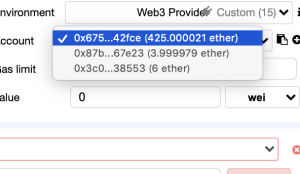
broser/211220_MyToken.sol
pragma solidity ^0.4.16;

interface tokenRecipient { function receiveApproval(address _from, uint256 _value, address _token, bytes _extraData) public; }

contract TokenERC20 {
    // Public variables of the token
    string public name;
    string public symbol;
    uint8 public decimals = 18;
    // 18 decimals is the strongly suggested default, avoid changing it
    uint256 public totalSupply;

    // This creates an array with all balances
    mapping (address => uint256) public balanceOf;
    mapping (address => mapping (address => uint256)) public allowance;

    // This generates a public event on the blockchain that will notify clients
    event Transfer(address indexed from, address indexed to, uint256 value);

    // This notifies clients about the amount burnt
    event Burn(address indexed from, uint256 value);

    /**
     * Constrctor function
     *
     * Initializes contract with initial supply tokens to the creator of the contract
     */
    function TokenERC20(
        uint256 initialSupply,
        string tokenName,
        string tokenSymbol
    ) public {
        totalSupply = initialSupply * 10 ** uint256(decimals);  // Update total supply with the decimal amount
        balanceOf[msg.sender] = totalSupply;                // Give the creator all initial tokens
        name = tokenName;                                   // Set the name for display purposes
        symbol = tokenSymbol;                               // Set the symbol for display purposes
    }

    /**
     * Internal transfer, only can be called by this contract
     */
    function _transfer(address _from, address _to, uint _value) internal {
        // Prevent transfer to 0x0 address. Use burn() instead
        require(_to != 0x0);
        // Check if the sender has enough
        require(balanceOf[_from] >= _value);
        // Check for overflows
        require(balanceOf[_to] + _value > balanceOf[_to]);
        // Save this for an assertion in the future
        uint previousBalances = balanceOf[_from] + balanceOf[_to];
        // Subtract from the sender
        balanceOf[_from] -= _value;
        // Add the same to the recipient
        balanceOf[_to] += _value;
        Transfer(_from, _to, _value);
        // Asserts are used to use static analysis to find bugs in your code. They should never fail
        assert(balanceOf[_from] + balanceOf[_to] == previousBalances);
    }

    /**
     * Transfer tokens
     *
     * Send `_value` tokens to `_to` from your account
     *
     * @param _to The address of the recipient
     * @param _value the amount to send
     */
    function transfer(address _to, uint256 _value) public {
        _transfer(msg.sender, _to, _value);
    }

    /**
     * Transfer tokens from other address
     *
     * Send `_value` tokens to `_to` on behalf of `_from`
     *
     * @param _from The address of the sender
     * @param _to The address of the recipient
     * @param _value the amount to send
     */
    function transferFrom(address _from, address _to, uint256 _value) public returns (bool success) {
        require(_value <= allowance[_from][msg.sender]);     // Check allowance
        allowance[_from][msg.sender] -= _value;
        _transfer(_from, _to, _value);
        return true;
    }

    /**
     * Set allowance for other address
     *
     * Allows `_spender` to spend no more than `_value` tokens on your behalf
     *
     * @param _spender The address authorized to spend
     * @param _value the max amount they can spend
     */
    function approve(address _spender, uint256 _value) public
        returns (bool success) {
        allowance[msg.sender][_spender] = _value;
        return true;
    }

    /**
     * Set allowance for other address and notify
     *
     * Allows `_spender` to spend no more than `_value` tokens on your behalf, and then ping the contract about it
     *
     * @param _spender The address authorized to spend
     * @param _value the max amount they can spend
     * @param _extraData some extra information to send to the approved contract
     */
    function approveAndCall(address _spender, uint256 _value, bytes _extraData)
        public
        returns (bool success) {
        tokenRecipient spender = tokenRecipient(_spender);
        if (approve(_spender, _value)) {
            spender.receiveApproval(msg.sender, _value, this, _extraData);
            return true;
        }
    }

    /**
     * Destroy tokens
     *
     * Remove `_value` tokens from the system irreversibly
     *
     * @param _value the amount of money to burn
     */
    function burn(uint256 _value) public returns (bool success) {
        require(balanceOf[msg.sender] >= _value);   // Check if the sender has enough
        balanceOf[msg.sender] -= _value;            // Subtract from the sender
        totalSupply -= _value;                      // Updates totalSupply
        Burn(msg.sender, _value);
        return true;
    }

    /**
     * Destroy tokens from other account
     *
     * Remove `_value` tokens from the system irreversibly on behalf of `_from`.
     *
     * @param _from the address of the sender
     * @param _value the amount of money to burn
     */
    function burnFrom(address _from, uint256 _value) public returns (bool success) {
        require(balanceOf[_from] >= _value);                // Check if the targeted balance is enough
        require(_value <= allowance[_from][msg.sender]);    // Check allowance
        balanceOf[_from] -= _value;                         // Subtract from the targeted balance
        allowance[_from][msg.sender] -= _value;             // Subtract from the sender's allowance
        totalSupply -= _value;                              // Update totalSupply
        Burn(_from, _value);
        return true;
    }
}
SettingでSolidity versionを0.4.16に合わせる
※Compilerのバージョンが異なると、実行できない
TimeCoinを1億枚発行します
100000000, “Timecoin”, “TMCN”
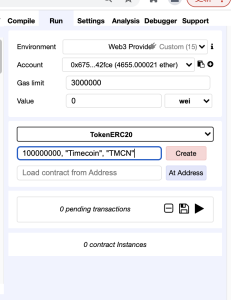
transferしてみます。
transfer: “0x87b2d715dafdfa88da7d76b25069162153967e23″, 2000
personal.unlockAccount(eth.accounts[0],”pass1”)
miner.start()
なぜだろう、、、
まあ、tokenの発行方法はなんとなくわかりました。
Running 3 transaction(s) …
(0) {
“value”: “0”,
“parameters”: [
1000
],
“abi”: “0x99ff0d9125e1fc9531a11262e15aeb2c60509a078c4cc4c64cefdfb06ff68647”,
“contractName”: “Token”,
“bytecode”: “6060604052341561000f57600080fd5b6040516020806102a9833981016040528080519060200190919050505b806000803373ffffffffffffffffffffffffffffffffffffffff1673ffffffffffffffffffffffffffffffffffffffff168152602001908152602001600020819055505b505b610228806100816000396000f30060606040526000357c0100000000000000000000000000000000000000000000000000000000900463ffffffff16806370a082311461004957806390b98a1114610096575b600080fd5b341561005457600080fd5b610080600480803573ffffffffffffffffffffffffffffffffffffffff169060200190919050506100f0565b6040518082815260200191505060405180910390f35b34156100a157600080fd5b6100d6600480803573ffffffffffffffffffffffffffffffffffffffff16906020019091908035906020019091905050610108565b604051808215151515815260200191505060405180910390f35b60006020528060005260406000206000915090505481565b6000816000803373ffffffffffffffffffffffffffffffffffffffff1673ffffffffffffffffffffffffffffffffffffffff16815260200190815260200160002054101561015957600090506101f6565b816000803373ffffffffffffffffffffffffffffffffffffffff1673ffffffffffffffffffffffffffffffffffffffff16815260200190815260200160002060008282540392505081905550816000808573ffffffffffffffffffffffffffffffffffffffff1673ffffffffffffffffffffffffffffffffffffffff16815260200190815260200160002060008282540192505081905550600190505b929150505600a165627a7a72305820ce860e3f5be7186124af4f5b1b7d2f2bce526d21e1473f9ae5860d1b9e8275610029”,
“linkReferences”: {},
“name”: “”,
“type”: “constructor”,
“from”: “0x6752a913de4f4530ed3f071371db8d70acc42fce”
}
(0) data: 6060604052341561000f57600080fd5b6040516020806102a9833981016040528080519060200190919050505b806000803373ffffffffffffffffffffffffffffffffffffffff1673ffffffffffffffffffffffffffffffffffffffff168152602001908152602001600020819055505b505b610228806100816000396000f30060606040526000357c0100000000000000000000000000000000000000000000000000000000900463ffffffff16806370a082311461004957806390b98a1114610096575b600080fd5b341561005457600080fd5b610080600480803573ffffffffffffffffffffffffffffffffffffffff169060200190919050506100f0565b6040518082815260200191505060405180910390f35b34156100a157600080fd5b6100d6600480803573ffffffffffffffffffffffffffffffffffffffff16906020019091908035906020019091905050610108565b604051808215151515815260200191505060405180910390f35b60006020528060005260406000206000915090505481565b6000816000803373ffffffffffffffffffffffffffffffffffffffff1673ffffffffffffffffffffffffffffffffffffffff16815260200190815260200160002054101561015957600090506101f6565b816000803373ffffffffffffffffffffffffffffffffffffffff1673ffffffffffffffffffffffffffffffffffffffff16815260200190815260200160002060008282540392505081905550816000808573ffffffffffffffffffffffffffffffffffffffff1673ffffffffffffffffffffffffffffffffffffffff16815260200190815260200160002060008282540192505081905550600190505b929150505600a165627a7a72305820ce860e3f5be7186124af4f5b1b7d2f2bce526d21e1473f9ae5860d1b9e827561002900000000000000000000000000000000000000000000000000000000000003e8
[block:1425 txIndex:0] from:0x675…42fce, to:TokenERC20.transfer(address,uint256) 0x9dc…09b6e, value:0 wei, 1 logs, data:0xa90…007d0, hash:0x69f…e3972
Details
Debug
from 0x6752a913de4f4530ed3f071371db8d70acc42fce
to TokenERC20.transfer(address,uint256) 0x9dc215338fac216e5e04221c9aed78a31a609b6e
gas 53034 gas
transaction cost 53034 gas
hash 0x69fbfb4cbc25afc761ef1cbbe814fbf35f01c1f153cf73f97e090575675e3972
input 0xa9059cbb00000000000000000000000087b2d715dafdfa88da7d76b25069162153967e2300000000000000000000000000000000000000000000000000000000000007d0
decoded input {
“address _to”: “0x87b2d715dafdfa88da7d76b25069162153967e23”,
“uint256 _value”: “2000”
}
decoded output –
logs [
{
“topic”: “0xddf252ad1be2c89b69c2b068fc378daa952ba7f163c4a11628f55a4df523b3ef”,
“event”: “Transfer”,
“args”: [
“6752a913de4f4530ed3f071371db8d70acc42fce”,
“87b2d715dafdfa88da7d76b25069162153967e23”,
“2000”
]
}
]
value 0 wei
ああああああああああ、できたー
scenario.jsonを保存してから実行しないとpendingになるのね。理解した。
### ETH送金
> web3.fromWei(eth.getBalance(eth.accounts[1]), “ether”)
0
> web3.fromWei(eth.getBalance(eth.accounts[0]), “ether”)
265
– アカウントのロック解除
> personal.unlockAccount(eth.accounts[0],”pass1″)
true
– ETH送金
> eth.sendTransaction({from: eth.accounts[0], to: eth.accounts[1], value: web3.toWei(10, “ether”)})
“0x2c0c90b18598551e678fa0eddef034c5e7759c2750927abae38cef9486814c0c”
– マイニングする(マイニングをしないと送金されない ブロックが生成されてないからか)
> miner.start()
null
> eth.mining
true
> eth.hashrate
16082
> web3.fromWei(eth.getBalance(eth.accounts[1]),”ether”)
10
> miner.stop()
null
### トランザクション、ブロック
> eth.getTransaction(“0x2c0c90b18598551e678fa0eddef034c5e7759c2750927abae38cef9486814c0c”)
{
blockHash: “0xc0f7e2bffbeece31a4a890f6d4b554a7b79f323543a3d146463ad78b9d9a6198”,
blockNumber: 54,
from: “0x6752a913de4f4530ed3f071371db8d70acc42fce”,
gas: 21000,
gasPrice: 1000000000,
hash: “0x2c0c90b18598551e678fa0eddef034c5e7759c2750927abae38cef9486814c0c”,
input: “0x”,
nonce: 0,
r: “0x32d8d13541808080dabefbc39df215e01516ead9115be54de16133d60e9104d8”,
s: “0x3d1e49ba781eaa5ccae9683f8c2e2225e06aed1bdb736514bc29cf551923be33”,
to: “0x87b2d715dafdfa88da7d76b25069162153967e23”,
transactionIndex: 0,
type: “0x0”,
v: “0x38”,
value: 10000000000000000000
}
> eth.getBlock(“54”)
{
difficulty: 131072,
extraData: “0xd883010a0d846765746888676f312e31372e32856c696e7578”,
gasLimit: 3311539,
gasUsed: 21000,
hash: “0xc0f7e2bffbeece31a4a890f6d4b554a7b79f323543a3d146463ad78b9d9a6198”,
logsBloom: “0x00000000000000000000000000000000000000000000000000000000000000000000000000000000000000000000000000000000000000000000000000000000000000000000000000000000000000000000000000000000000000000000000000000000000000000000000000000000000000000000000000000000000000000000000000000000000000000000000000000000000000000000000000000000000000000000000000000000000000000000000000000000000000000000000000000000000000000000000000000000000000000000000000000000000000000000000000000000000000000000000000000000000000000000000000000000”,
miner: “0x6752a913de4f4530ed3f071371db8d70acc42fce”,
mixHash: “0x08bb6af9df543835877260cd890a8e234383269fcefaa0b03f6cec0aea87ae18”,
nonce: “0x77ca71556eca292f”,
number: 54,
parentHash: “0x14be3c7269afab1eb01e221dfe05283d21a574cabb707571a464f5d3e106210a”,
receiptsRoot: “0xaa48dd6dc5cf21faf1da3ed77d1b91e087e446ad7485ac4d8b737c53e6faf2c1”,
sha3Uncles: “0x1dcc4de8dec75d7aab85b567b6ccd41ad312451b948a7413f0a142fd40d49347”,
size: 648,
stateRoot: “0xc76aaf77c4d6a10159b8dd505eef0e2c3c3b00afcf3ef826db794d895e8b3c84”,
timestamp: 1639974714,
totalDifficulty: 7294014,
transactions: [“0x2c0c90b18598551e678fa0eddef034c5e7759c2750927abae38cef9486814c0c”],
transactionsRoot: “0xce5ed8b87e501a3061bf6520df5c76ee0847426e8ad05e647f847fca0e5b4acf”,
uncles: []
}
### 手数料の確認
> personal.newAccount(“pass3”)
“0x3c0fdb1594e99dc9c0cdd65ea8f6c2631b838553″
> eth.getBalance(eth.accounts[1])
10000000000000000000
> eth.getBalance(eth.accounts[2])
0
> personal.unlockAccount(eth.accounts[1],”pass2″)
true
> eth.sendTransaction({from: eth.accounts[1], to: eth.accounts[2], value: web3.toWei(6,”ether”)})
“0xb1a53e635f9c6cec886b23d31a8184cb3490c0bed8b2348267d49d663b2b5bd1”
> miner.start()
> eth.getBalance(eth.accounts[2])
6000000000000000000
> miner.stop()
null
> eth.getBalance(eth.accounts[1])
3999979000000000000
手数料がかかるアカウントと、かからないアカウントがあるのね
// geth起動
$ geth –networkid “15” –nodiscover –port 30304 –datadir ./ console 2>> ./geth_err.log
### マイニング
– アカウントの作成(送金をする為に2つ作る)
> personal.newAccount(“pass1”)
“0x6752a913de4f4530ed3f071371db8d70acc42fce”
> personal.newAccount(“pass2”)
“0x87b2d715dafdfa88da7d76b25069162153967e23”
マイニングを受け取るアカウント
> eth.coinbase
“0x6752a913de4f4530ed3f071371db8d70acc42fce”
#### アカウントの変更
> miner.setEtherbase(eth.accounts[1])
true
> eth.coinbase
“0x87b2d715dafdfa88da7d76b25069162153967e23”
#### ブロックとアカウント残高を確認
> eth.blockNumber
0
> eth.getBalance(eth.accounts[0])
0
> eth.getBalance(eth.accounts[1])
0
#### マイニングスタート
> miner.start()
null
> eth.mining
true
> eth.hashrate
24455
> eth.blockNumber
19
> eth.blockNumber
46
#### マイニングストップ
> miner.stop()
null
> eth.getBalance(eth.accounts[0])
265000000000000000000
> web3.fromWei(eth.getBalance(eth.accounts[0]), “ether”)
265
なんかできてるっぽい
コマンドラインで操作するのね
Goで書いていくのかと思ってたわ
GethはGo Ethereumの略, GNU LGPL v3ライセンス
Ethereumクライアントで、マイニングや送金を実行することができる。
送金の際はトランザクションを生成し、任意のコードも載せることもできる。
### Ubuntu20.04にGethをインストールする
$ sudo apt-get update
$ sudo apt-get upgrade
$ sudo add-apt-repository -y ppa:ethereum/ethereum
$ sudo apt-get update
$ sudo apt-get install ethereum
$ geth –help
$ geth –help
NAME:
geth – the go-ethereum command line interface
Copyright 2013-2021 The go-ethereum Authors
USAGE:
geth [options] [command] [command options] [arguments…]
VERSION:
1.10.13-stable-7a0c19f8
### Gethの起動
1. データディレクトリ: 送受信するブロックやアカウント情報を保存
2. genesis.json: 設定ファイル、ローカルプライベートテストネットを使う場合に必要
$ vi genesis.json
{
  "config": {
        "chainId": 10,
        "homesteadBlock": 0,
        "eip150Block": 0,
        "eip155Block": 0,
        "eip158Block": 0
    },
  "alloc"      : {},
  "coinbase"   : "0x0000000000000000000000000000000000000000",
  "difficulty" : "0x20000",
  "extraData"  : "",
  "gasLimit"   : "0x2fefd8",
  "nonce"      : "0x0000000000000042",
  "mixhash"    : "0x0000000000000000000000000000000000000000000000000000000000000000",
  "parentHash" : "0x0000000000000000000000000000000000000000000000000000000000000000",
  "timestamp"  : "0x00"
}
$ tree
.
├── genesis.json
├── geth
│ ├── LOCK
│ ├── chaindata
│ │ ├── 000001.log
│ │ ├── CURRENT
│ │ ├── LOCK
│ │ ├── LOG
│ │ └── MANIFEST-000000
│ ├── lightchaindata
│ │ ├── 000001.log
│ │ ├── CURRENT
│ │ ├── LOCK
│ │ ├── LOG
│ │ └── MANIFEST-000000
│ └── nodekey
└── keystore
$ geth –networkid “15” –nodiscover –port 30304 –datadir ./ console 2>> ./geth_err.log
Welcome to the Geth JavaScript console!
instance: Geth/v1.10.13-stable-7a0c19f8/linux-amd64/go1.17.2
at block: 0 (Thu Jan 01 1970 00:00:00 GMT+0000 (UTC))
datadir: /home/vagrant/dev/ethereum/eth_testnet
modules: admin:1.0 debug:1.0 eth:1.0 ethash:1.0 miner:1.0 net:1.0 personal:1.0 rpc:1.0 txpool:1.0 web3:1.0
To exit, press ctrl-d or type exit
OK
var nem = require("nem-sdk").default;

const password = '';
const privateKey = '';
const common = nem.model.objects.create('common')(password, privateKey);
const fileName = "sample.txt";
const content = "Apostille is awesome !";
const tag = "Test Apostille";
var fileContent = nem.crypto.js.enc.Utf8.parse(content);

var endpoint = nem.model.objects.create("endpoint")(nem.model.nodes.defaultMainnet, nem.model.nodes.defaultPort);

var apostille = nem.model.apostille.create(common, "Test.txt", fileContent, tag, nem.model.apostille.hashing["SHA256"], false, {}, true, nem.model.network.data.mainnet.id);


async function main() {
	nem.model.transactions.send(common, apostille.transaction, endpoint).then(function(res){
		// If code >= 2, it's an error
		if (res.code >= 2) {
			console.error(res.message);
		} else {
			console.log("\nTransaction: " + res.message);
			console.log("\nCreate a file with the fileContent text and name it:\n" + apostille.data.file.name.replace(/\.[^/.]+$/, "") + " -- Apostille TX " + res.transactionHash.data + " -- Date DD/MM/YYYY" + "." + apostille.data.file.name.split('.').pop());
			console.log("When transaction is confirmed the file should audit successfully in Nano");
			console.log("\nYou can also take the following hash: " + res.transactionHash.data + " and put it into the audit.js example");
		}
	}, function(err) {
		console.error(err);
	});
}

main();
$ node apostille.js
Transaction: SUCCESS
Create a file with the fileContent text and name it:
Test — Apostille TX 22817314fc9e51742ce6a5836e1ad7bb622cf32289d546831d1ab99224618c2f — Date DD/MM/YYYY.txt
When transaction is confirmed the file should audit successfully in Nano
You can also take the following hash: 22817314fc9e51742ce6a5836e1ad7bb622cf32289d546831d1ab99224618c2f and put it into the audit.js example
おおおおおお、完全に理解した。
### apostilleのcheck
var nem = require("nem-sdk").default;

const content = "Apostille is awesome !";
var fileContent = nem.crypto.js.enc.Utf8.parse(content);

var endpoint = nem.model.objects.create("endpoint")(nem.model.nodes.defaultMainnet, nem.model.nodes.defaultPort);

var txHash = "22817314fc9e51742ce6a5836e1ad7bb622cf32289d546831d1ab99224618c2f"


async function main() {
	nem.com.requests.transaction.byHash(endpoint, txHash).then(function(res) {
	  // Verify
	  if (nem.model.apostille.verify(fileContent, res.transaction)) {
	    console.log("Apostille is valid");
	  } else {
	    console.log("Apostille is invalid");
	  }
	}, function(err) {
	  console.log("Apostille is invalid");
	  console.log(err);
	});
}

main();
$ node confirm.js
Apostille is valid
すげええええええええ
これを実装する
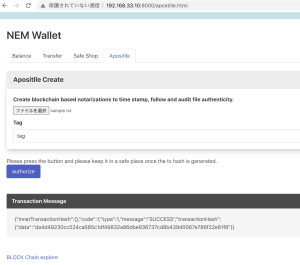
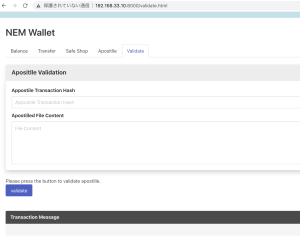
よっしゃあああああああああああああああああああああああ
あとはNEMの価格を取得して表示するのみ
ブロックチェーン上に上げるために、ファイル名とファイルの中身を取得したい。
html
				<div class="control">
					<input id="file" name="file" type="file" />
				</div>
				// 省略
		<p>Please press the button.</p>
		<input type="submit" class="button is-link" id="btn" value="authorize" onclick="OnButtonClick();">
view: buttonを押すと処理を実行するように書いている(onChangeではない)
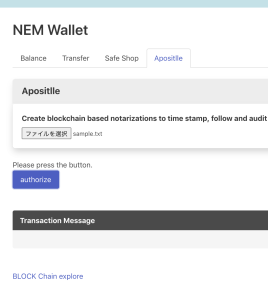
reader.readAsTextとした後に、reader.onload(ファイルの読み込み完了) 後に処理をする。
		let reader = new FileReader();
		let input = ""

		function OnButtonClick() {
			input = document.getElementById("file").files[0]
			reader.readAsText(input, 'UTF-8')
			reader.onload = ()=> {
	            main();
	        };

		}
		async function main() {
			console.log(input.name)
			console.log(reader.result);
		}
なるほどー、割と簡単にできたなー