test.php
$str = "123-4567";
if(preg_match("/^[0-9]{3}-[0-9]{4}$/", $str)){
	echo "マッチします。";
} else {
	echo "マッチしません。";
}
正規表現 半角文字
/^[\x21-\x7e]*$/
うーん 難しいな
随机应变 ABCD: Always Be Coding and … : хороший

test.php
$str = "123-4567";
if(preg_match("/^[0-9]{3}-[0-9]{4}$/", $str)){
echo "マッチします。";
} else {
echo "マッチしません。";
}
正規表現 半角文字
/^[\x21-\x7e]*$/
うーん 難しいな
SCM Manager: https://scm-manager.org/
easy way to share and manage git repositories
GitをGUIで管理できるツール
なるほど、SCMで管理しているのではなく、ソース自体はGithubなどで管理していることは変わりないのね
	"repositories": {
		"my/repo": {
			"type": "vcs",
			"url": "https://github.com/my/repo"
		}
	}
RepoProject/composer.json
{
	"name": "sample-vendor/ralabel",
	"description": "Composerサンプルプロジェクト",
	"license": "MIT",
	"autoload": {
		"psr-0": {
			"Ralabel\\":"src/"
		}
	}
}
DummyProject/composer.json
{
	"repositories": [
		{
			"type": "vcs",
			"url" : "/home/vagrant/dev/composer/RepoProject/"
		}
	],
	"require": {
		"sample-vendor/ralabel": "dev-master"
	}
}
composer.jsonのscriptsはコマンドだけで実行できる
ライブラリ側でcomposer.jsonを作成して、利用側のcomposer.jsonでrepositoriesで指定してパーツを利用するのか、、
なるほど、repositoriesの使い方を理解した。
composer.jsonのバージョン指定方法
-dev: 開発中
-rc: 公開前
-stable: 安定版
requireは必ず必要なパッケージ
require-devは開発用だけで必要なパッケージ
本番環境では、composer install -no-devとしてインストール
### オートロード機能
オートロード機能は自動でclass fileを読み込む機能
psr-4: 名前空間とcomposer.jsonの存在するディレクトリからの相対パスの対応付け
	"autoload": {
		"psr-4" : {
			"App\\": "app/"
		}
	}
autoloadセクションを編集した場合、下記コマンドを実行して変更を反映
$ composer dump-autoload
### バージョン指定
	"config": {
		"platform": {
			"php": "5.5.9"
		}
	}
$ php composer.phar suggests
インストールしたパッケージと共に利用すると良い関連パッケージ
repositories: カスタムパッケージのリポジトリを設定
Custom package repositories to use.By default Composer only uses the packagist repository. By specifying repositories you can get packages from elsewhere.
vcs: The version control system repository can fetch packages from git, svn, fossil and hg repositories.
Repositories are not resolved recursively. You can only add them to your main composer.json. Repository declarations of dependencies’ composer.jsons are ignored.
prefer-stable:When this is enabled, Composer will prefer more stable packages over unstable ones when finding compatible stable packages is possible. If you require a dev version or only alphas are available for a package, those will still be selected granted that the minimum-stability allows for it.
repositoriesの箇所はテストする必要がある
$ curl -sS https://getcomposer.org/installer | php
$ php composer.phar –version
Composer version 2.4.1 2022-08-20 11:44:50
### composer.json
composerで管理する依存パッケージを定義するためのファイル
composer.json
L composerで管理する依存パッケージを定義するためのファイル
{
	"require": {
		"ircmaxell/random-lib": "1.0.0"
	}
}
composer.lock
L チーム内で同じバージョンを共有するための仕組み
L composer install でcomposer.lockで記したバージョンのパッケージインストール
L composer update で composer.lockに記されたバージョンを無視して、composer.jsonの最新版に更新
vendor
L composer installでインストールされたプログラムが、composer.jsonと同じ階層になるvendorフォルダ内に配置される
$ php composer.phar install
$ ls
composer.json composer.lock composer.phar vendor
$ ls vendor/
autoload.php composer ircmaxell
require_once "vendor/autoload.php";

$factory = new RandomLib\Factory;

$generator = $factory->getMediumStrengthGenerator();

echo $generator->generateString(32, "abcdef");
$ php index.php
cabdaddbdbdbbdeeffdeaeadffacefed
ここまでは基礎
composer.jsonの中に書かれている各項目が何を意味するか理解する必要がある
JMeterはapacheが開発しているオープンソースの負荷検証ツール
java8以上が必要
### UbuntuにJMeterをインストール
$ sudo apt install jmeter
あれ、エラーになるな…
macに入れてみる
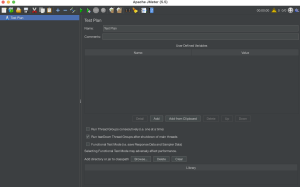
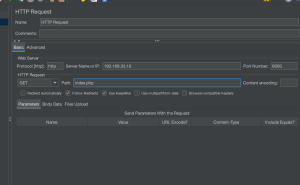
thread groupを作成し、その後、 HTTP requestを設定する
Number of Threads(users), Ramp-up period(seconds), Loop Countを設定する
Ramp-Up期間が何秒かけてスレッドを送信するか
なるほど、考え方は多少わかった。
スキーマ(Schema)とは、1つのデータベースの中に複数設定することができる名前空間
$ psql –version
$ sudo -u postgres psql
postgres=# \l
List of databases
Name | Owner | Encoding | Collate | Ctype | Access privileges
———–+———-+———-+———+———+———————–
postgres | postgres | UTF8 | C.UTF-8 | C.UTF-8 |
template0 | postgres | UTF8 | C.UTF-8 | C.UTF-8 | =c/postgres +
| | | | | postgres=CTc/postgres
template1 | postgres | UTF8 | C.UTF-8 | C.UTF-8 | =c/postgres +
| | | | | postgres=CTc/postgres
testdb | postgres | UTF8 | C.UTF-8 | C.UTF-8 |
(4 rows)
# \c testdb
You are now connected to database “testdb” as user “postgres”.
postgres=# \dn
List of schemas
Name | Owner
——–+———-
public | postgres
(1 row)
postgres=# create schema bank1;
CREATE SCHEMA
postgres=# create schema bank2;
CREATE SCHEMA
postgres=# \dn
List of schemas
Name | Owner
——–+———-
bank1 | postgres
bank2 | postgres
public | postgres
(3 rows)
### 現在のスキーマ
postgres=# select current_schema();
current_schema
—————-
public
(1 row)
### スキーマの変更
postgres=# set search_path = bank1;
SET
postgres=# select current_schema();
current_schema
—————-
bank1
(1 row)
### スキーマを指定してテーブル作成
create table bank1.data (
id integer,
name varchar(256)
);
スキーマのテーブルができている
# \dt bank1.*
List of relations
Schema | Name | Type | Owner
——–+——+——-+———-
bank1 | data | table | postgres
(1 row)
PHPから接続する場合はスキーマ指定が必要
なるほど、スキーマの概念を理解した
ISMSとは、個別の問題毎の技術対策の他に、組織のマネジメントとして、自らのリスクアセスメントにより必要なセキュリティレベルを決め、プランを持ち、資源を配分して、システムを運用すること
-nには、Totalで発行するリクエスト数を指定
-cには、同時接続数を指定
$ ab -n
Complete requestsがリクエストに成功
$ ab -n 100 -c 100 -P id:password https://*.co.jp/
$ ab -n 100 -c 100 https://www.google.com/
This is ApacheBench, Version 2.3 <$Revision: 1843412 $>
Copyright 1996 Adam Twiss, Zeus Technology Ltd, http://www.zeustech.net/
Licensed to The Apache Software Foundation, http://www.apache.org/
Benchmarking www.google.com (be patient)…..done
Server Software: gws
Server Hostname: www.google.com
Server Port: 443
SSL/TLS Protocol: TLSv1.2,ECDHE-ECDSA-CHACHA20-POLY1305,256,256
Server Temp Key: X25519 253 bits
TLS Server Name: www.google.com
Document Path: /
Document Length: 15095 bytes
Concurrency Level: 100
Time taken for tests: 5.690 seconds
Complete requests: 100
Failed requests: 99
(Connect: 0, Receive: 0, Length: 99, Exceptions: 0)
Total transferred: 1611214 bytes
HTML transferred: 1505980 bytes
Requests per second: 17.58 [#/sec] (mean)
Time per request: 5689.514 [ms] (mean)
Time per request: 56.895 [ms] (mean, across all concurrent requests)
Transfer rate: 276.55 [Kbytes/sec] received
Connection Times (ms)
min mean[+/-sd] median max
Connect: 534 1480 684.7 1113 2959
Processing: 189 1196 500.7 1350 3571
Waiting: 120 720 301.6 563 1339
Total: 723 2677 799.6 2599 5033
Percentage of the requests served within a certain time (ms)
50% 2599
66% 2936
75% 2958
80% 2977
90% 3549
95% 5022
98% 5032
99% 5033
100% 5033 (longest request)
Requests per second:17.58 [#/sec] (mean) が1秒間に捌けるリクエスト
Time per request: が1秒間に捌けるリクエスト
なるほど、apache benchの概念を理解した
負荷テストツールには、Apache Bench, Apache JMeter, Locust, Tsung, Gatling, Vegetaなどがある。
Apache BentchとVegetaはシナリオテストができない。
### 負荷テストのアプローチ
– 性能テスト: システムが想定している負荷に対し、どの程度のスループットやレイテンシかを確認
– 限界テスト: 処理限界に近い、または超過した負荷に対し、エラーが出るかなど挙動を確認
– 耐久テスト: 長時間負荷をかけた際の挙動を確認
計画書作成、スペックを変更、ダミーデータ作成、負荷テストと負荷テストツールの作成、単一エンドポイントに対するテスト、オートスケールを有効にした場合のテスト、シナリオテスト、耐久テスト
スループットの限界値を見つけるために、同時にアクセスするユーザ数を徐々に上げていく
なるほど、かなり奥が深い